
What Are the Most Powerful Features of Navisworks for Architects and Engineers?
Navisworks software has always offered impressive functionality, but in 2026, the updates are sharper and more targeted for modern AEC needs. Below are ten powerful features of Navisworks you should be using:
-
Revamped Clash Detection Interface: Easier to navigate, more customizable, and supports batch processing, making clash detection faster and more accurate, especially when coordinating across multiple disciplines and consultants.
-
Enhanced Properties Panel: Offers a clearer view of element data. Architects benefit from better material insights, while engineers can easily view system attributes and track design intent across stages.
-
Autodesk Translation Framework for IFC Import: Ensures more reliable imports of Industry Foundation Classes (IFC) files, preserving object data across tools and enhancing interoperability.
-
Section Above and Below Grid: Allows users to isolate model elements above or below specified gridlines, ideal for multi-story coordination and improving team focus during design reviews.
-
Find Items Overhaul: Provides smarter filtering options and improved search performance, especially in large 3D model Navisworks files, helping users locate elements quickly.
-
General Enhancements: Improvements in UI performance, stability, and model loading times enhance user productivity and overall experience.
-
4D Simulation and Scheduling: Seamless linking of time data with model elements; used extensively in Navisworks for construction planning to visualize project sequencing and deadlines.
-
BIM 360 Integration: Enhances real-time model collaboration via the cloud-based Navisworks BIM 360 integration module, helping teams access updates instantly.
-
Rendering Style Manager: Allows for flexible presentation outputs and better material previews, enhancing Navisworks rendering features and design communication.
-
Direct Revit Geometry Support: Reduces errors and rework when exporting from Revit, making Navisworks for architects more seamless and accurate.
To fully leverage these advanced features of Navisworks, many professionals pursue Navisworks certification, which validates their skills and improves their chances of working on large-scale collaborative projects
These functionalities equip both architects and engineers to stay ahead in 2026’s demanding design and construction landscape. The updates support smarter project delivery, from model accuracy to team collaboration.
Which Navisworks Tools Improve Coordination and Clash Detection?
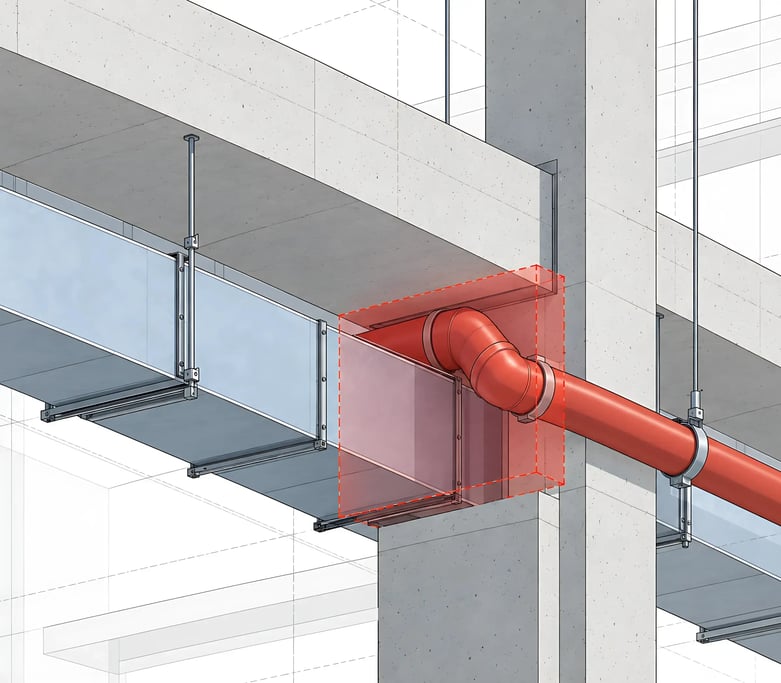
Efficient coordination is the backbone of successful BIM workflows, and this is where Navisworks software excels. Among its most valuable coordination tools:
-
Clash Detective Tool: Detects interferences between building elements in federated models. The new revamped Navisworks clash detection interface adds features like color-coded clashes and improved grouping logic for easier issue management.
-
Navisworks Coordination Plugin: Integrates with Revit and AutoCAD, simplifying cross-platform model merging and issue tracking.
-
Clash Detection Reports: The automated Navisworks clash detection report generator allows teams to track and resolve issues systematically.
-
4D Simulation in Navisworks: Allows users to simulate construction timelines and spot potential clashes over time, not just in space.
These capabilities reinforce Navisworks coordination workflows. With more detailed model visibility and real-time issue resolution, you can drastically reduce on-site problems and costly delays.
Moreover, whether you're working with Navisworks Simulate or Navisworks Manage, both support these coordination tools. Navisworks Manage offers advanced features like clash detection and Quantification tools, while Navisworks Simulate supports simulation and visualization minus clash testing.
Ultimately, whether you're a detailer, BIM manager, or construction coordinator, these tools are built to minimize oversight and maximize precision.
How Do Navisworks Features Enhance BIM Workflows in 2026?
The true value of Navisworks software lies in how it supports and enhances every phase of the BIM process from design to delivery. In 2026, the updates are clearly tailored to solve real-world problems faced by AEC professionals.
Key improvements:
- Model Aggregation: Easily combine files from multiple platforms (Revit, IFC, AutoCAD) into a single Navisworks 3D model environment for centralized review.
- Time and Cost Integration: The 4D simulation in Navisworks lets you simulate and visualize construction sequences against time. Teams can now better align resources, prevent scheduling conflicts, and update stakeholders in real time.
- Navisworks for Engineers: Engineers benefit from better visibility of systems like HVAC, plumbing, and MEP, while architects can visualize design intent in high resolution using enhanced Navisworks rendering features.
- Cloud Collaboration: The Navisworks BIM 360 integration supports instant sharing, issue tracking, and approvals across disciplines, even remotely.
- User Accessibility: With tools like Navisworks Freedom, stakeholders can review the model freely without needing advanced BIM training.
Teams across disciplines experience direct Navisworks benefits through real-time updates, reduced coordination errors, and a more synchronized design-to-construction pipeline
Even for users just getting started, the Navisworks basics are intuitive and scalable. Whether you’re modeling, simulating, or coordinating, each update reinforces a smoother, more intelligent BIM pipeline.
Seamless Navisworks integration with tools like Revit, AutoCAD, and BIM 360 enhances interdisciplinary collaboration by unifying design, scheduling, and issue tracking. This interconnected environment supports decision-making across all project phases.
What’s New in Navisworks 2026 Compared to Previous Versions?
Compared to earlier releases, Navisworks 2026 is a noticeable leap forward. Autodesk Navisworks prioritized user feedback and real-world usage to improve core performance and add smarter features.
Key updates include:
-
Improved IFC Importing: Thanks to the Autodesk Translation Framework, IFC files now retain more metadata and geometry integrity, especially for civil models.
-
Performance Boosts: Faster model load times and better rendering stability help reduce lag when working on large Navisworks 3D model files.
-
Section Tools: The new Section Above and Below Grid feature simplifies navigation for complex buildings, a win for vertical construction teams.
-
UI Refinement: Panels like the Enhanced Properties Panel are now more customizable, offering detailed insights with fewer clicks.
-
Real-time BIM 360 Syncing: The Navisworks BIM 360 integration allows model changes to be viewed instantly by remote collaborators.
-
Expanded Compatibility: Support for Revit 2026 and Civil 3D exports has been improved, especially for Navisworks for engineers in infrastructure.
These updates directly impact how professionals coordinate and present BIM data, ensuring 2026 workflows are more connected, insightful, and efficient than ever.