---
title: Best YouTube Channels, Courses & Communities to Learn SketchUp 2026
description: Discover the best resources to learn SketchUp, from YouTube, structured online courses, to active communities where AEC professionals share tips and workflows.
image: https://blog.novatr.com/hubfs/Blog%20Image%20(16).png
---
[Blogs](https://www.novatr.com/learning-hub)
- [Architecture & Construction](https://www.novatr.com/learning-hub?category=Architecture+%26+Construction)
- [BIM](https://www.novatr.com/learning-hub?category=BIM)
- [Computational Design](https://www.novatr.com/learning-hub?category=Computational+Design)
- [Company News](https://www.novatr.com/learning-hub?category=Company+News)
- [Expert Talks](https://www.novatr.com/learning-hub?category=Expert+Talks)
Explore Courses
[Just Launched  BIM Professional Program v.2026 Take your career to the next level by mastering the real-world application of BIM. Know More](https://www.novatr.com/courses/bim-professional-program)
[ Master Computational Design Course Break into an advanced career by learning to apply the power of computation to the art of design. Know More](https://www.novatr.com/courses/computational-design)
[Blogs](https://www.novatr.com/learning-hub)
Explore Blogs
- [Architecture & Construction](https://www.novatr.com/learning-hub?category=Architecture+%26+Construction)
- [BIM](https://www.novatr.com/learning-hub?category=BIM)
- [Computational Design](https://www.novatr.com/learning-hub?category=Computational+Design)
- [Company News](https://www.novatr.com/learning-hub?category=Company+News)
- [Expert Talks](https://www.novatr.com/learning-hub?category=Expert+Talks)
Courses
- [BIM Professional Program v.2026](https://www.novatr.com/courses/bim-professional-program)
- [Master Computational Design](https://www.novatr.com/courses/computational-design)
- [Archi/](https://www.novatr.com/learning-hub?category=BIM)
Featured Article
# Best YouTube Channels, Courses & Communities to Learn SketchUp

Harshita Chaudhary
April 30, 2026
5 min read
.png)

Learning SketchUp doesn’t have to mean spending a fortune on training programs or degrees. Today, there are plenty of free and well-structured resources available, from YouTube channels hosted by working professionals to guided online courses and thriving communities, all designed to help you learn at your own pace.
This blog brings together the best of all three: where to watch, where to learn, and where to connect with people already using SketchUp in their day-to-day work. Whether you’re starting from scratch or looking to refine your skills, there’s something here for every level.
Unlock High-Paying Careers With BIM
Master BIM workflows, software and skills on real projects.
Apply Now
\*Limited seats available
## Which YouTube Channels Offer the Best Free SketchUp Tutorials?
If you want to learn SketchUp without spending money, YouTube is one of the best places to start. Several creators break down everything from the basics to advanced workflows, making it easy to build real skills at your own pace.
Here are some of the top YouTube channels to learn SketchUp:
### **1. SketchUp's Official YouTube Channel**
The official channel is a great starting point for anyone trying to understand what SketchUp is and how it works. It covers core SketchUp tools, SketchUp features, and regular updates on new functionality, making it ideal for beginners and professionals alike.
### **2. TheSketchUpEssentials**
This channel is widely recommended for free SketchUp tutorials on YouTube. It walks you through SketchUp 3D models, SketchUp plugins, and important plugins for SketchUp that can speed up your workflow significantly. A solid choice for designers at any level.
### **3. MasterSketchUp**
Focused on practical, project-based learning, MasterSketchUp covers SketchUp 3D software workflows used in real professional settings. You will find tutorials on the rendering software, working with a SketchUp file, and building detailed models from scratch.
### **4. Tyson Kay (TheSketchUpEssentials)**
Particularly popular among architects, this is one of the go-to destinations for SketchUp YouTube tutorials for architects. It covers techniques such as easy rendering and how to present your models professionally, which is directly relevant if you are targeting jobs in design or construction.
### **5. Skill Builder by SketchUp**
A channel dedicated to sharpening specific skills, Skill Builder dives into individual SketchUp tools, features, and lesser-known tricks that help you work faster and smarter within the 3D modeling software environment.
## Which Online Communities and Forums Provide Real-World Help and Support?
At some point, you will run into a problem that no video quite covers, and that’s where online communities become invaluable. Whether you are stuck on a file issue, looking for feedback on your SketchUp models, or trying to figure out which plugins work best for a specific project, these spaces connect you with people who have already been there.
### **1. SketchUp Community Forum (community.sketchup.com)**
This is the official forum run by Trimble, and it is one of the most active places to get help with anything related to SketchUp software. From troubleshooting SketchUp tools to discussing SketchUp rendering software options, experienced users and even the SketchUp team respond regularly. It is well-organised and beginner-friendly.
### **2. Novatr Learner Community**
The [Novatr learner community](https://whatsapp.com/channel/0029Vb7Gy2LBFLgMx79j7B1b) on WhatsApp keeps you up to date with headlines that have been circling the AEC industry. You should join this if you're looking for weekly quizzes, polls, industry-relevant articles, and upskilling updates.
### **3. Reddit - r/sketchup**
A growing community where designers, architects, and hobbyists share their work, ask questions, and exchange tips. You will find honest conversations about SketchUp 3D modeling, plugin recommendations, and render results, all in a casual, no-pressure environment.
### **4. SketchUcation**
One of the oldest and most respected independent communities for SketchUp users. It is especially useful if you are exploring important plugins for SketchUp, as the forum hosts a large plugin library alongside active discussion threads where developers and power users exchange knowledge.
### **5. LinkedIn Groups and Architecture Forums**
For those thinking about SketchUp jobs or building a professional profile, LinkedIn groups focused on architecture, interior design, and BIM are worth joining. They blend skill-sharing with networking, giving your learning a real career dimension.
## How Can Combining Videos, Courses, and Communities Accelerate Learning?
YouTube channels give you quick exposure to how SketchUp software works, but watching someone else use tools and build models is not the same as knowing how to do it yourself.
Structured courses fill that gap by taking you through concepts in a logical order, building skills progressively. You start to understand not just how individual SketchUp features work, but why they work the way they do. That said, even the best course cannot prepare you for every situation.
That is where communities come in. Whether it is the official SketchUp Forum, r/sketchup, or SketchUcation, having access to people who have already solved the problem you are facing, whether it involves a tricky SketchUp file, a SketchUp render that is not behaving, or finding the right SketchUp plugins for a specific workflow, can significantly shorten your learning curve.
The professionals who learn SketchUp fastest are usually the ones doing all three: watching to understand, learning to apply, and connecting to troubleshooting. No single resource replaces the other. Together, they create a learning environment that is closer to how real project experience works: observe, practice, and ask questions when you get stuck. That combination is what turns a beginner into someone genuinely ready to work with SketchUp 3D modeling software on live projects.
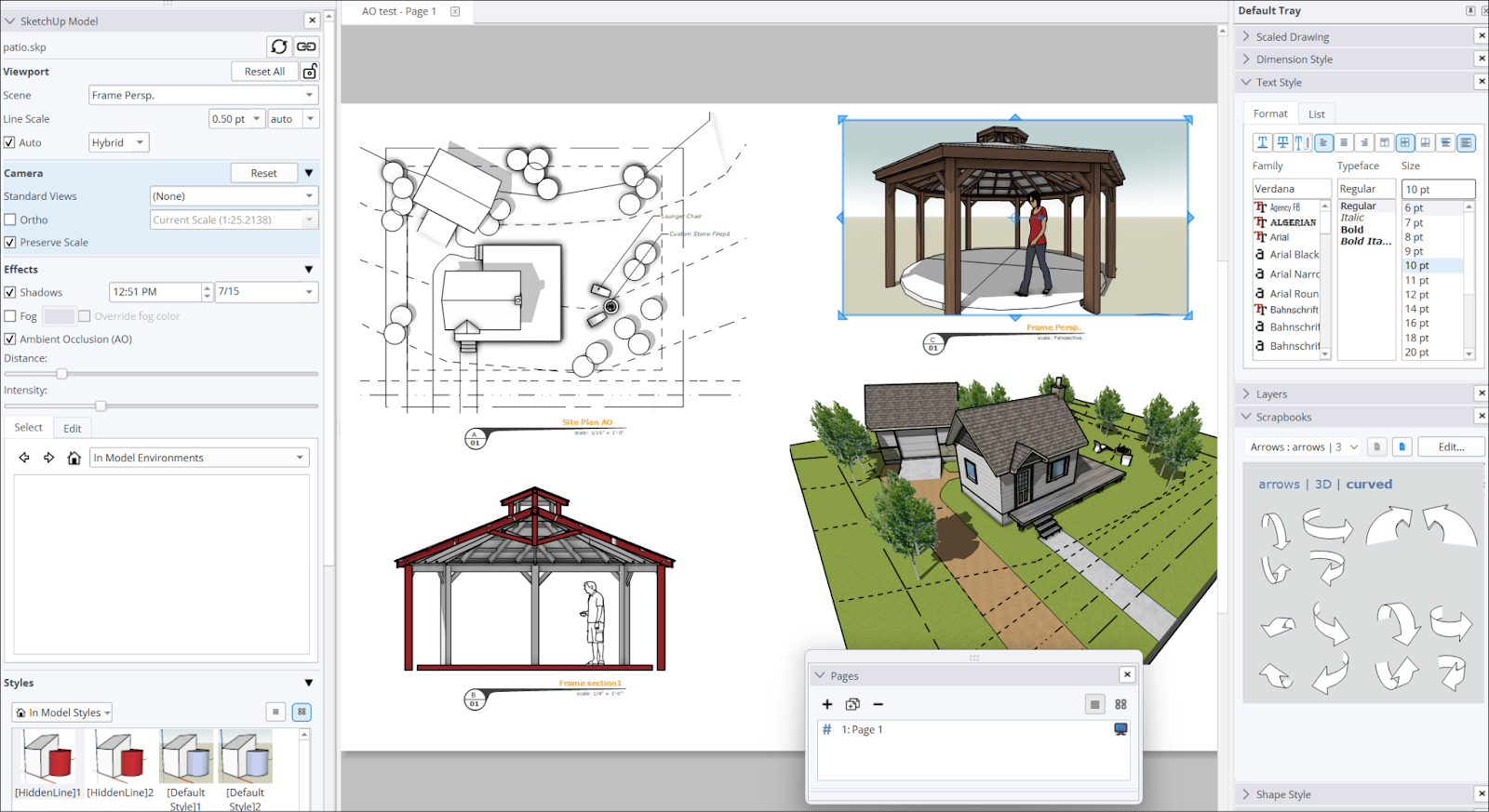
## What Are the Pros and Cons of Paid vs. Free Learning Resources?
Free resources like free SketchUp tutorials on YouTube are accessible and plentiful, but they can lack structure and vary widely in quality.
Paid courses, on the other hand, offer a guided path through SketchUp 3D modeling software, covering everything from core SketchUp tools to advanced SketchUp rendering software in a logical sequence. The trade-off is cost and commitment.
The honest answer is that most people who successfully learn SketchUp use both. Free content builds familiarity, while paid courses build competence. Choosing one over the other entirely often slows progress down rather than speeding it up.
## How Should Learners Choose the Right Resource for their Goals?
The right resource depends entirely on where you are starting from and what you are trying to achieve.
If you are a complete beginner trying to understand what SketchUp is and how to navigate the interface, starting with free SketchUp tutorials on YouTube makes the most sense. They give you a low-pressure way to get comfortable with tools and basic features before committing time or money to anything structured.
If you have the basics down and want to work on real deliverables, such as detailed 3D models, polished render outputs, or learning important plugins for SketchUp, a structured course will take you further faster.
If you are targeting SketchUp jobs in architecture, interior design, or construction, focus on resources that combine practical 3D modeling software skills with portfolio-building. Knowing the software is one thing; being able to demonstrate it through completed projects is what employers actually look for.
A simple way to decide is to match the resource to the gap. If you need inspiration and exposure, watch. If you need structure and progression, enroll. If you need answers and accountability, join a community. Most learners need all three at different stages, and recognising which gap you are trying to fill at any given moment is what makes your learning time actually count.
Master BIM and Get Hired Faster
Join a community of 8500+ Architects and Engineers.
Explore Now
\*Limited seats available
## **Conclusion**
There has never been a better time to learn SketchUp. Between free SketchUp tutorials on YouTube, structured courses that walk you through SketchUp 3D modeling software step by step, and active communities where real professionals share knowledge daily, the resources available today are genuinely enough to take you from beginner to job-ready.
The key is not finding the perfect resource. It is building a habit of learning consistently across all three. Watch, practice, ask questions, and keep building. Whether your goal is mastering SketchUp render outputs, exploring SketchUp plugins, or landing your first role, the path is there. The resources covered in this blog, from YouTube channels and online courses to active forums, provide a strong foundation to move from beginner to confident practitioner. Platforms like Novatr's [**BIM Course for Architects**](https://www.novatr.com/courses/building-information-modelling) take it further, offering mentored, project-based learning that reflects real SketchUp demands.
## FAQs
### **1. Which YouTube channels are best for learning SketchUp from beginner to advanced levels?**
The official SketchUp channel, TheSketchUpEssentials, and Skill Builder are among the top YouTube channels to learn SketchUp, covering everything from basic SketchUp tools to advanced workflows.
### **2. What online courses offer structured training in SketchUp?**
Platforms like Udemy, LinkedIn Learning, and Coursera offer structured courses covering SketchUp 3D modeling software, SketchUp features, and SketchUp rendering software for all skill levels.
### **3. Are there free communities where SketchUp learners can ask questions and get help?**
Yes. The official SketchUp Forum, r/sketchup on Reddit, and SketchUcation are excellent SketchUp forums and groups for designers offering free peer support and advice.
Was this content helpful to you
Like Yes
Dislike No
.png)
TABLE OF CONTENTS
BIM Is The New Standard. Are You Certified?
Get Certified in BIM
SHARE ON YOUR SOCIALS
Link Copied Successfully
Related articles
[ BIM Archi Architecture Courses vs BIM Courses: Which One Gives Better Career Growth? 12 May 2026 4 min read](https://blog.novatr.com/blog/architecture-courses-vs-bim-courses) [.png) BIM Archi Best YouTube Channels, Courses & Communities to Learn Autodesk Construction Cloud 12 May 2026 5 min read](https://blog.novatr.com/blog/best-resources-to-learn-autodesk-construction-cloud) [.png) BIM Archi Best Features of Autodesk Construction Cloud Architects Should Be Using This Year 11 May 2026 5 min read](https://blog.novatr.com/blog/best-autodesk-construction-cloud-features-for-architects) [ BIM Archi What Is Autodesk Construction Cloud and Why Do Architects Use It? 11 May 2026 4 min read](https://blog.novatr.com/blog/what-is-autodesk-construction-cloud-and-why-do-architects-use-it)
Download Syllabus
## BIM Professional Program
Next Cohort
June 2026
Program Duration
7 Months
Premium Program benefits
8 Credentials from Autodesk, NSDC, Novatr
1 program. 10 career paths. Infinite Growth.
40+ ISO 19650 & RIBA real-world projects to practice
1-on-1 guidance. Access 400+ industry experts.
Access the biggest AEC-Tech community on the planet. 8500+ and counting
Curated for you by 100+ global BIM leaders.
Lifelong access to course content
Enter your details to download the program syllabus.
##### BIM Professional Program
June 2026, 7 Months
Your Name Invalid name.
Phone Number Enter a valid phone number
Email Please enter a valid email address.
Select years of experience\* Currently studying 0-1 years 1-2 years 2-4 years 4-8 years 8-10 years 10-12 years 12+ years Invalid selection.
Specialisation Select your background\* Architecture Civil Engineering Mechanical Engineering Electrical Engineering Invalid selection.
Are you professionally trained in interior design?
Yes
No
I agree to the [Terms of Use](https://www.novatr.com/terms-and-conditions) and [Privacy Policy](https://www.novatr.com/privacy-policy), and consent to be contacted by Email, Call, WhatsApp, or SMS.
Submit
Ready to skyrocket your career?
Begin your next chapter in AEC
with Novatr!
We are here to help you take the industry by storm with advanced, tech-first skills.
[Explore Courses](https://www.novatr.com/#courses)
Join our newsletter
Submit
Thank you for signing up.
We’ll send you a nice letter once per week. No spam.

Dare to Disrupt.
Join thousands of people who organise
work and life with Novatr.
Company
- [About Us](https://www.novatr.com/about)
- [BIM Professional Program v.2026](https://www.novatr.com/courses/bim-professional-program)
- [Masters Computational Design](https://www.novatr.com/courses/computational-design)
- [Become a Mentor](https://www.novatr.com/apply-as-mentor)
- [Hiring from Us](https://www.novatr.com/hire-from-us)
- [Careers at Novatr](https://www.novatr.com/career)
Resources
- [Blog](https://www.novatr.com/learning-hub)
- [Media Room](https://www.novatr.com/media-room-home-page)
- [Career Builder](https://www.novatr.com/career-navigator)
- [Events & Webinars](https://www.novatr.com/webinars)
- [FAQs & Support Center](https://www.novatr.com/contact-us)
- [Contact Us](https://www.novatr.com/contact-us)
- [Privacy Policy](https://www.novatr.com/privacy-policy)
- [Terms of Use](https://www.novatr.com/terms-and-conditions)
©2023 Oneistox Network Pvt. Ltd.
All Rights Reserved
```json
{
"@context" : "https://schema.org",
"@type" : "BlogPosting",
"author" : {
"@type" : "Person",
"name" : "Harshita Chaudhary",
"url" : "https://blog.novatr.com/blog/author/harshita-chaudhary"
},
"dateModified" : "2026-04-30T12:24:32.875Z",
"datePublished" : "2026-04-30T12:16:01.000Z",
"headline" : "Best YouTube Channels, Courses & Communities to Learn SketchUp {{year}}",
"image" : [ "https://blog.novatr.com/hubfs/Blog%20Image%20(16).png" ],
"mainEntityOfPage" : {
"@id" : "https://blog.novatr.com/blog/best-resources-to-learn-sketchup",
"@type" : "WebPage"
},
"publisher" : {
"@type" : "Organization",
"logo" : {
"@type" : "ImageObject",
"url" : "https://blog.novatr.com/hubfs/Novatr%20Prev%20OX-2.svg"
}
}
}
```