---
title: Best YouTube Channels, Courses & Communities to Learn BIM 360 2026
description: Discover the best resources to learn BIM 360, from YouTube, online courses, to active communities where AEC professionals share tips & workflows.
image: https://blog.novatr.com/hubfs/Blog%20Image%20(15).png
---
[Blogs](https://www.novatr.com/learning-hub)
- [Architecture & Construction](https://www.novatr.com/learning-hub?category=Architecture+%26+Construction)
- [BIM](https://www.novatr.com/learning-hub?category=BIM)
- [Computational Design](https://www.novatr.com/learning-hub?category=Computational+Design)
- [Company News](https://www.novatr.com/learning-hub?category=Company+News)
- [Expert Talks](https://www.novatr.com/learning-hub?category=Expert+Talks)
Explore Courses
[Just Launched  BIM Professional Program v.2026 Take your career to the next level by mastering the real-world application of BIM. Know More](https://www.novatr.com/courses/bim-professional-program)
[ Master Computational Design Course Break into an advanced career by learning to apply the power of computation to the art of design. Know More](https://www.novatr.com/courses/computational-design)
[Blogs](https://www.novatr.com/learning-hub)
Explore Blogs
- [Architecture & Construction](https://www.novatr.com/learning-hub?category=Architecture+%26+Construction)
- [BIM](https://www.novatr.com/learning-hub?category=BIM)
- [Computational Design](https://www.novatr.com/learning-hub?category=Computational+Design)
- [Company News](https://www.novatr.com/learning-hub?category=Company+News)
- [Expert Talks](https://www.novatr.com/learning-hub?category=Expert+Talks)
Courses
- [BIM Professional Program v.2026](https://www.novatr.com/courses/bim-professional-program)
- [Master Computational Design](https://www.novatr.com/courses/computational-design)
- [Archi/](https://www.novatr.com/learning-hub?category=BIM)
Featured Article
# Best YouTube Channels, Courses & Communities to Learn BIM 360

Harshita Chaudhary
April 28, 2026
6 min read
.png)

Learning BIM 360 software does not require expensive training or exhaustive degree programs. Today, there are enough free and structured resources, from YouTube channels run by working professionals to online courses and active communities, to get you started and support your progress.
This blog walks you through the best of each: where to watch, where to learn, and where to connect with people already working with BIM 360 software every day. Whether you are just starting or looking to advance your skills, there is something here for every stage of your learning journey.
Unlock High-Paying Careers With BIM
Master BIM workflows, software and skills on real projects.
Apply Now
\*Limited seats available
## What Makes BIM 360 an Essential Platform for BIM Professionals?
BIM projects involve multiple teams working on interconnected systems, and that is exactly where things can go wrong without the right platform.
The BIM 360 workflow brings together project managers, designers, contractors, and architects into a single cloud-based environment, enabling quality control, task monitoring, and seamless communication. ([source](https://www.elogictech.com/blog/bim-mep-design-and-modeling-with-bim-360/)).
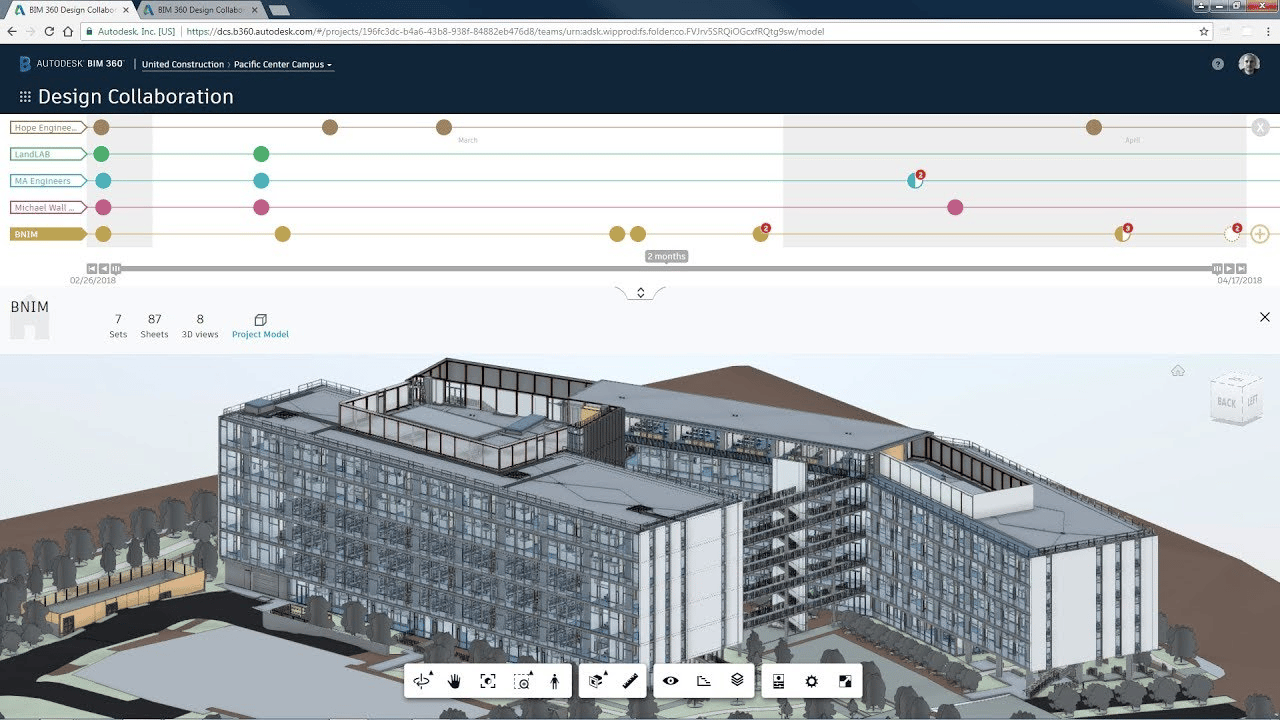
BIM 360 document management ensures everyone works from the latest version of a file, while BIM 360 design enables real-time collaboration on Revit models across teams. BIM 360 Insight provides stakeholders with complete visibility into project status through real-time data and updates, helping teams spot issues early and make informed decisions.
Together, these BIM 360 features make collaboration and management more efficient and structured, and focused on delivering projects.
## Which YouTube Channels Provide the Best Free Tutorials and Hands-on BIM 360 Demos?
There is no shortage of good free content for learning BIM 360 software; these seven channels are worth adding to the playlist.
### 1. The B1M
Founded by Fred Mills, it is the world's largest YouTube channel for construction, covering BIM concepts, industry trends, and real project stories in an accessible way.
### 2. BIM HUB
Offers in-depth tutorials and software training for tools including Revit, Navisworks, and BIM 360, with a mix of quick tips, comprehensive tutorials, and project-based content.
### 3. Aussie BIM Guru
Run by Gavin Crump, this channel focuses on teaching professional BIM workflows, particularly Revit, Dynamo, and automation for the wider AEC industry
### 4. That BIM Girl
Hosted by Jacqueline Rohrmann, the channel was created to promote BIM and help people who are struggling with the software.
### 5. Balkan Architect
The channel creates Revit and AutoCAD tutorials specifically for architects, making it one of the most consistent free resources available.
### 6. Revit Pure (BIM Pure)
This is an expert-driven knowledge platform focused on Autodesk Revit and BIM, known for well-structured, beginner-friendly content.
### 7. BIM Corner
Run by a group of six passionate engineers, it shares practical knowledge about BIM technology and demonstrates real-world applications.
## What Online Courses Offer Structured Learning Paths for Mastering BIM 360?
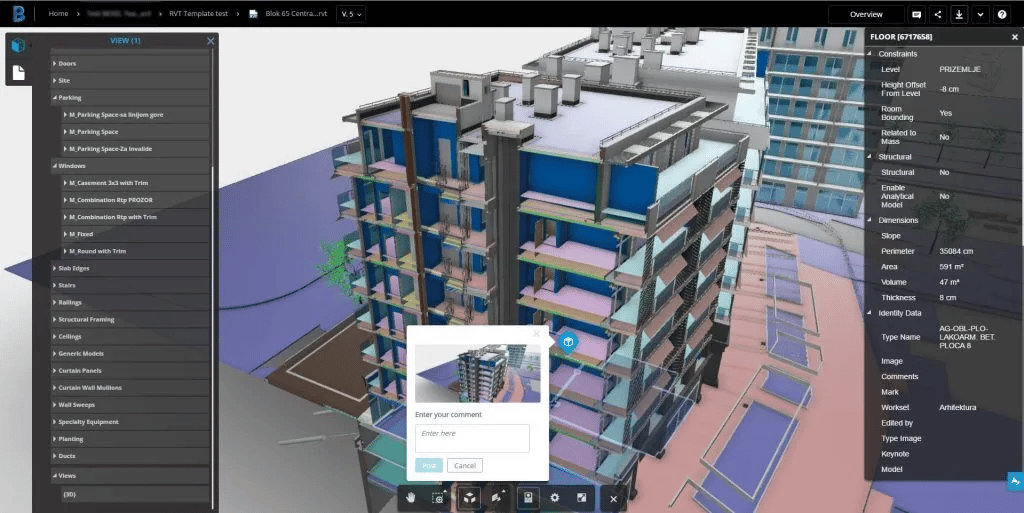
If you want to go beyond free tutorials and gain a deeper understanding of BIM 360, these courses offer structured, step-by-step learning paths.
### 1. Novatr - BIM Professional Course
This is a comprehensive course for MEP engineers, covering 12+ BIM tools through weekly live sessions, mentor interactions, and a real-world ISO-standard capstone project within an industry-aligned curriculum.
### 2. Autodesk Learning
Autodesk provides on-demand BIM 360 courses directly from Autodesk, covering modules like BIM 360 Design, Docs, Coordinate, and Build, making it the most product-specific resource available.
### 3. LinkedIn Learning - BIM 360 Docs Essential Training
Taught by BIM expert Eric Chappell, this course covers document sharing, markups, issue management, and review workflows in a practical, beginner-friendly format.
### 4. Udemy - Autodesk Construction Cloud & BIM 360
This course teaches how to set up projects, share plans, track issues, and configure approval workflows, making it a good option for self-paced learners.
### 5. Coursera - BIM Courses
Coursera offers broader BIM courses suitable for those building foundational knowledge before diving into platform-specific tools.
### 6. Pinnacle Series
This course provides nearly 300 BIM software training videos with learning paths covering BIM 360 Plan, Design Collaboration, Project Management, and more, particularly useful for firm-wide training.
## Which Communities and Forums help solve Real-World BIM 360 Challenges?
Learning BIM 360 software only through one source can only get you so far. Being part of the right community is where real problem-solving happens.
### 1. Autodesk BIM 360 Community Forum
This is the go-to platform for current users to ask questions about specific issues, interact with thought leaders, and submit feature enhancement ideas directly to Autodesk's product teams.
### 2. Reddit - r/BIM
This is where working professionals discuss day-to-day challenges, share workflows, and debate tools in a candid, peer-to-peer environment - without filters or brand messaging.
### 3. LinkedIn BIM Groups
These groups connect you with professionals across firms and geographies, making them useful for both knowledge sharing and building industry relationships over time.
### 4. Novatr Learner Community
The [Novatr learner community](https://whatsapp.com/channel/0029Vb7Gy2LBFLgMx79j7B1b) on WhatsApp keeps you up to date with headlines that have been circling the AEC industry. You should join this if you're looking for weekly quizzes, polls, industry-relevant articles, and upskilling updates.
### 5. Autodesk University (AU)
This annual conference brings together thousands of AEC professionals to explore industry innovations, attend expert-led sessions, and connect with practitioners actively working on BIM projects at scale. Its recorded sessions are also accessible online, making it a year-round resource
## How can Combining Videos, Courses, and Communities Accelerate BIM 360 Proficiency?
Each resource type has its strengths and limitations.
YouTube channels give you quick exposure to how BIM 360 software works in practice, but watching someone else use a tool is not the same as knowing how to use it yourself.
Structured courses fill that gap by taking you through concepts in a logical order, building skills progressively instead of in a fragmented manner. But courses alone can leave you stuck when a real project throws up a problem that no tutorial anticipated.
That is where communities come in. Whether it is the Autodesk BIM 360 Forum, r/BIM, or Novatr's Learner Community, having access to people who have already solved the problem you are facing can significantly shorten the learning curve.
The professionals who pick up BIM 360 software fastest are usually the ones doing all three: watching to understand, learning to apply, and connecting to troubleshooting. No single resource replaces the other. Together, they create a learning environment that is closer to how real project experience works: observe, practice, and ask questions when you get stuck.
## What Tips help Learners Stay Up-to-Date with BIM 360 Updates and Workflows?
BIM 360 software is updated regularly, and workflows that worked six months ago may have improved or changed. Staying current does not require significant effort; it requires knowing where to look.
Following Autodesk's official release notes is the most direct way to track changes to BIM 360 features, whether it is an update to document management, a new Insight dashboard, or changes in how collaboration permissions are handled.
Revisiting YouTube channels like BIM HUB and Aussie BIM Guru regularly helps too, as creators often cover new updates as they roll out, particularly changes to BIM 360 design and BIM 360 workflow that affect day-to-day project use.
Staying active in communities like the Autodesk Forum and r/BIM means you often hear about workflow changes from other users before you encounter them yourself.
Finally, structured programs like [Novatr's](https://www.novatr.com/learning-hub) [BIM Professional Course for Architects](https://www.novatr.com/courses/building-information-modelling) are created around current industry practice, ensuring that what you learn about BIM 360 management and coordination reflects how teams are actually working today, not how they worked two years ago.
Master BIM and Get Hired Faster
Join a community of 8500+ Architects and Engineers.
Explore Now
\*Limited seats available
## Conclusion
Getting better at BIM 360 software is not about finding one perfect resource; it is about building the right combination of inputs. Free tutorials get you started, structured courses build real competency, and communities keep you connected to how the industry is actually using the tool on a day-to-day basis.
The resources covered in this blog, from YouTube channels and online courses to active forums, provide a strong foundation to move from beginner to confident practitioner. Platforms like Novatr's [**BIM Course for Architects**](https://www.novatr.com/courses/building-information-modelling) take it further, offering mentored, project-based learning that reflects real BIM 360 workflow demands.
The tools are available. The communities are active. The only step left is to begin.
## FAQs
### **1. Which YouTube channels are best for learning BIM 360 fundamentals?**
BIM HUB, Aussie BIM Guru, Balkan Architect, and That BIM Girl are strong starting points for learning BIM 360 software fundamentals through practical, easy-to-follow tutorials.
### **2. Are there any free online courses that teach the BIM 360 workflow?**
Yes. Autodesk Learning offers free on-demand courses covering core BIM 360 workflow modules directly from Autodesk.
### **3. Do BIM 360 tutorials cover document management and coordination tools?**
Yes. Most tutorials and courses cover BIM 360 document management, model coordination, clash detection, and BIM 360 collaboration, the tools most used on live projects.
Was this content helpful to you
Like Yes
Dislike No
.png)
TABLE OF CONTENTS
BIM Is The New Standard. Are You Certified?
Get Certified in BIM
SHARE ON YOUR SOCIALS
Link Copied Successfully
Related articles
[.png) BIM Archi Best YouTube Channels, Courses & Communities to Learn SketchUp 30 April 2026 5 min read](https://blog.novatr.com/blog/best-resources-to-learn-sketchup) [ BIM Archi Architecture Courses vs BIM Courses: Which One Gives Better Career Growth? 12 May 2026 4 min read](https://blog.novatr.com/blog/architecture-courses-vs-bim-courses) [.png) BIM Archi Best YouTube Channels, Courses & Communities to Learn Autodesk Construction Cloud 12 May 2026 5 min read](https://blog.novatr.com/blog/best-resources-to-learn-autodesk-construction-cloud) [.png) BIM Archi Best Features of Autodesk Construction Cloud Architects Should Be Using This Year 11 May 2026 5 min read](https://blog.novatr.com/blog/best-autodesk-construction-cloud-features-for-architects)
Download Syllabus
## BIM Professional Program
Next Cohort
June 2026
Program Duration
7 Months
Premium Program benefits
8 Credentials from Autodesk, NSDC, Novatr
1 program. 10 career paths. Infinite Growth.
40+ ISO 19650 & RIBA real-world projects to practice
1-on-1 guidance. Access 400+ industry experts.
Access the biggest AEC-Tech community on the planet. 8500+ and counting
Curated for you by 100+ global BIM leaders.
Lifelong access to course content
Enter your details to download the program syllabus.
##### BIM Professional Program
June 2026, 7 Months
Your Name Invalid name.
Phone Number Enter a valid phone number
Email Please enter a valid email address.
Select years of experience\* Currently studying 0-1 years 1-2 years 2-4 years 4-8 years 8-10 years 10-12 years 12+ years Invalid selection.
Specialisation Select your background\* Architecture Civil Engineering Mechanical Engineering Electrical Engineering Invalid selection.
Are you professionally trained in interior design?
Yes
No
I agree to the [Terms of Use](https://www.novatr.com/terms-and-conditions) and [Privacy Policy](https://www.novatr.com/privacy-policy), and consent to be contacted by Email, Call, WhatsApp, or SMS.
Submit
Ready to skyrocket your career?
Begin your next chapter in AEC
with Novatr!
We are here to help you take the industry by storm with advanced, tech-first skills.
[Explore Courses](https://www.novatr.com/#courses)
Join our newsletter
Submit
Thank you for signing up.
We’ll send you a nice letter once per week. No spam.

Dare to Disrupt.
Join thousands of people who organise
work and life with Novatr.
Company
- [About Us](https://www.novatr.com/about)
- [BIM Professional Program v.2026](https://www.novatr.com/courses/bim-professional-program)
- [Masters Computational Design](https://www.novatr.com/courses/computational-design)
- [Become a Mentor](https://www.novatr.com/apply-as-mentor)
- [Hiring from Us](https://www.novatr.com/hire-from-us)
- [Careers at Novatr](https://www.novatr.com/career)
Resources
- [Blog](https://www.novatr.com/learning-hub)
- [Media Room](https://www.novatr.com/media-room-home-page)
- [Career Builder](https://www.novatr.com/career-navigator)
- [Events & Webinars](https://www.novatr.com/webinars)
- [FAQs & Support Center](https://www.novatr.com/contact-us)
- [Contact Us](https://www.novatr.com/contact-us)
- [Privacy Policy](https://www.novatr.com/privacy-policy)
- [Terms of Use](https://www.novatr.com/terms-and-conditions)
©2023 Oneistox Network Pvt. Ltd.
All Rights Reserved
```json
{
"@context" : "https://schema.org",
"@type" : "BlogPosting",
"author" : {
"@type" : "Person",
"name" : "Harshita Chaudhary",
"url" : "https://blog.novatr.com/blog/author/harshita-chaudhary"
},
"dateModified" : "2026-04-28T10:24:07.144Z",
"datePublished" : "2026-04-28T06:20:38.000Z",
"headline" : "Best YouTube Channels, Courses & Communities to Learn BIM 360 {{year}}",
"image" : [ "https://blog.novatr.com/hubfs/Blog%20Image%20(15).png" ],
"mainEntityOfPage" : {
"@id" : "https://blog.novatr.com/blog/best-resources-to-learn-bim-360",
"@type" : "WebPage"
},
"publisher" : {
"@type" : "Organization",
"logo" : {
"@type" : "ImageObject",
"url" : "https://blog.novatr.com/hubfs/Novatr%20Prev%20OX-2.svg"
}
}
}
```