.png)

Which BIM Software Are AEC Firms Using in 2026?
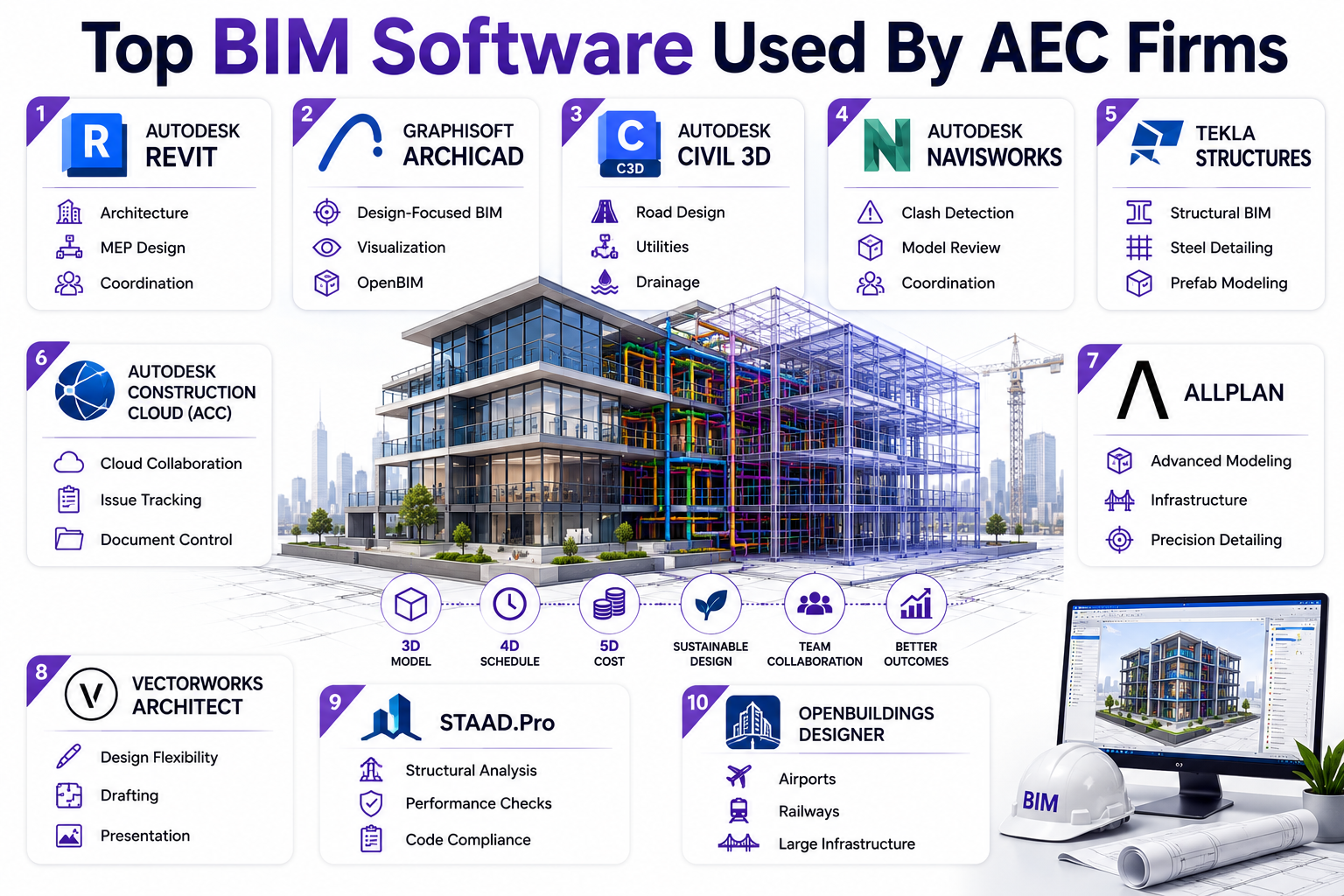
Through comprehensive 3D models, BIM software allows professionals to view all information about a structure’s physical and functional attributes. This allows them to collaborate better, improve project quality, and streamline its delivery. Let’s have a look at the most widely used software in AEC companies:
1. Revit
Considered the industry standard for BIM, Revit software is widely used by architects, engineers, and contractors. The platform supports everything from design development and documentation to multidisciplinary coordination.
2. Archicad
Many architecture firms prefer ArchiCAD for its design-focused approach to BIM. Powerful visualization tools and an intuitive interface make it highly appealing for architectural workflows.
3. Civil 3D
Infrastructure projects often rely on Civil 3D for planning and design. Engineers use it to develop intelligent models for roads, utility networks, grading, and drainage systems.
4. Navisworks
Navisworks is the go-to choice for professionals when coordination is key to the project stage. Its clash detection and project review features help teams identify issues before construction begins.
5. Tekla Structures
Complex structural and steel projects demand a high level of detail. Tekla Structures helps engineers create accurate, fabrication-ready models that can be carried through to construction.
6. Autodesk Construction Cloud (ACC)
Built to connect project stakeholders on a common platform, ACC brings design and construction teams together. The features of centralised documents, workflows, and project data improve collaboration across the project lifecycle.
7. Allplan
Precision and detailing are where Allplan stands out. The software is widely used across architecture, engineering, and infrastructure projects that require advanced modelling capabilities.
8. Vectorworks Architect
Architects looking for greater design flexibility often turn to this BIM software. Along with BIM functionality, the software offers powerful drafting, modelling, and presentation tools.
9. STAAD.Pro
Structural analysis forms the core of STAAD.Pro. Engineers use the software to evaluate building performance, optimise designs, and verify compliance with industry standards.
10. OpenBuildings Designer
Large and complex developments require specialised BIM solutions. This is where OpenBuildings Designer comes to use for making highways. airports, railway stations, commercial facilities, and other infrastructure-intensive projects.
How Do Revit, Navisworks, and ACC Work Together?
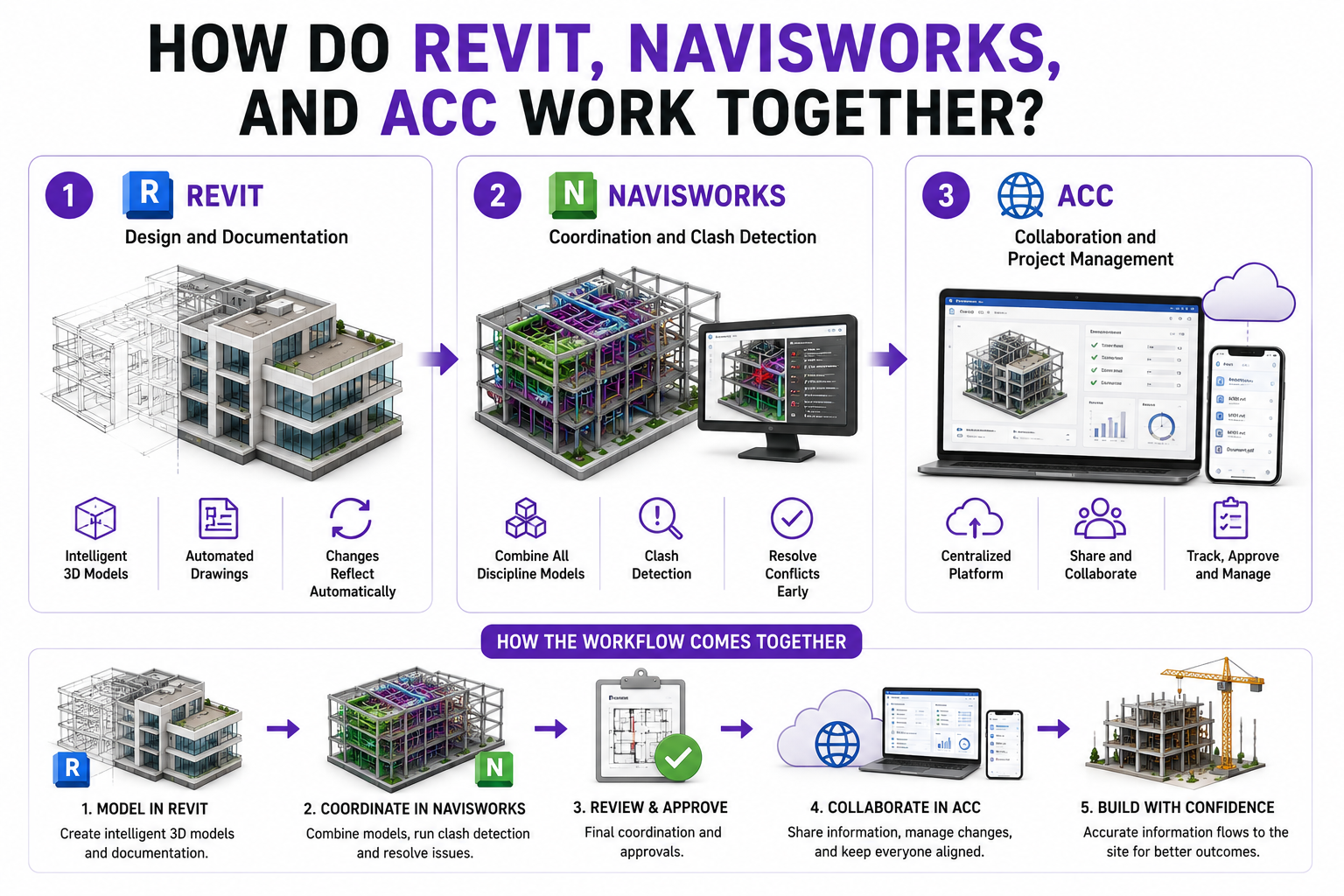
While Revit is primarily an architecture software, Navisworks and Autodesk Construction Cloud (ACC) are used by engineers and other players in the construction industry. Put together, these software enhance communication and BIM workflow across the project’s lifecycle.
1. Revit: Design and Documentation
Most BIM projects begin in Revit. Architects, structural engineers, and MEP consultants use it to create intelligent 3D models and generate project documentation. Since every drawing is linked to the model, changes are automatically reflected across the project.
2. Navisworks: Coordination and Clash Detection
Navisworks helps in project coordination by combining architectural, structural, and MEP models into a single environment. Teams can review the design, identify clashes, and resolve conflicts before work begins on site.
3. ACC: Collaboration and Project Management
Construction projects involve dozens of stakeholders working across different locations. ACC provides a central platform where teams can share files, track changes, manage approvals, and access the latest project information.
How the Workflow Comes Together?
A typical workflow starts with BIM modelling in Revit. These models are then reviewed and coordinated in Navisworks to eliminate clashes. Once approved, project information is shared through ACC, allowing designers, contractors, and owners to collaborate throughout the project lifecycle.
Which BIM Tools Are Best for Architecture, MEP, and Infrastructure?
BIM software manage intelligent 3D models through the lifespan of a project. Hence, these tools are made to support various stages of project development and find different applications across the AEC industry. Let’s take a deep dive into them individually:
|
Software |
Discipline |
Best for |
|
Revit |
Architecture |
Building design, documentation, and multidisciplinary coordination |
|
Archicad |
Architecture |
Architectural design, modeling, and collaboration |
|
Vectorworks Architect |
Architecture |
Design flexibility, 2D drafting, and BIM workflows |
|
Navisworks |
MEP |
Clash detection, model coordination, and constructability reviews |
|
Revit |
MEP |
Detailed MEP drafting and documentation |
|
Civil 3D |
Infrastructure |
Roads, highways, land development, and utility networks |
|
OpenRoads Designer |
Infrastructure |
Transportation and roadway design projects |
|
OpenBuildings Designer |
Infrastructure |
Rail, airports, stations, and large infrastructure facilities |
|
Autodesk Construction Cloud |
Infrastructure |
Common data environment, document management, and collaboration |
How Are AI and Cloud Platforms Changing BIM Workflows?
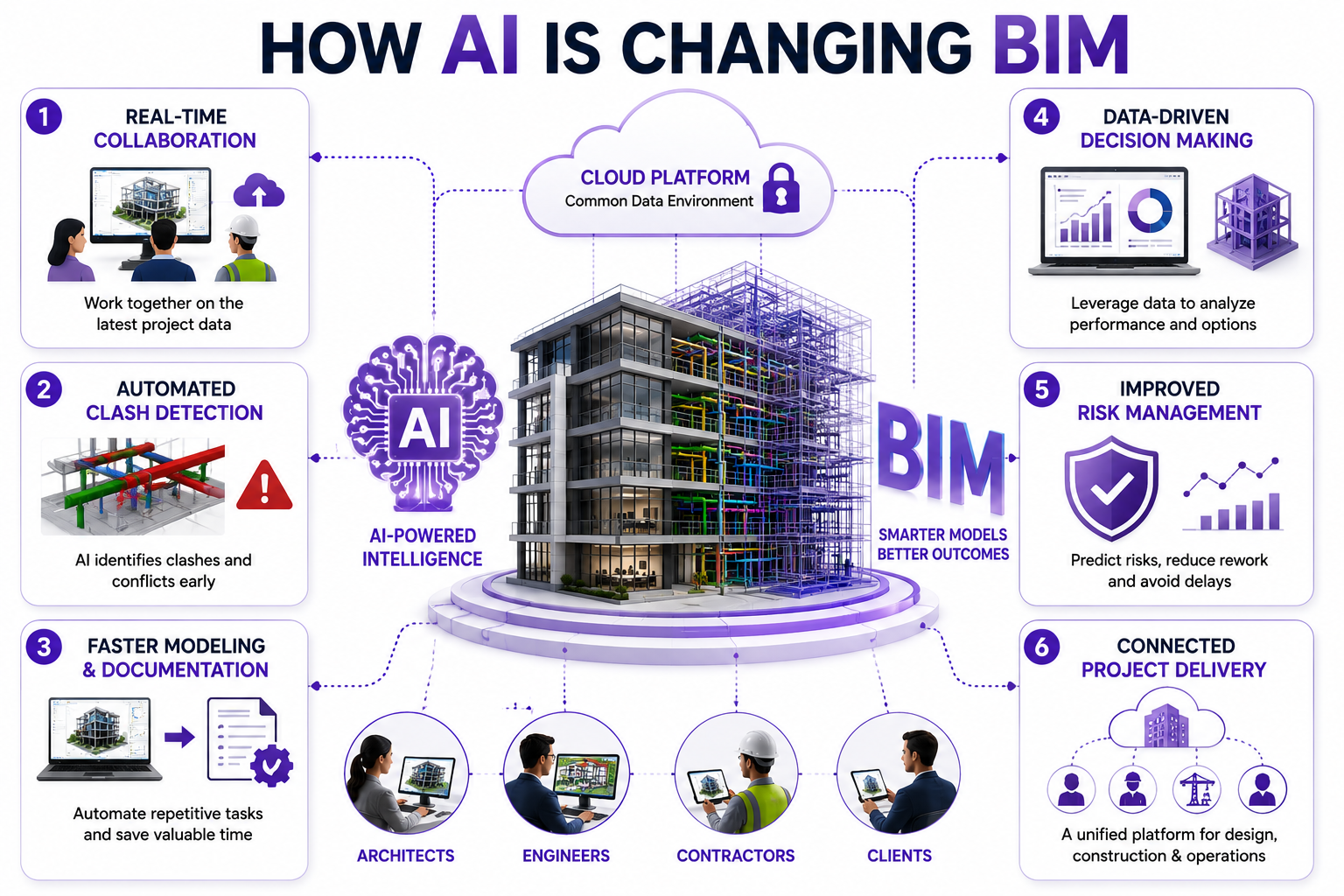
Artificial Intelligence and cloud collaboration platforms are unlocking new possibilities for BIM. While AI is enabling to generative designs and predictive analysis, cloud platforms serve as Common Data Environments (CDEs) where teams can host, share, and work on 3D models. Here’s how they are transforming BIM workflows:
1. Real-Time Collaboration
Project teams no longer need to exchange multiple file versions over email. Cloud platforms allow architects, engineers, contractors, and clients to access the latest project information from a single source.
2. Automated Clash Detection
Reviewing complex models manually can be time-consuming and prone to errors. AI-powered tools can identify clashes, inconsistencies, and design conflicts much faster, allowing teams to resolve issues early.
3. Faster Documentation and Modelling
Many repetitive BIM tasks can now be automated with AI. From generating schedules to updating documentation, AI tools helps reduce manual effort and improve productivity.
4. Data-Driven Decision Making
BIM software collect large volumes of project data. Teams can use this information to analyse performance, evaluate design options, and make more informed decisions throughout the project lifecycle.
5. Improved Risk Management
With the use of AI in construction, potential issues are easier to identify when project data is continuously monitored and analysed. This helps teams anticipate delays, reduce rework, and improve project outcomes.
6. Connected Project Delivery
Cloud-based BIM platforms bring design, construction, and operations teams onto a shared environment. Having better access to information improves coordination and ensures everyone is working with the latest data.
What BIM Skills Should Professionals Learn Beyond Modelling?
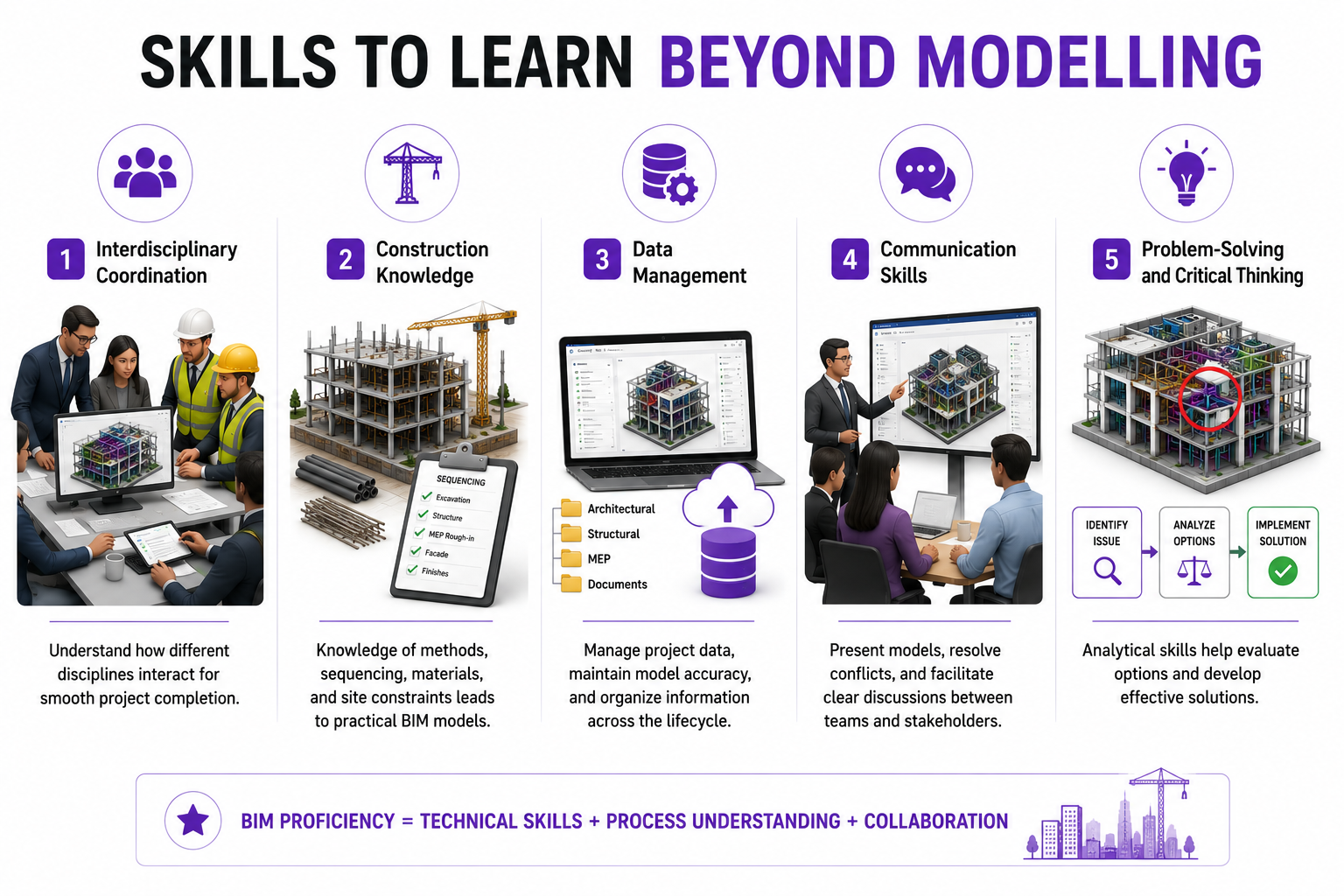
BIM is not just software. It’s a process. Hence, it requires professionals to do more than simply create 3D models. Here is the list of allied skills one needs to have to be BIM proficient.
1. Interdisciplinary Coordination
BIM projects involve architects, structural engineers, MEP consultants, contractors, and developers. Understanding how different disciplines interact is essential for smooth project completion.
2. Construction Knowledge
Understanding construction methods, sequencing, materials, and site constraints helps professionals develop more practical BIM models.
3. Data Management
Beyond modelling, professionals should know how to manage project data, maintain model accuracy, and organise information throughout the project lifecycle.
4. Communication Skills
Coordinating multiple stakeholders requires clear communication. BIM experts often present models, resolve conflicts, and facilitate discussions between teams.
5. Problem-Solving and Critical Thinking
Having good analytical skills help BIM professionals evaluate options and develop effective solutions.
How Do Companies Choose the Right BIM Software Stack?
A BIM software stack is essentially a combination of tools grouped together for managing everything from design to construction and management of a project. This is how most companies build their stack:
1. Project Requirements
The scale and nature of a project determines the level of BIM software integration.
2. Discipline-Specific Needs
Architects, structural engineers, MEP consultants, contractors, and facility managers use software tailored to their workflows.
3. Interoperability
BIM workflows involve multiple stakeholders and software platforms. Hence, firms should prioritise tools that can exchange information seamlessly and support common file formats.
4. Training and Adoption
Even the most powerful BIM software can become ineffective if teams struggle to use it. Ease of learning, availability of training resources, and industry adoption often influence software selection.
5. Cost and Return on Investment
Licensing fees, implementation costs, and training expenses are important considerations. Organisations usually evaluate whether the productivity gains and project efficiencies justify the investment.
6. Integration with Existing Systems
Many companies already use project management, ERP, or document control platforms. Choosing BIM tools that integrate with existing systems helps create a more connected digital workflow.
What Trends Are Shaping the Future of BIM Software in AEC?
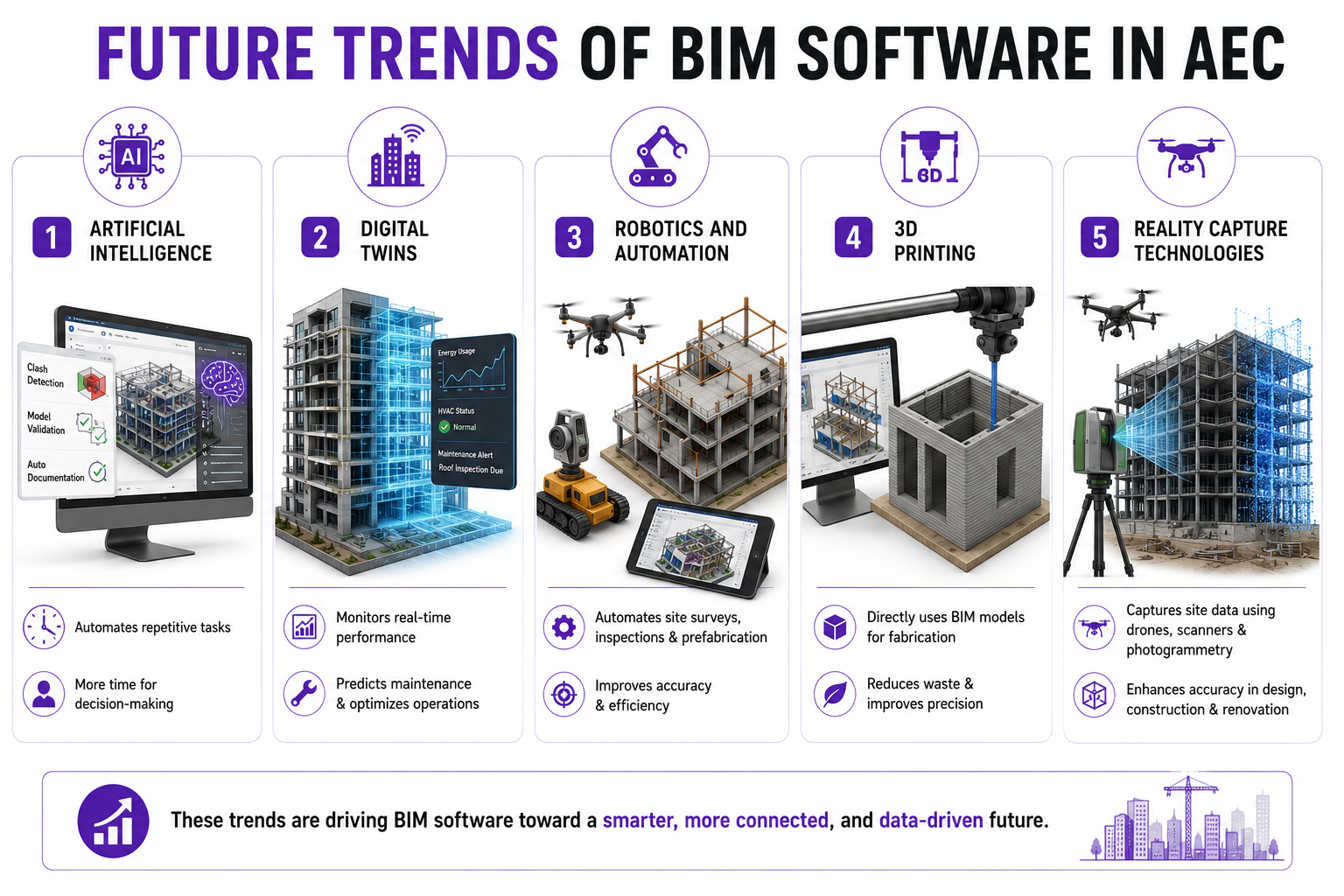
The capabilities of BIM are being enhanced through various new-age tools and technologies. These include AI, robotics, 3D printing, and digital twins. Let’s have a closer look at them:
1. Artificial Intelligence
AI is helping automate repetitive tasks such as clash detection, model validation, and documentation. As BIM software become more intelligent, professionals can spend less time on manual processes and more time on decision-making.
2. Digital Twins
A digital twin is a virtual representation of a physical asset that updates using real-world data. When combined with BIM, digital twins can help owners monitor building performance, predict maintenance requirements, and optimise operations.
3. Robotics and Automation
Digital construction companies are increasingly using robotics for tasks like site surveys, inspections, and prefabrication. With BIM models they can access the data needed to guide these automated processes with accuracy.
4. 3D Printing
3D printing construction technology is changing how building components are manufactured and assembled. BIM models can now be directly used to generate fabrication information, reducing material waste and improving precision.
5. Reality Capture Technologies
Drones, laser scanners, and photogrammetry are making it easier to capture site conditions. This data can be integrated into BIM models to improve accuracy during design, construction, and renovation projects.