---
title: "Tekla Structures: The Ultimate Guide for Civil Engineers (2026)"
description: Explore the key features, benefits, and applications of Tekla Structures for civil engineers in 2026. Learn how to enhance your BIM workflow & proficiency.
image: https://blog.novatr.com/hubfs/Everything%20A%20Civil%20Engineer%20Need%20to%20Know%20About%20Tekla%20Structure.jpg
---
[Blogs](https://www.novatr.com/learning-hub)
- [Architecture & Construction](https://www.novatr.com/learning-hub?category=Architecture+%26+Construction)
- [BIM](https://www.novatr.com/learning-hub?category=BIM)
- [Computational Design](https://www.novatr.com/learning-hub?category=Computational+Design)
- [Company News](https://www.novatr.com/learning-hub?category=Company+News)
- [Expert Talks](https://www.novatr.com/learning-hub?category=Expert+Talks)
Explore Courses
[Just Launched  BIM Professional Program v.2026 Take your career to the next level by mastering the real-world application of BIM. Know More](https://www.novatr.com/courses/bim-professional-program)
[ Master Computational Design Course Break into an advanced career by learning to apply the power of computation to the art of design. Know More](https://www.novatr.com/courses/computational-design)
[Blogs](https://www.novatr.com/learning-hub)
Explore Blogs
- [Architecture & Construction](https://www.novatr.com/learning-hub?category=Architecture+%26+Construction)
- [BIM](https://www.novatr.com/learning-hub?category=BIM)
- [Computational Design](https://www.novatr.com/learning-hub?category=Computational+Design)
- [Company News](https://www.novatr.com/learning-hub?category=Company+News)
- [Expert Talks](https://www.novatr.com/learning-hub?category=Expert+Talks)
Courses
- [BIM Professional Program v.2026](https://www.novatr.com/courses/bim-professional-program)
- [Master Computational Design](https://www.novatr.com/courses/computational-design)
- [BIM/](https://www.novatr.com/learning-hub?category=BIM) [BIM/](https://www.novatr.com/learning-hub?category=BIM)
Featured Article
# Tekla Structures For Civil Engineers: Key Benefits, Applications & Online Courses

Bandana Singh
March 11, 2025
12 min read


Mastering Tekla Structures Software is a game-changer for civil engineers looking to streamline workflows, enhance accuracy, and optimize construction projects. Whether you are a student eager to build expertise or a professional aiming to stay ahead in the industry, Tekla offers a robust solution for structural modeling and detailing.
According to the [U.S Census Bureau](https://www.census.gov/construction/c30/pdf/release.pdf), the U.S. construction industry is booming, with spending reaching $2.1 billion in January 2026, covering residential, commercial, and public infrastructure projects. With such rapid growth, mastering advanced BIM tools like Tekla is crucial for tackling complex designs, improving collaboration, and ensuring project efficiency.
In this guide, we will explore everything you need to know about Tekla Structures BIM Software, from its core features to its real-world applications, helping you take your civil engineering career to the next level.
Unlock High-Paying Careers With BIM
Master BIM workflows, software and skills on real projects.
Apply Now
\*Limited seats available
## What is Tekla Structures?
Tekla Structures is an advanced [Building Information Modeling software](https://www.novatr.com/blog/8-popular-bim-software) widely used by civil engineers and structural designers. It enables precise 3D modeling of steel, concrete, and timber structures, helping professionals create detailed and accurate construction plans. With powerful tools for clash detection, fabrication detailing, and project collaboration, Tekla Structures enhances efficiency in complex building projects.
Whether for small firms or [large-scale infrastructure projects](https://www.novatr.com/blog/impressive-architecture-mega-projects), Tekla Structures remains a top choice in structural engineering. When considering this software, factors like Tekla Structures software price play a crucial role. Pricing varies based on the license type and features, making it essential to choose the right plan based on project needs. So, do not forget to check out their official website for the cost details.
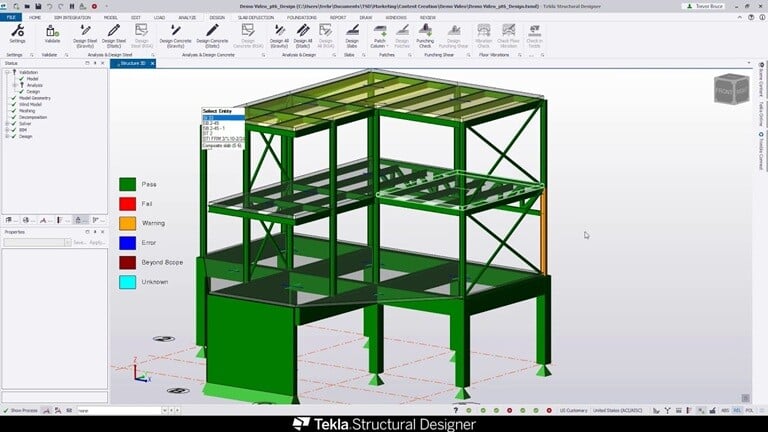
## Key Features of Tekla Structures
[Modern construction projects](https://www.novatr.com/blog/example-of-bim-projects-globally) require efficient structural design and detailing, and that is where Tekla Structures BIM software excels. Here are six standout features of Tekla Structures.
### 1. Intelligent BIM Modeling
Tekla Structures provides a highly detailed and information-rich 3D modeling environment. Engineers can create structurally accurate models of steel, concrete, and timber structures, ensuring every component fit outs perfectly before fabrication begins.
### 2. Advanced Steel and Reinforcement Detailing
The software offers industry-leading steel and rebar detailing tools. It automates shop drawings, material take-offs, and clash detection, minimizing errors and reducing project delays during fabrication and construction.
### 3. Interoperability with Other Software
Tekla supports various file formats like IFC, DWG, and STEP, making it easy to collaborate with teams using different design tools. For engineers transitioning from [AutoCAD Civil 3D](https://www.novatr.com/blog/autocad-civil-3d-features-benefits-applications-online-courses), Tekla offers a more structured and data-driven modeling approach tailored to complex construction needs.
### 4. Cloud Collaboration and Model Sharing
Tekla Structures integrates with [Trimble Connect](https://www.trimble.com/en/products/tekla), allowing real-time collaboration between engineers, architects, and contractors. Teams can review models, track revisions, and manage approvals from anywhere, improving project efficiency.
### 5. Seamless Structural Analysis Integration
With built-in compatibility with Tekla Structural Designer, users can analyze and optimize designs directly within the software. This integration ensures that structural integrity is maintained while reducing manual calculations and data transfers.
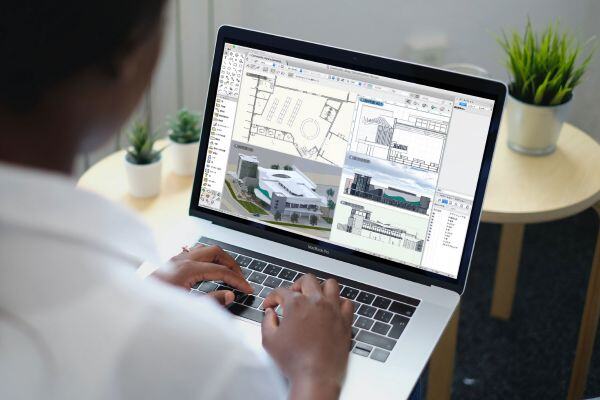
## Benefits of Tekla Structures for Civil Engineers
BIM Tekla Structures offers a data-driven approach to structural design, making projects more accurate and efficient. Here are some key benefits for civil engineers.
### 1. Accurate 3D Modeling
Tekla Structures allows engineers to create detailed, constructible 3D models of steel, concrete, and timber structures. This ensures that every element is designed with real-world feasibility, reducing clashes and costly rework.
### 2. Seamless Integration with Other Software
Tekla supports multiple file formats, enabling engineers to import and export models to different platforms. This makes it easier to work alongside [Building Information Modeling](https://www.novatr.com/blog/what-is-building-information-modeling-bim) software, CAD tools, and structural analysis programs.
### 3. Automated Steel and Rebar Detailing
Tekla automates the creation of fabrication-ready shop drawings, ensuring precise steel and reinforcement detailing. This feature enhances structural integrity while cutting down on manual drafting efforts.
### 4. Streamlined Project Collaboration
With Tekla Structures folder structures, teams can organize, store, and share project data effortlessly. Engineers, architects, and contractors can access the latest model updates in real-time, leading to fewer communication gaps
### 5. Reliable Construction Workflows
Tekla Structures streamlines the entire [design-to-construction process](https://www.tekla.com/uk/resources/blog/what-is-tekla-structures-and-why-would-i-use-it), minimizing errors in fabrication and assembly. Engineers can simulate erection sequences, ensuring smoother on-site execution.
Also Read - [Everything You Need to Know About Autodesk Construction Cloud As An Civil Engineer](https://www.novatr.com/blog/autodesk-construction-cloud-acc-complete-guide)
## Real-World Applications of Tekla Structures in Civil Engineering
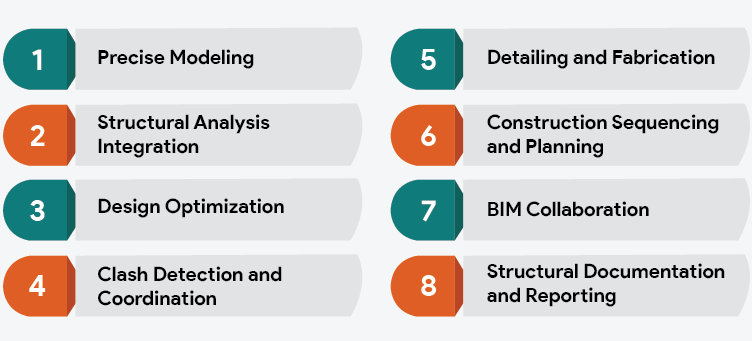
In modern construction, efficiency and accuracy are key to delivering successful projects. Tekla Structural Designer has become an essential tool for civil engineers, allowing them to create highly detailed, data-rich models that optimize workflows. Here are some major applications of Tekla Structures in civil engineering.
### 1. Reinforcement Modeling
With Tekla, civil engineers can generate accurate reinforcement drawings for bridges, tunnels, and high-rise buildings. It automates the detailing process, reducing errors and ensuring that reinforcement aligns perfectly with the design specifications.
### 2. Clash Detection and Coordination
Using Tekla Structural Designer, engineers can detect design conflicts between different structural elements. This helps in resolving issues before construction starts, leading to fewer delays and cost overruns.
### 3. Industrial Projects
Tekla is widely used in designing bridges, highways, airports, and industrial plants. Its advanced modeling capabilities ensure that large-scale [infrastructure projects](https://www.novatr.com/blog/bim-projects-around-the-world) are completed with high precision and durability.
### 4. BIM-Based Construction Planning
Tekla integrates with Building Information Modeling (BIM) platforms, enabling seamless collaboration between architects, engineers, and contractors. This enhances project coordination, making execution smoother and more predictable.
## Best Online Institutes to Learn Tekla Structures
Embarking on a journey to master Tekla Structures is essential for modern civil engineers. Here you can discover some of the best programs to elevate your career and stay ahead in the industry.
### 1. Novatr
[](https://www.novatr.com/courses/bim-for-civil-engineers/l?utm_source=blog&utm_medium=website_card_after_intro&utm_campaign=bim_civil_course_leads)
- Course Name: [BIM Professional Course for Civil Engineers](https://www.novatr.com/us/courses/bim-for-civil-engineers)
- **Duration:** 7 months
- **Fees:** $2500
- **Placement Assistance:** Yes
Build a future-ready career in construction with **Novatr’s** [**BIM Professional Course for Civil Engineers**](https://www.novatr.com/courses/bim-for-civil-engineers), a hands-on, industry-aligned program designed to help you master Building Information Modeling (BIM) from design to execution. Learn how top global firms use BIM processes and **BIM tools** to plan, coordinate, and deliver smarter, more efficient projects, while gaining the technical confidence to work on large-scale infrastructure and building developments. Recognized as one of the **best institutes for Tekla structure certification**, the program is designed to align learning with real-world construction practices.
**Here’s what you’ll learn:**
- 5+ industry softwares, including Autodesk Revit, Navisworks, Autodesk Construction Cloud: Docs, Coordination & Collaboration.
- Master essential plugins such as EF-Tools, DiRoots.One, pyRevit, ProSheets, Issue and Model Checker for Revit to automate documentation and improve precision.
- Learn complete BIM workflows, from digital design development, estimation & BOQ, and information modeling to clash detection, sequencing, and multidisciplinary coordination.
- Get hands-on experience working on real commercial and residential projects following ISO 19650 standards, guided by mentors from the global AEC industry.
- Develop professional construction documentation, audits, and deliverables aligned with international BIM practices.
**Earn globally recognized certifications:**
- **Novatr Course Certificate**, signed by the Academic Director.
- **Autodesk User Certification**, validating your command over Autodesk tools.
- **NSDC Certificate**, officially recognizing your BIM expertise.
- Optional Specialization Certificates, for learners who wish to deepen their skills in niche BIM applications.
Read More - [Explore All Top Online Courses & Training Programs to Learn Tekla Structures (For US Civil Engineers)](https://www.novatr.com/blog/tekla-online-courses-for-civil-engineers-in-usa)
### 2. Koenig Solutions
- **Course Name:** Tekla Structure Essentials Training Course
- **Duration:** 32 hours
- **Fees:** $1400
- **Placement Assistance:** No
If you are wondering how to learn Tekla Structures, then Koenig Solutions is another recommended option for you. It is a comprehensive Tekla Structures training program that covers fundamental aspects such as creating, managing, and exporting structural models, as well as generating fabrication and general arrangement drawings. This course is ideal for aspiring and practicing structural engineers, architects, construction professionals, and anyone seeking to enhance their proficiency in Tekla Structures.
### 3. Skyfi Labs
- **Course Name:** Tekla Software
- **Duration:** Not available
- **Fees:** $152
- **Placement Assistance:** No
Skyfi Labs offers a comprehensive Tekla Structures course to guide learners from basic to advanced levels. The curriculum is structured into three tiers, which are basic, intermediate, and advanced level. The course covers fundamental operations such as creating grids and editing stories, defining, drawing, and editing elements, analyzing and designing concrete and steel structures, and performing wind analysis and design.
### 4. Udemy
- **Course Name:** Tekla Structure Project Warehouse Course
- **Duration:** 4 hours
- **Fees:** $64.99
- **Placement Assistance:** No
This course is designed to equip learners with practical skills in creating detailed 3D models of warehouse structures using Tekla Structures software. Throughout the course, participants will master essential tasks such as grid creation, column and rafter modeling, and the development of various connections including base plates, purlins, and rafters. This training offers comprehensive instruction for both beginners and intermediate users.
## Future Trends and Developments in Tekla Structures
This section discusses emerging trends in Tekla Structures, including automation, cloud collaboration, sustainability, and advanced BIM integration.
Structural engineering workflows are evolving as projects demand higher accuracy, faster coordination, and data-driven decision-making. Tekla Structures continues to adapt to these changes by aligning with broader BIM and digital construction trends.
Key developments influencing the future of Tekla Structures include:
- Greater automation in steel and reinforcement detailing helps engineers reduce repetitive modeling effort while maintaining accuracy.
- Expanded cloud-based collaboration through connected BIM environments, allowing multidisciplinary teams to review and update models in near real time.
- Stronger focus on sustainability, with improved support for material optimization, quantity accuracy, and lifecycle-based design decisions.
- Deeper integration with construction planning and sequencing tools, enabling smoother transitions from design to fabrication and site execution.
- Enhanced interoperability with open BIM standards, supporting coordination across diverse software ecosystems used in large infrastructure projects.
As BIM adoption continues to grow, Tekla Structures is positioned to remain a central tool for civil engineers seeking reliable, model-based workflows that align with future construction and infrastructure demands.
Master BIM and Get Hired Faster
Join a community of 8500+ Architects and Engineers.
Explore Now
\*Limited seats available
# Conclusion
The future of civil engineering is being reshaped by digital tools, and Tekla Structures stands at the forefront of this transformation. Its ability to streamline modeling, detailing, and coordination has made it an essential asset in modern construction projects.
As the industry continues to evolve, mastering advanced software solutions is no longer an option, it is a needed requirement to excel. For civil engineers looking to expand their expertise, [BIM Professional Course for Civil Engineers](https://www.novatr.com/us/courses/bim-for-civil-engineers) by [Novatr](https://www.novatr.com/) is the perfect opportunity to gain in-depth knowledge and hands-on experience in BIM workflows. For the latest updates and insights, visit Novatr's [Resource Page](https://www.novatr.com/learning-hub).
Stay ahead in your career and apply for this course today!
## Frequently Asked Questions:
### 1. How to export STP files in Tekla Structures?
To export an STP (Standard for the Exchange of Product model data) file, go to File > Export > CAD format and select STEP/IGES format. Configure the export settings, ensuring the correct units and accuracy level are selected. Once the settings are finalized, click Export, and the STP file will be created, which can then be used in other CAD or CNC applications.
### 2. What is Tekla Structures Used For?
Tekla Structures is a BIM software used for structural design, detailing, and fabrication. It helps engineers and designers create accurate 3D models of steel, timber, and concrete structures, allowing for efficient planning, collaboration, and execution in construction projects.
### 3. How to manage folder structures in Tekla Structures?
Use a standardized folder structure, separating models, drawings, exports, and reference files. In File > Settings, define the default paths for saving files. Tekla also allows integration with cloud storage solutions for seamless team collaboration.
### 4. How to recover an autosaved project in Tekla Structures?
To recover an autosaved file, navigate to File > Open > Browse to Autosave Folder. Locate the most recent backup and open it. It is recommended to immediately save it with a new name to prevent overwriting. Adjust the autosave settings in Options > Save & Recovery to ensure frequent backups.
### 5. How is Tekla Structures different from other BIM software?
Tekla Structures focuses on construction-level structural modeling and detailing, offering higher accuracy for steel and reinforcement workflows compared to general BIM tools primarily used for architectural coordination and visualization.
Was this content helpful to you
Like Yes
Dislike No

TABLE OF CONTENTS
BIM Is The New Standard. Are You Certified?
Get Certified in BIM
SHARE ON YOUR SOCIALS
Link Copied Successfully
Related articles
[ BIM Top 5 Online Tekla Courses for Civil Engineers in the USA 10 March 2025 7 min read](https://blog.novatr.com/blog/tekla-online-courses-for-civil-engineers-in-usa) [ BIM Civil Future Ready Career Paths for Civil Engineers in 2026 11 June 2026 7 min read](https://blog.novatr.com/blog/future-ready-career-paths-for-civil-engineers) [ BIM 7 Best VDC BIM Software to Master as a VDC Engineer in 2026 11 March 2025 12 min read](https://blog.novatr.com/blog/vdc-bim-softwares) [ BIM Civil Top 7 Free Software Tools For Civil Engineers 11 June 2026 8 min read](https://blog.novatr.com/blog/top-7-free-software-tools-for-civil-engineers)
Download Syllabus
## BIM Professional Program
Next Cohort
June 2026
Program Duration
7 Months
Premium Program benefits
8 Credentials from Autodesk, NSDC, Novatr
1 program. 10 career paths. Infinite Growth.
40+ ISO 19650 & RIBA real-world projects to practice
1-on-1 guidance. Access 400+ industry experts.
Access the biggest AEC-Tech community on the planet. 8500+ and counting
Curated for you by 100+ global BIM leaders.
Lifelong access to course content
Enter your details to download the program syllabus.
##### BIM Professional Program
June 2026, 7 Months
Your Name Invalid name.
Phone Number Enter a valid phone number
Email Please enter a valid email address.
Select years of experience\* Currently studying 0-1 years 1-2 years 2-4 years 4-8 years 8-10 years 10-12 years 12+ years Invalid selection.
Specialisation Select your background\* Architecture Civil Engineering Mechanical Engineering Electrical Engineering Invalid selection.
Are you professionally trained in interior design?
Yes
No
I agree to the [Terms of Use](https://www.novatr.com/terms-and-conditions) and [Privacy Policy](https://www.novatr.com/privacy-policy), and consent to be contacted by Email, Call, WhatsApp, or SMS.
Submit
Ready to skyrocket your career?
Begin your next chapter in AEC
with Novatr!
We are here to help you take the industry by storm with advanced, tech-first skills.
[Explore Courses](https://www.novatr.com/#courses)
Join our newsletter
Submit
Thank you for signing up.
We’ll send you a nice letter once per week. No spam.

Dare to Disrupt.
Join thousands of people who organise
work and life with Novatr.
Company
- [About Us](https://www.novatr.com/about)
- [BIM Professional Program v.2026](https://www.novatr.com/courses/bim-professional-program)
- [Masters Computational Design](https://www.novatr.com/courses/computational-design)
- [Become a Mentor](https://www.novatr.com/apply-as-mentor)
- [Hiring from Us](https://www.novatr.com/hire-from-us)
- [Careers at Novatr](https://www.novatr.com/career)
Resources
- [Blog](https://www.novatr.com/learning-hub)
- [Media Room](https://www.novatr.com/media-room-home-page)
- [Career Builder](https://www.novatr.com/career-navigator)
- [Events & Webinars](https://www.novatr.com/webinars)
- [FAQs & Support Center](https://www.novatr.com/contact-us)
- [Contact Us](https://www.novatr.com/contact-us)
- [Privacy Policy](https://www.novatr.com/privacy-policy)
- [Terms of Use](https://www.novatr.com/terms-and-conditions)
©2023 Oneistox Network Pvt. Ltd.
All Rights Reserved
```json
{
"@context" : "https://schema.org",
"@type" : "BlogPosting",
"author" : {
"@type" : "Person",
"name" : "Bandana Singh",
"url" : "https://blog.novatr.com/blog/author/bandana-singh"
},
"dateModified" : "2026-01-19T12:07:24.048Z",
"datePublished" : "2025-03-11T07:59:05.000Z",
"headline" : "Tekla Structures: The Ultimate Guide for Civil Engineers ({{year}})",
"image" : [ "https://blog.novatr.com/hubfs/Everything%20A%20Civil%20Engineer%20Need%20to%20Know%20About%20Tekla%20Structure.jpg" ],
"mainEntityOfPage" : {
"@id" : "https://blog.novatr.com/blog/tekla-for-civil-engineers-benefits-applications",
"@type" : "WebPage"
},
"publisher" : {
"@type" : "Organization",
"logo" : {
"@type" : "ImageObject",
"url" : "https://blog.novatr.com/hubfs/Novatr%20Prev%20OX-2.svg"
}
}
}
```