---
title: "Revit Massing in Architecture: Complete Guide to Conceptual Design"
description: Learn how Revit massing is transforming architectural conceptualization. Explore how to create Revit mass models, and apply site massing tools.
image: https://blog.novatr.com/hubfs/Revit%20Massing_%20How%20to%20Use%20This%20Feature%20for%20Conceptual%20Architectural%20Designs.jpg
---
[Blogs](https://www.novatr.com/learning-hub)
- [Architecture & Construction](https://www.novatr.com/learning-hub?category=Architecture+%26+Construction)
- [BIM](https://www.novatr.com/learning-hub?category=BIM)
- [Computational Design](https://www.novatr.com/learning-hub?category=Computational+Design)
- [Company News](https://www.novatr.com/learning-hub?category=Company+News)
- [Expert Talks](https://www.novatr.com/learning-hub?category=Expert+Talks)
Explore Courses
[Just Launched  BIM Professional Program v.2026 Take your career to the next level by mastering the real-world application of BIM. Know More](https://www.novatr.com/courses/bim-professional-program)
[ Master Computational Design Course Break into an advanced career by learning to apply the power of computation to the art of design. Know More](https://www.novatr.com/courses/computational-design)
[Blogs](https://www.novatr.com/learning-hub)
Explore Blogs
- [Architecture & Construction](https://www.novatr.com/learning-hub?category=Architecture+%26+Construction)
- [BIM](https://www.novatr.com/learning-hub?category=BIM)
- [Computational Design](https://www.novatr.com/learning-hub?category=Computational+Design)
- [Company News](https://www.novatr.com/learning-hub?category=Company+News)
- [Expert Talks](https://www.novatr.com/learning-hub?category=Expert+Talks)
Courses
- [BIM Professional Program v.2026](https://www.novatr.com/courses/bim-professional-program)
- [Master Computational Design](https://www.novatr.com/courses/computational-design)
- [ARCHI/](https://www.novatr.com/learning-hub?category=BIM)
Featured Article
# Revit Massing: How to Use This Feature for Conceptual Architectural Designs
.jpg)
Tanmay Gadade
April 28, 2025
10 min read
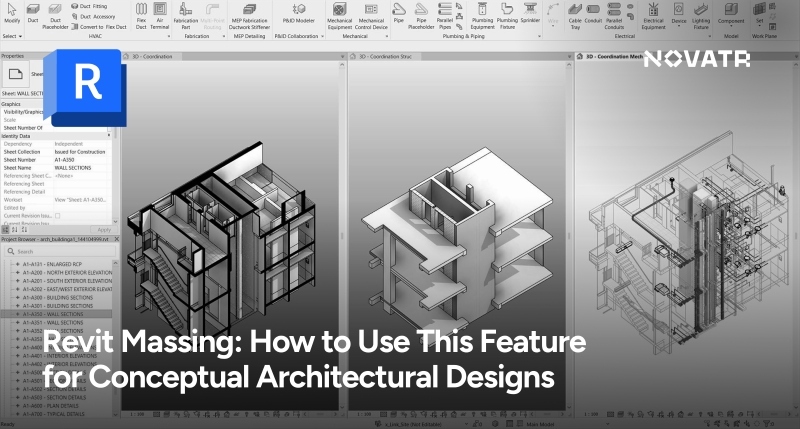

In architecture, the conceptual design stage transforms imagination into its initial physical form, setting the stage for all that comes next. Sketches, physical models, and CAD were the norm in the past, but with the introduction of BIM software such as Revit, the design process has changed. **Massing with Revit** enables architects to define abstract volumes, form 3D shapes, and determine feasibility before the inclusion of details such as walls or windows. Revit massing tools are not only for modeling but also for bridging form and function, facilitating quicker iteration, improved analysis, and seamless incorporation into the project cycle. Understanding **what is massing in Revit** and **how to do massing in Revit** is transforming building design, widening imagination, and accuracy.
Unlock High-Paying Careers With BIM
Master BIM workflows, software and skills on real projects.
Apply Now
\*Limited seats available
## What is Revit Massing?
Revit Massing is a collection of tools housed in the "Massing & Site" tab. It is meant to help architects draft initial forms, surfaces, and building shapes that will later be transformed into construction elements.
These capabilities collectively enable designers to establish the volumetric extent of their design, experiment with spatial configurations, examine environmental conditions, and initiate the architectural story in a [BIM-compatible](https://www.novatr.com/blog/detailed-bim-guide) environment.
## Guide to Creating Conceptual Masses
The real power of [massing in Revit architecture](https://www.novatr.com/blog/how-revit-massing-is-revolutionizing-early-stage-architecture-design) lies in how it transforms 2D sketches into intelligent, editable 3D forms. It is easy and flexible to create a conceptual mass in Revit. Follow these step-by-step instructions to get you started:
### Step 1: Access the Massing Environment
- Go to the Massing & Site tab.
- Click on In-Place Mass and give your massing model Revit a name.
### Step 2: Establish Reference Levels and Planes
- Utilize existing levels or establish new levels for story heights.
- Insert reference planes to set control lines for sketches and forms.
### Step 3: Base Profile Sketching
- Utilize 2D drawing tools like Rectangle, Circle, Spline, and Polygon.
- Maintain closed loops to form solid shapes.
### Step 4: Make 3D Forms
- Apply the Create Form command to extrude, blend, revolve, or sweep the profiles.
- Adjust parameters and grips to refine the shape.
### Step 5: Apply Parameters
- Parameterize your mass by giving values and formulas to height, width, angle, and so on.
- This allows for simple iteration and versioning.
### Step 6: Finish the Mass
- Click Finish Mass to finish and leave the massing environment.
- Your conceptual form is now ready for analysis and additional detailing.
## Advanced Massing Techniques in Revit

Once you’ve created the basic massing model in Revit, several [advanced features](https://www.novatr.com/blog/advanced-revit-and-bim-techniques) can enhance and integrate your design with real-world data.
1. Mass Floors
You can easily calculate usable area and volume by assigning floor levels to your mass. This proves useful when dealing with commercial and residential projects where Revit mass floors influence zoning and budget determinations.
### 2. Divided Surfaces
Surface division tools allow you to divide a mass face into grids, which is perfect for exploring facade design and material patterns.
3. Environmental Analysis
You can analyze how different orientations and shapes affect natural light exposure and shading by pairing sun path and shadow analysis.
### 4. Site Integration
Use Revit site massing tools to locate your mass on topography, roads, and site boundaries. This ensures your design works in context, factoring in terrain slopes and site restrictions.
### 5. Model by Face
After you've nailed your idea, you can then convert mass surfaces into building components like walls, floors, and roofs by using the "Model by Face" command. This completes the cycle between low-level and high-level design.
Together, these tools bring Revit massing models from geometric blocks to an actual working piece of the BIM process.
Also Check out: [How To Access Free Revit Families & Use Them For Your Architecture Project](https://novatr.com/blog/free-revit-families)
## How Massing Shapes Smarter BIM Workflows

Massing in Building Information Modelling (BIM) is the process of creating initial-rough geometric volumes to experiment with building design concepts before detailed modeling.
- **Conceptual Design Exploration:** Enables quick exploration of various building shapes and spatial arrangements.
- **Integration with Building Systems:** Links early forms to structural, mechanical, and energy analysis tools.
- **Collaborative Design Process:** Enables massing models to be quickly shared and edited between disciplines.
- **Visualization and Communication:** Offers crisp 3D perspectives to communicate design intention to clients and stakeholders.
- **Analysis and Optimization:** Facilitates analyzing environmental conditions such as sunlight, wind, and zoning requirements at the initial stage.
Also Check out - [How Revit Massing is revolutionizing early stage architecture](https://www.novatr.com/blog/how-revit-massing-is-revolutionizing-early-stage-architecture-design)
## Revit vs. Other Conceptual Tools
How does Revit's massing capability stack up against other conceptual design tools? Here's a quick comparison:
| Revit Massing Feature | Function | Application in Design |
| --- | --- | --- |
| In-Place Mass | Create mass forms directly in a project | Site-specific studies, one-off conceptual forms |
| Conceptual Mass Environment | Separate mode for designing parametric mass families | Early-stage massing models with parametric controls |
| Mass Floors | Define floor levels within a mass | Floor area calculations, volume assessments |
| Curtain Systems on Massing | Apply curtain walls and panels on mass surfaces | Visualizing façade systems, energy performance studies |
| Form Tools (Extrude, Blend, etc.) | Create and manipulate 3D mass forms | Complex geometry, organic architecture experimentation |
| Reporting Parameters | Add parameters to masses for scheduling and analysis | Floor area ratio (FAR), gross area, and energy usage estimates |
| Sun Path & Shadows | Analyze how massing responds to solar angles | Passive design, shading studies, and building orientation |
## How Novatr Enables You to Master Revit Massing and BIM
If you want to master Revit—not only the software but its applications in the real world—Novatr provides an industry-specific solution. Some of them are:
1. Project-Based Learning
2. Expert Mentorship
3. Interoperability Training
4. Portfolio Development
5. Career Guidance
Novatr also regularly updates its curriculum to match evolving industry demands. So whether you’re an undergraduate student or a working architect looking to shift toward BIM, their courses offer a guided pathway to upskilling with purpose.
Master BIM and Get Hired Faster
Join a community of 8500+ Architects and Engineers.
Explore Now
\*Limited seats available
## Conclusion
Digital tools have transformed architectural design, compelling architects to think bigger, design smarter, and build better. From visualization with high-powered capability to real-time analysis, software like AutoCAD and BIM has transformed the process of ideas coming to life. Of them, **Revit massing tools** are particularly important, facilitating early-stage conceptualization with flexibility and data-rich information.
Yet, technology never supersedes the instinct of the architect. The very core of design lies in human imagination, creativity, and empathy. Programs like Revit do not create ideas—it enables the architect to explore and convey them more conveniently.
If you’ve ever wondered **what is massing in Revit** or want to explore **how to do massing in Revit** to improve your conceptual design process, this is your cue. Enroll in the PGP in[Building Information Modeling (BIM) for Architects](https://www.novatr.com/courses/building-information-modelling) by [Novatr](https://www.novatr.com/us)to design with purpose, precision, and heart.
For more insights and AEC updates, visit our [Resource Page](https://www.novatr.com/learning-hub).
Was this content helpful to you
Like Yes
Dislike No

TABLE OF CONTENTS
BIM Is The New Standard. Are You Certified?
Get Certified in BIM
SHARE ON YOUR SOCIALS
Link Copied Successfully
Related articles
[ Building Information Modelling BIM vs CAD: Why Architects Are Making the Shift to Smarter Design 19 April 2025 5 min read](https://blog.novatr.com/blog/bim-vs-cad-why-architects-are-making-the-shift-to-smarter-design) [ Building Information Modelling How Revit Massing Is Revolutionizing Early-Stage Architecture Design 19 April 2025 4 min read](https://blog.novatr.com/blog/how-revit-massing-is-revolutionizing-early-stage-architecture-design) [ Building Information Modelling Essential Revit Tools Every Architect & BIM Engineer Must Know 18 April 2025 4 min read](https://blog.novatr.com/blog/top-revit-tools-for-architects-and-bim-engineers) [ SketchUp Workflows for Architects for 2026 13 April 2026 5 min read](https://blog.novatr.com/blog/sketchup-workflow-for-architects)
Download Syllabus
## BIM Professional Program
Next Cohort
June 2026
Program Duration
7 Months
Premium Program benefits
8 Credentials from Autodesk, NSDC, Novatr
1 program. 10 career paths. Infinite Growth.
40+ ISO 19650 & RIBA real-world projects to practice
1-on-1 guidance. Access 400+ industry experts.
Access the biggest AEC-Tech community on the planet. 8500+ and counting
Curated for you by 100+ global BIM leaders.
Lifelong access to course content
Enter your details to download the program syllabus.
##### BIM Professional Program
June 2026, 7 Months
Your Name Invalid name.
Phone Number Enter a valid phone number
Email Please enter a valid email address.
Select years of experience\* Currently studying 0-1 years 1-2 years 2-4 years 4-8 years 8-10 years 10-12 years 12+ years Invalid selection.
Specialisation Select your background\* Architecture Civil Engineering Mechanical Engineering Electrical Engineering Invalid selection.
Are you professionally trained in interior design?
Yes
No
I agree to the [Terms of Use](https://www.novatr.com/terms-and-conditions) and [Privacy Policy](https://www.novatr.com/privacy-policy), and consent to be contacted by Email, Call, WhatsApp, or SMS.
Submit
Ready to skyrocket your career?
Begin your next chapter in AEC
with Novatr!
We are here to help you take the industry by storm with advanced, tech-first skills.
[Explore Courses](https://www.novatr.com/#courses)
Join our newsletter
Submit
Thank you for signing up.
We’ll send you a nice letter once per week. No spam.

Dare to Disrupt.
Join thousands of people who organise
work and life with Novatr.
Company
- [About Us](https://www.novatr.com/about)
- [BIM Professional Program v.2026](https://www.novatr.com/courses/bim-professional-program)
- [Masters Computational Design](https://www.novatr.com/courses/computational-design)
- [Become a Mentor](https://www.novatr.com/apply-as-mentor)
- [Hiring from Us](https://www.novatr.com/hire-from-us)
- [Careers at Novatr](https://www.novatr.com/career)
Resources
- [Blog](https://www.novatr.com/learning-hub)
- [Media Room](https://www.novatr.com/media-room-home-page)
- [Career Builder](https://www.novatr.com/career-navigator)
- [Events & Webinars](https://www.novatr.com/webinars)
- [FAQs & Support Center](https://www.novatr.com/contact-us)
- [Contact Us](https://www.novatr.com/contact-us)
- [Privacy Policy](https://www.novatr.com/privacy-policy)
- [Terms of Use](https://www.novatr.com/terms-and-conditions)
©2023 Oneistox Network Pvt. Ltd.
All Rights Reserved
```json
{
"@context" : "https://schema.org",
"@type" : "BlogPosting",
"author" : {
"@type" : "Person",
"name" : "Tanmay Gadade",
"url" : "https://blog.novatr.com/blog/author/tanmay"
},
"dateModified" : "2026-02-24T06:14:49.653Z",
"datePublished" : "2025-04-28T12:34:11.000Z",
"headline" : "Revit Massing in Architecture: Complete Guide to Conceptual Design",
"image" : [ "https://blog.novatr.com/hubfs/Revit%20Massing_%20How%20to%20Use%20This%20Feature%20for%20Conceptual%20Architectural%20Designs.jpg" ],
"mainEntityOfPage" : {
"@id" : "https://blog.novatr.com/blog/revit-massing-in-architecture",
"@type" : "WebPage"
},
"publisher" : {
"@type" : "Organization",
"logo" : {
"@type" : "ImageObject",
"url" : "https://blog.novatr.com/hubfs/Novatr%20Prev%20OX-2.svg"
}
}
}
```