---
title: What Does a BIM MEP Project Look Like? 2026
description: Learn how BIM models turn into MEP drawings, shop drawings, clash reports, and documentation in real BIM MEP projects.
image: https://blog.novatr.com/hubfs/Blog%20Image%20(22).png
---
[Blogs](https://www.novatr.com/learning-hub)
- [Architecture & Construction](https://www.novatr.com/learning-hub?category=Architecture+%26+Construction)
- [BIM](https://www.novatr.com/learning-hub?category=BIM)
- [Computational Design](https://www.novatr.com/learning-hub?category=Computational+Design)
- [Company News](https://www.novatr.com/learning-hub?category=Company+News)
- [Expert Talks](https://www.novatr.com/learning-hub?category=Expert+Talks)
Explore Courses
[Just Launched  BIM Professional Program v.2026 Take your career to the next level by mastering the real-world application of BIM. Know More](https://www.novatr.com/courses/bim-professional-program)
[ Master Computational Design Course Break into an advanced career by learning to apply the power of computation to the art of design. Know More](https://www.novatr.com/courses/computational-design)
[Blogs](https://www.novatr.com/learning-hub)
Explore Blogs
- [Architecture & Construction](https://www.novatr.com/learning-hub?category=Architecture+%26+Construction)
- [BIM](https://www.novatr.com/learning-hub?category=BIM)
- [Computational Design](https://www.novatr.com/learning-hub?category=Computational+Design)
- [Company News](https://www.novatr.com/learning-hub?category=Company+News)
- [Expert Talks](https://www.novatr.com/learning-hub?category=Expert+Talks)
Courses
- [BIM Professional Program v.2026](https://www.novatr.com/courses/bim-professional-program)
- [Master Computational Design](https://www.novatr.com/courses/computational-design)
- [MEP/](https://www.novatr.com/learning-hub?category=BIM)
Featured Article
# What Does a Real BIM MEP Project Look Like? (From Model to Drawings)

Neha Singh
May 21, 2026
7 min read
.png)

Modern buildings contain large networks of ducts, pipes, cable trays, and electrical systems, especially in commercial and mixed-use projects. When these systems are planned separately, construction clashes become more common, which is why BIM MEP workflow is gaining importance across the Indian construction industry.
According to the Bureau of Energy Efficiency (BEE), buildings account for nearly [33%](https://beeindia.gov.in/en/content/buildings-sector) of India’s total electricity consumption. To reduce coordination errors before installation, many teams now rely on BIM models and coordinated MEP drawings.
A real MEP project usually moves through modeling, coordination, revisions, drawings, and documentation before construction begins.
## **Key Takeaways**
- Planning, coordination, revisions, and documentation are all part of a BIM MEP project.
- Most site drawings now come directly from coordinated BIM models.
- Teams usually catch routing and space issues before installation starts.
- Standardized BIM documentation supports smoother project execution.
Unlock High-Paying Careers With BIM
Master BIM workflows, software and skills on real projects.
Apply Now
\*Limited seats available
## **What Does a Real BIM MEP Project Workflow Look Like From Start to Finish?**
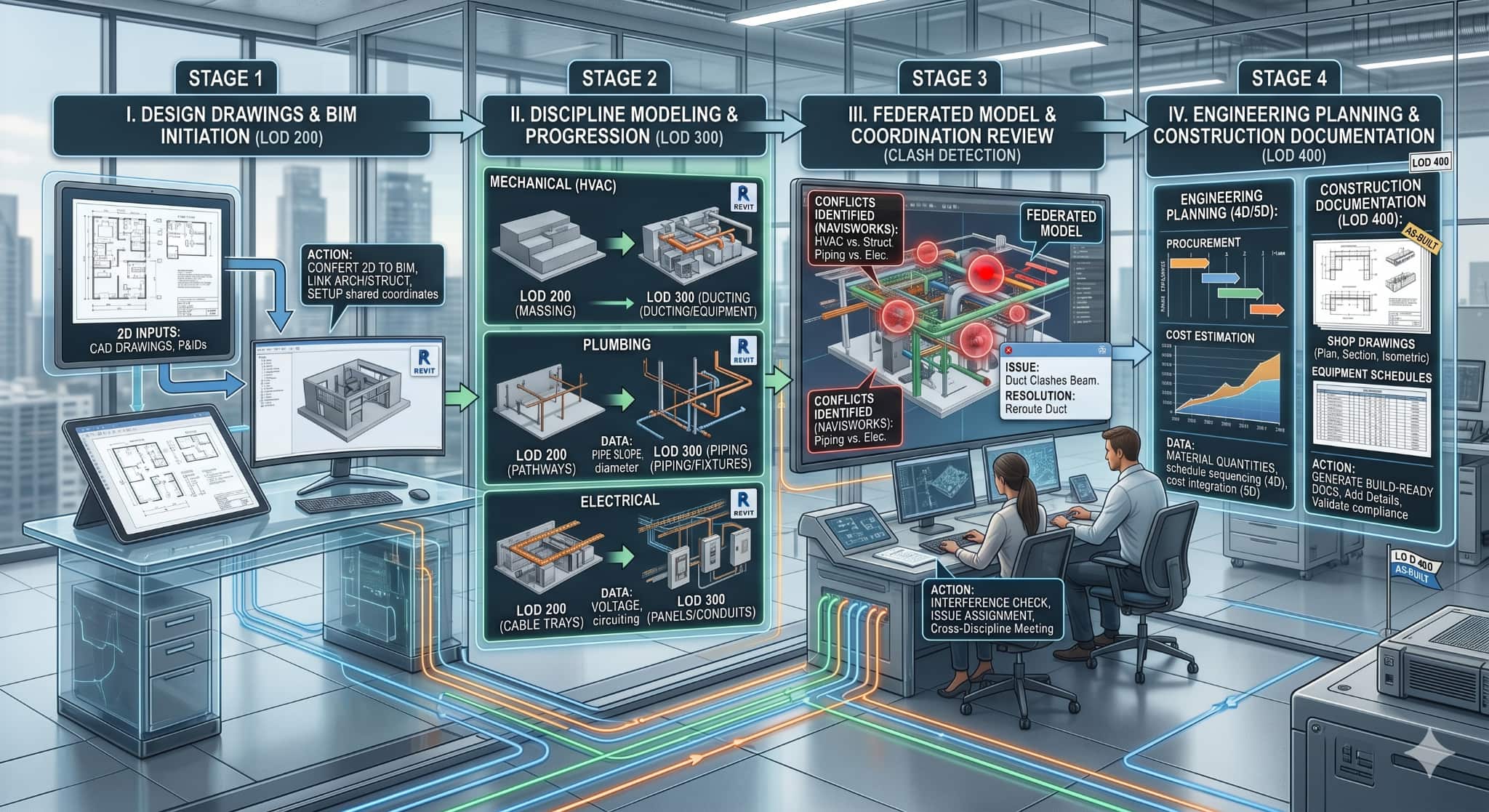
Most people imagine a BIM MEP project as a 3D model on a screen. In reality, the work is far more detailed. A project moves through several review, coordination, and documentation stages before anything reaches the construction site.
Typical stages in the workflow include:
- **Reviewing Project Information**
The BIM team starts with architectural plans, structural layouts, reflected ceiling plans, and client requirements. Prior to creating any models, the team normally inspects the area of the ceilings, service routes, and positions of large machinery.
- **Planning MEP Systems**
Following this, plans for plumbing, electrical, mechanical, and fire protection systems can be developed from the design layout. At this stage, routing decisions become important because available space is usually limited.
- **Developing BIM Models**
Engineers create BIM models using actual component sizes and elevations instead of symbolic lines used in traditional drafting.
- **Checking Clashes Between Systems**
Once all disciplines are combined, clashes start appearing between ducts, beams, cable trays, pipes, and walls. Some issues are small, while others may affect entire service routes.
- **Reworking Problem Areas**
Teams revise layouts repeatedly until services fit properly within the available building space.
- **Preparing Project Documentation**
After approval of the coordination, the models are then utilized for the **construction drawings**, shop drawings, and other BIM processes.
- **Handling Site Revisions**
During construction, models may still need updates if site conditions differ from approved layouts.
On many projects, coordination continues almost until the finishing stage because building services often change during execution.
## **Which Deliverables Are Created in a BIM MEP Project?**
A BIM MEP project does not end with model creation. Not every team uses the same type of project information.
Typical deliveries consist of:
- **MEP Drawings**
It includes plans for HVAC, electrical, drainage, plumbing, and firefighting systems.
- **Construction Drawings**
Contractors use construction drawings during execution because they contain dimensions, levels, sections, and installation details.
- **Shop Drawings**
Shop drawings go into much more detail. They are prepared for fabrication teams and usually include supports, sleeves, duct joints, and piping connections.
- **Coordination Drawings**
These drawings help teams check whether multiple services can fit together inside the same area.
- **BIM Models**
The BIM models themselves remain active project references throughout coordination and construction.
- **Schedules**
Equipment schedules, duct schedules, panel schedules, and quantity data are often extracted directly from the model.
- **Clash Reports**
These reports help track unresolved coordination issues between disciplines.
- **As-built Records**
At the end of the project, updated documentation is prepared to match the final installed condition.
Different teams depend on different outputs. The site teams rely heavily on drawings for the implementation phase, while consultants and BIM managers will devote their time to model and coordination reviews.
[Also Read: Top 50 MEP Interview Questions & Answers ](https://www.novatr.com/blog/best-mep-engineer-interview-questions)
## **How Do Models Translate Into Construction Drawings and Documentation?**
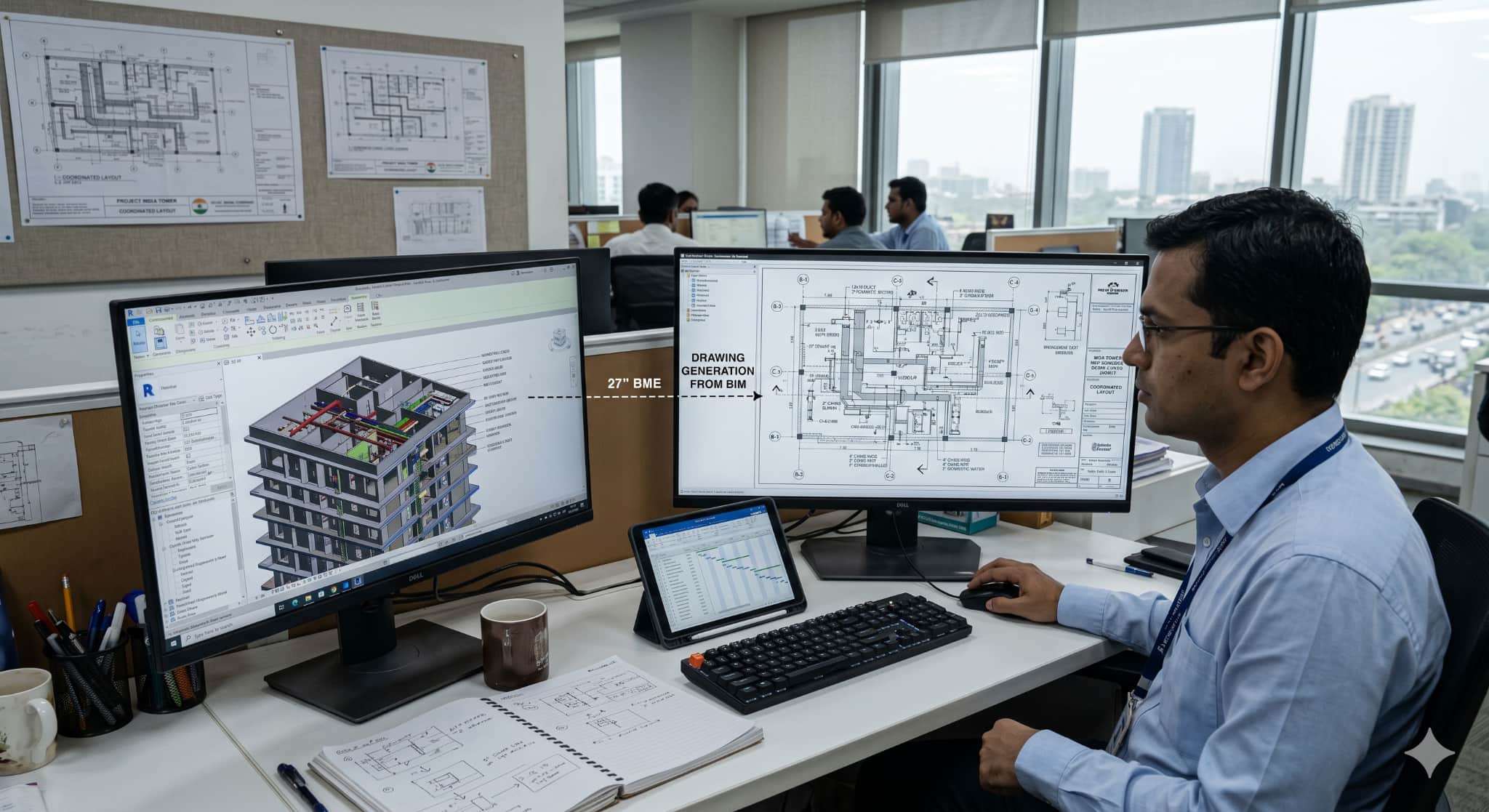
A key benefit of adopting the BIM workflow process is the integration between the model and the drawing.
### **How BIM Models are Converted into MEP Drawings?**
- **Generation of Views from Model**
Views can be created from the model, including plans, elevations, and sections, directly from coordinated BIM models.
- **Project information gets added**
Engineers then place dimensions, tags, notes, symbols, and legends required for construction.
- **Development of detailed service drawings**
Routing, offsets, maintenance clearance, and equipment access drawings are developed.
- **Fabrication details are developed**
Coordinated BIM models later become the base for shop drawings and prefabrication work.
- **Schedules are extracted**
BIM documentation can generate schedules for fixtures, ducts, pumps, panels, and piping systems.
- **Revisions become easier to manage**
Since drawings remain connected to the BIM models, updates can be reflected without redrawing everything manually.
### **How Shop Drawings are Created from BIM Models?**
In most projects, shop drawings are prepared only after the coordination stage is approved.
The process is usually handled in stages:
- Coordinated model views are taken first
- Fabrication details get added later
- Support and hanger locations are marked separately
- Spool information is included wherever needed
- Sheets are finally arranged as per project standards
Because everything comes from the same coordinated model, the drawings usually stay more consistent during project execution.
## **Where Do Coordination Sheets and Clash Reports Fit in the Process?**
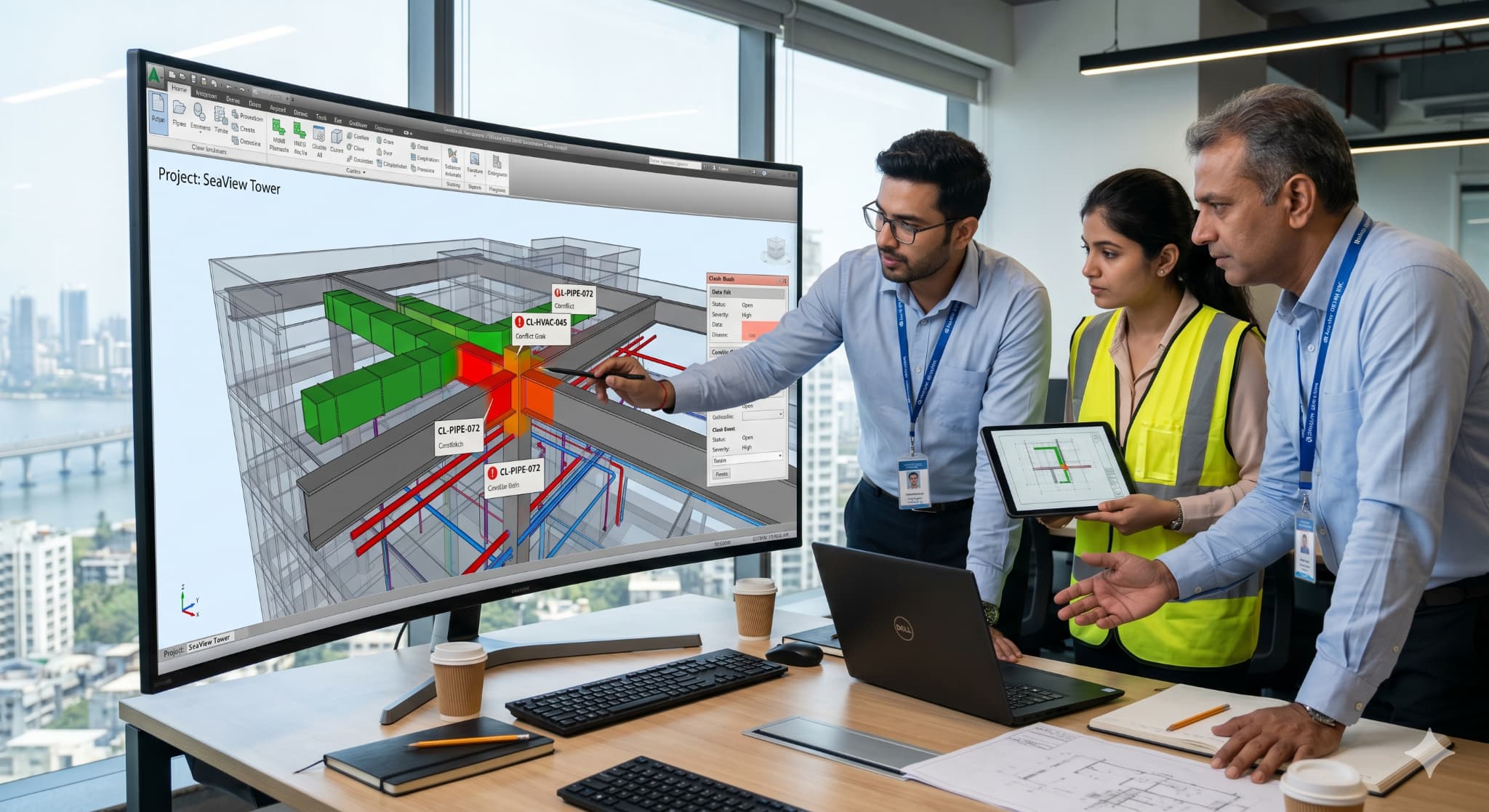
Coordination sheets and clash reports help teams identify conflicts before installation begins on site. Without coordination, services can end up crossing into the same area inside ceilings and shafts.
Coordination sheets are usually prepared for:
- Areas where ceiling space becomes too crowded
- Shafts and vertical service zones
- Maintenance access around systems
- Equipment rooms and plant spaces
- Routing near beams or structural members
They make it easier to see how services are sitting inside the same area.
Clash reports can contain:
- Physical clashes between systems
- Clearance problems around equipment
- Images showing the clash location
- IDs linked to each issue
- Revision updates after corrections
Most teams go through these reports repeatedly during coordination reviews until the major issues are sorted out.
[Also Read: Top 10 MEP Engineering Courses in India ](https://www.novatr.com/blog/top-mep-engineering-courses-in-india)
## **What Tools and Standards Are Used Across BIM MEP Project Delivery?**
Different tools usually enter the project at different stages, rather than a single software tool handling everything.
Common BIM MEP tools include:
- Projects usually involve tools such as Revit, Navisworks, AutoCAD, BIM 360, and other fabrication software, depending on workflow requirements.
Common standards followed in BIM workflow include:
- File and view naming rules
- Drawing sheet setup methods
- Clash checking procedures
- Level of Development requirements
- Revision tracking practices
- Submission and documentation rules
Project teams in India also follow different BIM standards depending on client and project requirements.
Master BIM and Get Hired Faster
Join a community of 8500+ Architects and Engineers.
Explore Now
\*Limited seats available
## Conclusion
A real MEP project involves far more than preparing a 3D model. Teams move through planning, routing, clash checking, revisions, construction drawings, shop drawings, and BIM documentation before systems finally reach the construction site.
As projects become more detailed, BIM MEP workflow is helping teams manage coordination more efficiently and reduce avoidable installation problems.
You can explore the [BIM Course for MEP Engineers](https://www.novatr.com/courses/bim-for-mep-engineers) by [Novatr](https://www.novatr.com/) to understand how BIM workflows are applied in real projects. You can also visit their [resources page](https://www.novatr.com/learning-hub) for material on BIM and MEP workflows.
## **FAQs**
### 1. What does a real BIM MEP project include?
A BIM MEP project can involve: modeling, clash detection, schedules, coordination sheets, site drawings, and construction documentation.
### 2. What are the key deliverables in a BIM MEP project?
The documents keep changing as the project moves ahead. Early coordination teams look more at clashes and schedules, but on-site work mostly follows drawings.
### 3. What does an MEP BIM model look like?
There will be no layouts of individual services, but all the systems will be incorporated within the same 3D environment.
Was this content helpful to you
Like Yes
Dislike No
.png)
TABLE OF CONTENTS
BIM Is The New Standard. Are You Certified?
Get Certified in BIM
SHARE ON YOUR SOCIALS
Link Copied Successfully
Related articles
[ CIVIL How World's Longest Bridge Randselva Built Using BIM & Tekla? 20 February 2026 4 min read](https://blog.novatr.com/blog/how-worlds-longest-bridge-randselva-built-using-bim-tekla) [ BIM What Kind of Portfolio Can You Build During a BIM Course? 29 June 2026 8 min read](https://blog.novatr.com/blog/build-a-strong-bim-portfolio-during-bim-course) [.png) What Is AutoCAD and Why Do Architects Use It? 20 April 2026 5 min read](https://blog.novatr.com/blog/what-is-autocad-and-why-do-architects-use-it) [.png) Types of MEP Drawings in Construction Projects 27 May 2025 5 min read](https://blog.novatr.com/blog/top-mep-design-drawings-in-construction-projects)
Download Syllabus
## BIM Professional Program
Next Cohort
June 2026
Program Duration
7 Months
Premium Program benefits
8 Credentials from Autodesk, NSDC, Novatr
1 program. 10 career paths. Infinite Growth.
40+ ISO 19650 & RIBA real-world projects to practice
1-on-1 guidance. Access 400+ industry experts.
Access the biggest AEC-Tech community on the planet. 8500+ and counting
Curated for you by 100+ global BIM leaders.
Lifelong access to course content
Enter your details to download the program syllabus.
##### BIM Professional Program
June 2026, 7 Months
Your Name Invalid name.
Phone Number Enter a valid phone number
Email Please enter a valid email address.
Select years of experience\* Currently studying 0-1 years 1-2 years 2-4 years 4-8 years 8-10 years 10-12 years 12+ years Invalid selection.
Specialisation Select your background\* Architecture Civil Engineering Mechanical Engineering Electrical Engineering Invalid selection.
Are you professionally trained in interior design?
Yes
No
I agree to the [Terms of Use](https://www.novatr.com/terms-and-conditions) and [Privacy Policy](https://www.novatr.com/privacy-policy), and consent to be contacted by Email, Call, WhatsApp, or SMS.
Submit
Ready to skyrocket your career?
Begin your next chapter in AEC
with Novatr!
We are here to help you take the industry by storm with advanced, tech-first skills.
[Explore Courses](https://www.novatr.com/#courses)
Join our newsletter
Submit
Thank you for signing up.
We’ll send you a nice letter once per week. No spam.

Dare to Disrupt.
Join thousands of people who organise
work and life with Novatr.
Company
- [About Us](https://www.novatr.com/about)
- [BIM Professional Program v.2026](https://www.novatr.com/courses/bim-professional-program)
- [Masters Computational Design](https://www.novatr.com/courses/computational-design)
- [Become a Mentor](https://www.novatr.com/apply-as-mentor)
- [Hiring from Us](https://www.novatr.com/hire-from-us)
- [Careers at Novatr](https://www.novatr.com/career)
Resources
- [Blog](https://www.novatr.com/learning-hub)
- [Media Room](https://www.novatr.com/media-room-home-page)
- [Career Builder](https://www.novatr.com/career-navigator)
- [Events & Webinars](https://www.novatr.com/webinars)
- [FAQs & Support Center](https://www.novatr.com/contact-us)
- [Contact Us](https://www.novatr.com/contact-us)
- [Privacy Policy](https://www.novatr.com/privacy-policy)
- [Terms of Use](https://www.novatr.com/terms-and-conditions)
©2023 Oneistox Network Pvt. Ltd.
All Rights Reserved
```json
{
"@context" : "https://schema.org",
"@type" : "BlogPosting",
"author" : {
"@type" : "Person",
"name" : "Neha Singh",
"url" : "https://blog.novatr.com/blog/author/neha-singh"
},
"dateModified" : "2026-05-21T06:31:54.573Z",
"datePublished" : "2026-05-21T06:28:25.000Z",
"headline" : "What Does a BIM MEP Project Look Like? {{year}}",
"image" : [ "https://blog.novatr.com/hubfs/Blog%20Image%20(22).png" ],
"mainEntityOfPage" : {
"@id" : "https://blog.novatr.com/blog/bim-mep-project",
"@type" : "WebPage"
},
"publisher" : {
"@type" : "Organization",
"logo" : {
"@type" : "ImageObject",
"url" : "https://blog.novatr.com/hubfs/Novatr%20Prev%20OX-2.svg"
}
}
}
```