---
title: Explore the Top Benefits of Revit in Architecture, Civil Engineering & MEP
description: Explore the benefits of using Revit for better collaboration and accuracy to automation and faster, more efficient project delivery in AEC projects.
image: https://lh7-us.googleusercontent.com/docsz/AD_4nXcSeTD6Uv31A4j-9ykFYDgv_2ebQvG9v2CukDDHhJCXM4Ylj8WKeEEWLPZLsGnPLj8r6zH2Gx3-0EaLxZuCkry8c-_qMjzcDYWWHwYF0OT2Tkt4-xdE01txnWst18f2rQG2JJtpurRqfSHV3-66CPN1_viE?key=m382FL2iQtxYw8qWNflllQ
---
[Blogs](https://www.novatr.com/learning-hub)
- [Architecture & Construction](https://www.novatr.com/learning-hub?category=Architecture+%26+Construction)
- [BIM](https://www.novatr.com/learning-hub?category=BIM)
- [Computational Design](https://www.novatr.com/learning-hub?category=Computational+Design)
- [Company News](https://www.novatr.com/learning-hub?category=Company+News)
- [Expert Talks](https://www.novatr.com/learning-hub?category=Expert+Talks)
Explore Courses
[Just Launched  BIM Professional Program v.2026 Take your career to the next level by mastering the real-world application of BIM. Know More](https://www.novatr.com/courses/bim-professional-program)
[ Master Computational Design Course Break into an advanced career by learning to apply the power of computation to the art of design. Know More](https://www.novatr.com/courses/computational-design)
[Blogs](https://www.novatr.com/learning-hub)
Explore Blogs
- [Architecture & Construction](https://www.novatr.com/learning-hub?category=Architecture+%26+Construction)
- [BIM](https://www.novatr.com/learning-hub?category=BIM)
- [Computational Design](https://www.novatr.com/learning-hub?category=Computational+Design)
- [Company News](https://www.novatr.com/learning-hub?category=Company+News)
- [Expert Talks](https://www.novatr.com/learning-hub?category=Expert+Talks)
Courses
- [BIM Professional Program v.2026](https://www.novatr.com/courses/bim-professional-program)
- [Master Computational Design](https://www.novatr.com/courses/computational-design)
- [BIM/](https://www.novatr.com/learning-hub?category=BIM) [BIM/](https://www.novatr.com/learning-hub?category=BIM)
Featured Article
# Benefits of Using Revit in Architecture, Civil Engineering and MEP

Bandana Singh
June 27, 2024
11 min read
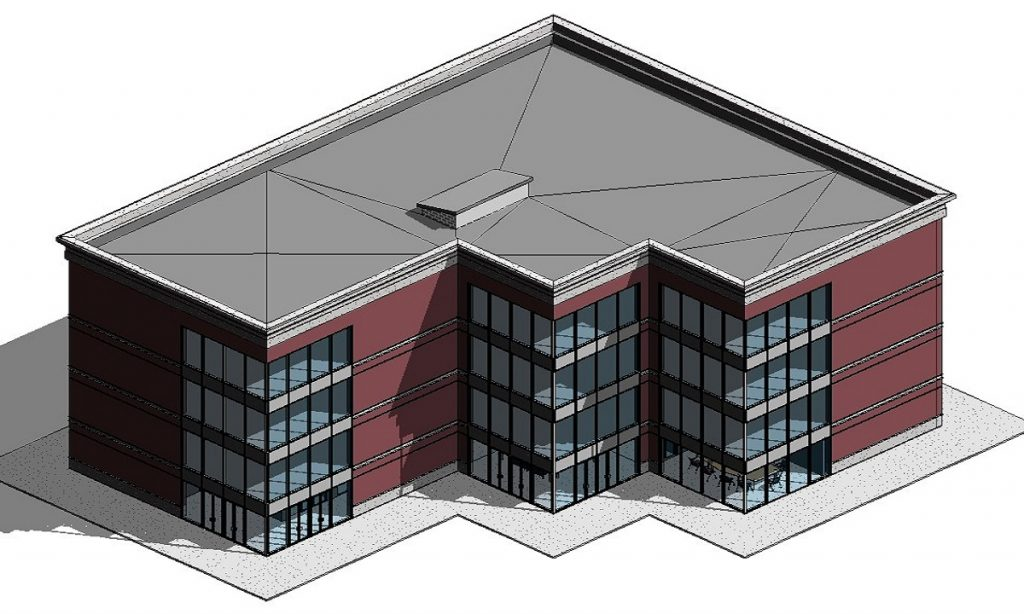

Revit has become a core tool across architecture, civil engineering, and MEP because modern construction no longer works in silos. Projects now demand integrated workflows where design, documentation, coordination, and data updates happen within a single shared environment. Revit supports this shift by enabling multidisciplinary teams to work on coordinated BIM models that reduce errors, improve clarity, and support faster decision-making.
As buildings and infrastructure projects grow more complex, professionals need tools that align design intent with engineering systems and construction requirements. Revit helps achieve this by connecting architectural models with structural and MEP data, ensuring consistency throughout the project lifecycle.
This guide explains the benefits of using Revit in architecture, civil engineering, and MEP by highlighting improved collaboration, modelling accuracy, automation, coordination, and efficiency across multidisciplinary BIM workflows.
Unlock High-Paying Careers With BIM
Master BIM workflows, software and skills on real projects.
Apply Now
\*Limited seats available
## **Benefits of Revit in Architecture Industry**
This section explains how Revit supports architects with integrated design workflows, accurate modelling, visual clarity, and sustainability analysis across all project stages.
Revit has transformed the architecture industry, offering architects with powerful features that enhance collaboration, design, and project execution. Through its integrated approach, Revit software allows synchronised workflow, facilitating better communication across all project phases. In the [**architecture industry**](https://www.novatr.com/blog/future-of-architecture), Revit is highly beneficial in designing complex structures and large-scale projects where accuracy is paramount. Let’s explore the key benefits of revit architecture:
### **1. Integrated Design Process**
Revit for architecture enables a comprehensive design process that combines architectural design, [**structural engineering**](https://blog.novatr.com/blog/benefits-of-bim-for-structural-engineers), and MEP into one model. This convergence enhances collaborative efforts and efficiency across different disciplines, leveraging Revit modelling capabilities to produce a more unified and accurate project outcome.
### **2. Better Collaboration**
Utilising Revit architecture plugins and advanced cloud-based tools, Revit enables multiple stakeholders to work on the same project simultaneously. This collaborative environment reduces the risk of data mismatches and ensures seamless communication, making sure all team members are on the same page and informed at every project stage.
### **3. High-Quality Visualisations**
One of the standout Revit capabilities is its ability to generate photorealistic renders directly from the model. This feature allows architects to create compelling visual presentations and accurately visualise the final outcome before construction begins, facilitating better decision-making and client satisfaction.
### **4. Enhanced Accuracy**
The features of Revit software include precise geometric calculations that help architects avoid common errors associated with manual coordination and measurement. These tools ensure that every architectural detail is precisely calculated, reducing discrepancies and enhancing the overall design integrity.
### **5. Sustainability Analysis**
Benefits of [**revit architecture**](https://www.novatr.com/blog/best-revit-practices) includes built-in tools for environmental impact and energy usage analysis. These tools help in designing more sustainable and energy-efficient buildings by allowing architects to assess and optimise the environmental footprint of their designs during the planning phase.
## **Benefits of Revit in Civil Engineering**
This section highlights how Revit benefits civil engineers by improving coordination, geometric accuracy, documentation updates, and infrastructure design workflows.
Revit has become transformative for [**civil engineers**](https://www.novatr.com/blog/bim-in-civil-engineering), integrating various project design phases and implementation into a single, coherent workflow. Revit software for civil engineering facilitates detailed modelling and rendering, enabling engineers to visualise project outcomes, manage complexities, and enhance precision throughout the construction process. Its adoption across the civil engineering sector is reshaping how infrastructure, bridges, roads, and other public works are designed, analysed, and built. Here are the key benefits of Revit for civil engineers:
### **1. Efficient Resource Management**
Revit facilitates effective resource management by enabling precise material estimations and tracking throughout the project lifecycle. This ensures optimal use of materials, reduces waste, and helps in budgeting and scheduling, making projects more economically and environmentally sustainable.
### **2. Accurate Geometric Information**
Revit modelling tools help create detailed and scalable models. These models offer precise geometric data essential for accurate analysis and implementation, ensuring that all aspects of the design are meticulously detailed and verifiable.
### **3. Enhanced Team Collaboration**
The [**Revit tools**](https://www.novatr.com/blog/popular-revit-plugins) allow multiple stakeholders to work on the same project in real-time, regardless of their geographical locations. This capability enhances communication, reduces errors, and ensures all team members are aligned with every change in the project, contributing to hassle-free project execution.
### **4. Advanced Revit Rendering**
[**Revit software**](https://blog.novatr.com/blog/detailed-revit-guide) for civil engineering helps in creating highly realistic visualisations of the projects. These visualisations can be used for multiple purposes, such as presentation, stakeholder approvals, or as a tool to analyse and refine complex design components before beginning the actual process of construction.
### **5. Dynamic Documentation**
Revit for civil engineers is beneficial in automating updates of project documents. Any changes to the model are immediately reflected in relevant drawings and blueprints. This dynamic approach to documentation saves time, reduces errors, and ensures that all stakeholders have access to the most current project information. The extensive Revit use in civil engineering enhances the accuracy and efficiency of project documentation, making it an invaluable tool for modern engineering practices.
> *Also Check out: [How Can Architects and Civil Engineers Best Use Revit to Their Advantage?](https://www.novatr.com/blog/best-revit-practices)*
## **Benefits of Revit in MEP**
This section focuses on how Revit enables MEP engineers to design, coordinate, and document mechanical, electrical, and plumbing systems more efficiently.
[**Revit software for civil engineering**](https://www.novatr.com/blog/bim-software-for-civil-engineers) and MEP is transforming the industry by providing a robust platform for designing and managing building systems. Its ability to create detailed 3D models allows for better visualisation, coordination, and analysis of mechanical, electrical, and plumbing systems within a building. It leads to creating more accurate designs that leads to improved project outcomes. [**Revit MEP**](https://www.novatr.com/blog/revit-mep) can help optimise workflow and deliver high-quality projects on time and within the budget. Read below the benefits of Revit for MEP professionals:
### **1. Enhanced Collaboration and Coordination**
Revit facilitates seamless collaboration among different departments involved in a project. By using a shared model, architects, structural engineers, and MEP professionals can work together more efficiently. This integrated approach helps identify and resolve conflicts early in the design process, reducing the risk of costly rework and delays.
### **2. Improved Accuracy and Reduced Errors**
The precision of Revit's 3D modelling capabilities ensures that designs are accurate and detailed. This reduces the chances of errors that can occur in traditional hand drawn designs. Accurate modelling helps MEP professionals create systems that fit perfectly within the architectural and structural constraints of a building. Apart from this, using Revit architecture shortcuts enhances efficiency, allowing professionals to quickly access tools and features that streamline the modelling process.
### **3. Cost Estimation and Material Takeoff**
Revit simplifies cost estimation and material takeoff processes by providing accurate quantities of materials and components directly from the model. This helps MEP professionals create more reliable budgets and reduce the risk of cost overruns. Additionally, [**Revit rendering capabilities**](https://www.novatr.com/blog/detailed-revit-guide) enhance the visualisation of materials and components, further aiding in accurate estimations and planning.
### **4. Improved Communication with Stakeholders**
The detailed and accurate models created in Revit can be used to effectively communicate design intent to clients, contractors, and other stakeholders. This improved communication helps ensure that everyone involved has a clear project understanding, reducing the likelihood of misunderstandings and misalignments. Besides this, [**Revit plugins**](https://www.novatr.com/blog/popular-revit-plugins) enhance these communication capabilities by offering additional tools and features that streamline the sharing and presentation of design information.
### **5. Efficient Design and Documentation**
Revit streamlines the design and documentation process by automating many tasks. This includes generating schedules, creating detailed drawings, and updating changes across all views and sheets automatically. This efficiency saves time and reduces the workload on MEP professionals. Additionally, Revit architecture rendering capabilities enhance visualisation, allowing for more detailed and realistic design presentations.
## **Revit for Different Roles in the AEC Industry **
This section outlines how Revit benefits different AEC professionals by aligning responsibilities, improving coordination, and supporting data-driven workflows.
Revit is one of the integral software programs that has transformed the AEC industry. Integrating this software allows AEC professionals to design, document, and analyse project capabilities in a single platform. It provides significant benefits to multiple roles, promoting accuracy and collaboration. Here are some of the key roles in the AEC industry that are benefitting the most from:
### **1. Architects**
Architects are among the primary Revit users, leveraging its extensive features to enhance the design and documentation process. Revit for architecture enables architects to create detailed 3D models that accurately represent the design intent. These models can be easily modified, with changes automatically reflected across all views and sheets, ensuring consistency and reducing the risk of errors. Revit architecture rendering capabilities allow architects to produce high-quality design visualisations. These realistic renderings help in conveying design concepts to clients and stakeholders, facilitating better decision-making and approval processes.
### **2. Estimators**
Revit allows estimators to extract accurate material quantities and components directly from the model, ensuring precise cost estimates. This capability reduces the risk of overestimation or underestimation, leading to more reliable project budgets. Revit’s dynamic nature ensures that any changes made to the model are instantly reflected in the associated quantities and costs. This real-time update feature helps estimators keep cost information current, making budget management more accurate and efficient throughout the entire project lifecycle.
### **3. Contractors**
For contractors, Revit offers several advantages that streamline construction processes and improve project outcomes. Its ability to visualise the project in a 3D environment helps [**understand the construction**](https://www.novatr.com/blog/significance-of-quality-control-in-construction) sequence and identify potential issues before they arise on-site. This visualisation is further enhanced by Revit architecture rendering, which provides realistic project images. Additionally, Revit architecture software helps in generating accurate construction schedules and timelines. The software's ability to link construction activities with the 3D model enables contractors to plan and manage resources more effectively, ensuring timely project completion.
### **4. Engineers**
Revit is a game-changer for engineers, as it enhances the design, analysis, and documentation processes, making engineering tasks more efficient and accurate. With its advanced [**3D modelling**](https://www.novatr.com/blog/everything-about-3d-modelling-in-construction) capabilities, Revit allows engineers to create detailed models of MEP systems. Revit also offers robust simulation and analysis tools, enabling engineers to optimise the performance and energy efficiency of MEP systems. These tools ensure that designs meet regulatory standards and client expectations, enhancing overall project quality.
> *Also Check out: [5 Best Revit Architecture Training Courses in India in 2026](https://www.novatr.com/blog/revit-architecture-training-courses)*
### **5. Facility Managers**
For facility managers, Revit provides comprehensive solutions for maintaining and operating buildings efficiently. The extensive Revit capabilities include detailed 3D models that encompass all building components and systems, offering facility managers a complete and accurate building representation. This detailed information is crucial for effective maintenance planning, space management, and overall building operation.
## Limitations and Challenges of Using Revit
This section discusses common challenges associated with Revit adoption, including learning curve, system requirements, workflow changes, and coordination risks.
While Revit offers strong benefits, its adoption requires careful planning.
Organizations commonly face the following challenges:
- A steep learning curve for teams new to BIM workflows
- High hardware requirements for handling large and complex models
- Initial productivity slowdowns during workflow transition
- File management issues when models are not properly structured
- Coordination risks if BIM standards are not clearly defined
In addition, collaboration can become inefficient when teams use inconsistent templates or outdated models. Addressing these challenges through structured training, clear BIM standards, phased implementation, and ongoing technical support helps teams gain long-term value from Revit without disrupting project delivery or design quality.
## **Conclusion**
Revit has undeniably transformed the AEC industry by offering a unified platform that enhances accuracy, collaboration, and efficiency for various roles such as architects, estimators, contractors, engineers, and facility managers. Its highly crucial features, including 3D modelling, real-time updates, and high-quality visualisations make it an indispensable tool for modern construction projects.
For those looking to enhance their skills in BIM and Revit can consider enrolling in specialised [**BIM Professional Course for Architects**](https://www.novatr.com/courses/building-information-modelling/l-v2?utm_source=google&utm_medium=cpc&utm_campaign=LP_new_bim_arch_4August&utm_id=LP_new_bim_arch_4August&utm_term=LP_new_bim_arch_4August&utm_content=LP_new_bim_arch_4August&utm_term=bim%20course&utm_campaign=LP_new_bim_arch_4August&utm_source=adwords&utm_medium=ppc&hsa_acc=6790124494&hsa_cam=20418826551&hsa_grp=153069590338&hsa_ad=668230401009&hsa_src=g&hsa_tgt=kwd-297096263029&hsa_kw=bim%20course&hsa_mt=b&hsa_net=adwords&hsa_ver=3&gad_source=1&gclid=CjwKCAjw-O6zBhASEiwAOHeGxUz4hZ9s7EPvhX_vZ5x5sicr3l5UkHQMnViuLsey6ex8vJ5ibbL16RoCky4QAvD_BwEhttps://www.novatr.com/courses/building-information-modelling/l-v2?utm_source=google&utm_medium=cpc&utm_campaign=LP_new_bim_arch_4August&utm_id=LP_new_bim_arch_4August&utm_term=LP_new_bim_arch_4August&utm_content=LP_new_bim_arch_4August&utm_term=bim%20course&utm_campaign=LP_new_bim_arch_4August&utm_source=adwords&utm_medium=ppc&hsa_acc=6790124494&hsa_cam=20418826551&hsa_grp=153069590338&hsa_ad=668230401009&hsa_src=g&hsa_tgt=kwd-297096263029&hsa_kw=bim%20course&hsa_mt=b&hsa_net=adwords&hsa_ver=3&gad_source=1&gclid=CjwKCAjw-O6zBhASEiwAOHeGxUz4hZ9s7EPvhX_vZ5x5sicr3l5UkHQMnViuLsey6ex8vJ5ibbL16RoCky4QAvD_BwE) and [**BIM Professional Course for Civil Engineers**](https://www.novatr.com/courses/bim-for-civil-engineers) offered by [**Novatr**](https://www.novatr.com/). These comprehensive BIM courses are designed to equip architects and civil engineers with the knowledge and skills needed to excel in this evolving industry.
Do check out our [**Resources page**](https://www.novatr.com/learning-hub) to learn more about the industry trends!
## FAQs
### 1. Does Revit help reduce design errors and rework?
Yes, Revit reduces design errors by maintaining a single coordinated model where changes update automatically. This minimizes inconsistencies between drawings, improves accuracy across disciplines, and helps teams detect conflicts earlier, reducing costly revisions during later project stages.
### 2. How does Revit improve collaboration between different engineering disciplines?
Revit allows architects, engineers, and MEP teams to work within a shared model environment. This enables real-time coordination, consistent data exchange, and better visibility of design changes, ensuring all disciplines stay aligned throughout the project lifecycle.
### 3. Is Revit suitable for large infrastructure and MEP projects?
Revit is well-suited for large infrastructure and MEP projects because it handles complex systems, supports detailed documentation, and enables coordination across multiple disciplines. Its scalability allows teams to manage extensive models while maintaining accuracy and consistency.
### 4. What roles in the AEC industry benefit the most from Revit?
Architects, civil engineers, MEP engineers, estimators, contractors, and facility managers benefit significantly from Revit. Each role uses the shared model to improve coordination, reduce information gaps, and support efficient planning, construction, and long-term building management.
### 5. What challenges should firms consider before adopting Revit?
Firms should consider training requirements, system performance needs, workflow adjustments, and BIM standard development before adopting Revit. Without proper planning, teams may face coordination issues or productivity drops during early stages of implementation.
Master BIM and Get Hired Faster
Join a community of 8500+ Architects and Engineers.
Explore Now
\*Limited seats available
Was this content helpful to you
Like Yes
Dislike No

TABLE OF CONTENTS
BIM Is The New Standard. Are You Certified?
Get Certified in BIM
SHARE ON YOUR SOCIALS
Link Copied Successfully
Related articles
[ Architecture and Construction BIM vs. Traditional Construction: Know which method is More Efficient for Civil Engineering Projects? 27 May 2024 9 min read](https://blog.novatr.com/blog/bim-vs-traditional-methods) [ Architecture and Construction 11 Best Autodesk Revit Courses for Architects and Civil Engineers (2026) 9 July 2024 15 min read](https://blog.novatr.com/blog/revit-courses-and-tutorials) [ Architecture and Construction What are the Benefits of Lumion for Revit for Design and Construction Projects? 8 July 2024 11 min read](https://blog.novatr.com/blog/lumion-with-revit) [ Architecture and Construction Advanced Revit and BIM Techniques in 2026 28 June 2024 14 min read](https://blog.novatr.com/blog/advanced-revit-and-bim-techniques)
Download Syllabus
## BIM Professional Program
Next Cohort
June 2026
Program Duration
7 Months
Premium Program benefits
8 Credentials from Autodesk, NSDC, Novatr
1 program. 10 career paths. Infinite Growth.
40+ ISO 19650 & RIBA real-world projects to practice
1-on-1 guidance. Access 400+ industry experts.
Access the biggest AEC-Tech community on the planet. 8500+ and counting
Curated for you by 100+ global BIM leaders.
Lifelong access to course content
Enter your details to download the program syllabus.
##### BIM Professional Program
June 2026, 7 Months
Your Name Invalid name.
Phone Number Enter a valid phone number
Email Please enter a valid email address.
Select years of experience\* Currently studying 0-1 years 1-2 years 2-4 years 4-8 years 8-10 years 10-12 years 12+ years Invalid selection.
Specialisation Select your background\* Architecture Civil Engineering Mechanical Engineering Electrical Engineering Invalid selection.
Are you professionally trained in interior design?
Yes
No
I agree to the [Terms of Use](https://www.novatr.com/terms-and-conditions) and [Privacy Policy](https://www.novatr.com/privacy-policy), and consent to be contacted by Email, Call, WhatsApp, or SMS.
Submit
Ready to skyrocket your career?
Begin your next chapter in AEC
with Novatr!
We are here to help you take the industry by storm with advanced, tech-first skills.
[Explore Courses](https://www.novatr.com/#courses)
Join our newsletter
Submit
Thank you for signing up.
We’ll send you a nice letter once per week. No spam.

Dare to Disrupt.
Join thousands of people who organise
work and life with Novatr.
Company
- [About Us](https://www.novatr.com/about)
- [BIM Professional Program v.2026](https://www.novatr.com/courses/bim-professional-program)
- [Masters Computational Design](https://www.novatr.com/courses/computational-design)
- [Become a Mentor](https://www.novatr.com/apply-as-mentor)
- [Hiring from Us](https://www.novatr.com/hire-from-us)
- [Careers at Novatr](https://www.novatr.com/career)
Resources
- [Blog](https://www.novatr.com/learning-hub)
- [Media Room](https://www.novatr.com/media-room-home-page)
- [Career Builder](https://www.novatr.com/career-navigator)
- [Events & Webinars](https://www.novatr.com/webinars)
- [FAQs & Support Center](https://www.novatr.com/contact-us)
- [Contact Us](https://www.novatr.com/contact-us)
- [Privacy Policy](https://www.novatr.com/privacy-policy)
- [Terms of Use](https://www.novatr.com/terms-and-conditions)
©2023 Oneistox Network Pvt. Ltd.
All Rights Reserved
```json
{
"@context" : "https://schema.org",
"@type" : "BlogPosting",
"author" : {
"@type" : "Person",
"name" : "Bandana Singh",
"url" : "https://blog.novatr.com/blog/author/bandana-singh"
},
"dateModified" : "2026-01-20T09:03:50.004Z",
"datePublished" : "2024-06-27T12:17:04.000Z",
"headline" : "Explore the Top Benefits of Revit in Architecture, Civil Engineering & MEP",
"image" : [ "https://lh7-us.googleusercontent.com/docsz/AD_4nXcSeTD6Uv31A4j-9ykFYDgv_2ebQvG9v2CukDDHhJCXM4Ylj8WKeEEWLPZLsGnPLj8r6zH2Gx3-0EaLxZuCkry8c-_qMjzcDYWWHwYF0OT2Tkt4-xdE01txnWst18f2rQG2JJtpurRqfSHV3-66CPN1_viE?key=m382FL2iQtxYw8qWNflllQ" ],
"mainEntityOfPage" : {
"@id" : "https://blog.novatr.com/blog/benefits-of-revit",
"@type" : "WebPage"
},
"publisher" : {
"@type" : "Organization",
"logo" : {
"@type" : "ImageObject",
"url" : "https://blog.novatr.com/hubfs/Novatr%20Prev%20OX-2.svg"
}
}
}
```