---
title: What Is BIM 360 and Why Do Architects Use It? [2026]
description: Discover how BIM 360 empowers architects with smart collaboration, document control, and streamlined workflows in today’s fast-paced construction world.
image: https://blog.novatr.com/hubfs/Your%20paragraph%20text%20(26).png
---
[Blogs](https://www.novatr.com/learning-hub)
- [Architecture & Construction](https://www.novatr.com/learning-hub?category=Architecture+%26+Construction)
- [BIM](https://www.novatr.com/learning-hub?category=BIM)
- [Computational Design](https://www.novatr.com/learning-hub?category=Computational+Design)
- [Company News](https://www.novatr.com/learning-hub?category=Company+News)
- [Expert Talks](https://www.novatr.com/learning-hub?category=Expert+Talks)
Explore Courses
[Just Launched  BIM Professional Program v.2026 Take your career to the next level by mastering the real-world application of BIM. Know More](https://www.novatr.com/courses/bim-professional-program)
[ Master Computational Design Course Break into an advanced career by learning to apply the power of computation to the art of design. Know More](https://www.novatr.com/courses/computational-design)
[Blogs](https://www.novatr.com/learning-hub)
Explore Blogs
- [Architecture & Construction](https://www.novatr.com/learning-hub?category=Architecture+%26+Construction)
- [BIM](https://www.novatr.com/learning-hub?category=BIM)
- [Computational Design](https://www.novatr.com/learning-hub?category=Computational+Design)
- [Company News](https://www.novatr.com/learning-hub?category=Company+News)
- [Expert Talks](https://www.novatr.com/learning-hub?category=Expert+Talks)
Courses
- [BIM Professional Program v.2026](https://www.novatr.com/courses/bim-professional-program)
- [Master Computational Design](https://www.novatr.com/courses/computational-design)
- [ARCHI/](https://www.novatr.com/learning-hub?category=BIM)
Featured Article
# Understanding BIM 360: Why It’s a Must-Have Tool for Modern Architects
.jpeg)
Naina
July 11, 2025
4 min read
.png)

In the ever-evolving world of architecture technology, professionals are constantly seeking tools that make their work more efficient, collaborative and transparent. This is exactly where what is BIM 360 steps in. From managing design documents to improving team communication, BIM 360 for architects is transforming how projects are delivered in real time. Think of it as your virtual project manager, but smarter, faster and always awake!
Let us dive deeper into what makes this cloud-based platform such a game-changer, especially in 2026.
Unlock High-Paying Careers With BIM
Master BIM workflows, software and skills on real projects.
Apply Now
\*Limited seats available
## **What Is BIM 360? **
So, what is BIM 360 exactly? Developed by Autodesk, BIM 360 software is a cloud-based platform designed to support construction and design professionals throughout a building’s lifecycle. From pre-construction to operations, it facilitates data-driven decisions with a centralised hub that connects teams, workflows, and insights.
One of the major strengths of BIM 360 tools lies in their flexibility. It is not just a tool; it is an entire ecosystem. Whether you are handling documentation, design coordination, or project delivery, there is a dedicated module for it. The platform is structured around various BIM 360 modules like BIM 360 design, BIM 360 document management, BIM 360 insight, and BIM 360 project management, each tailored to a specific project need.
For architects, this means having everything, from schematic drawings to revision history, all in one place, accessible from anywhere. No more messy email threads or missing files!
## **Why Is BIM 360 Important for Architects in 2026?**
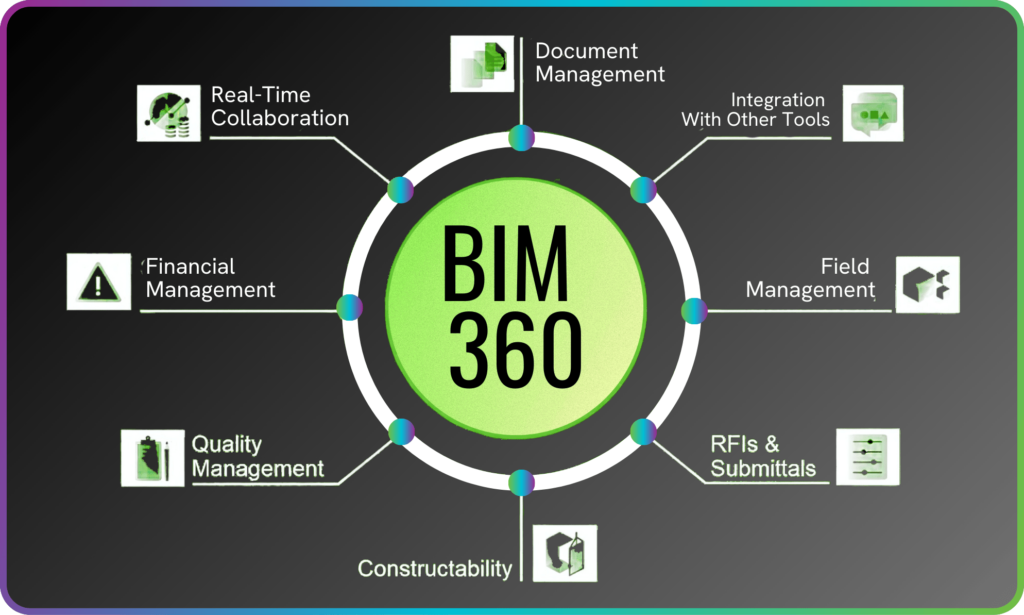
It is 2026. Speed, remote access and real-time coordination are no longer luxuries; they are necessities. As architectural firms embrace digital transformation, BIM 360 for architects has emerged as a powerful ally.
Firstly, it provides unmatched visibility. With BIM 360 insight, architects can track project progress, issues, and risks using powerful dashboards and predictive analytics. Secondly, the platform encourages proactive collaboration, especially useful in today's hybrid work environments.
Moreover, with increasingly complex compliance and sustainability goals, BIM 360 management ensures that architects stay aligned with regulations, client demands, and quality standards. The result? Reduced delays, higher accuracy and a boost in team morale. Not to mention, it makes the entire BIM 360 workflow feel like a breeze.
In short, it is the ultimate construction software that allows architects to design boldly and manage smartly.
## **How Does BIM 360 Improve Collaboration and Workflow?**
With BIM 360 design, multiple stakeholders, architects, engineers, and consultants can work simultaneously on the same Revit model. Changes are tracked in real time, and everyone stays on the same page. No more "Oops, I edited the wrong version!" moments.
The platform’s BIM 360 workflows are designed to mirror real-life project stages, making them intuitive even for first-time users. Tasks like RFIs (Requests for Information), issue tracking, and approvals are seamlessly handled in the cloud, ensuring smoother transitions between planning, design, and construction.
Also, the built-in mobile functionality means you can be reviewing floor plans from your site visit while your colleague is making design edits back at the office, all without skipping a beat.
This seamless integration boosts not just productivity, but also trust among teams. Collaboration has never looked this smart.
## **Which BIM 360 Modules Are Most Useful for Architects?**
When it comes to BIM 360 modules, architects have a full toolkit at their disposal. Each module addresses a unique part of the architectural journey. Here are some of the most valuable ones:
### **1. BIM 360 design**
This is where most of the collaborative magic happens. It allows real-time model co-authoring and design data sharing.
### **2. BIM 360 document management**
Say goodbye to folder chaos. This module organises, stores, and controls access to design documents in a structured manner.
### **3. BIM 360 insight**
This analytical module provides project dashboards and predictive insights that help in risk mitigation.
### **4. BIM 360 project management**
Helps in managing meeting minutes, tracking issues, and assigning tasks effectively.
### **5. BIM 360 management**
This combines administrative tools, configuration settings and role-based permissions to maintain control across the project.
Each of these modules serves a precise purpose, but together they form a powerful ecosystem. Location, file types, or communication barriers no longer limit architects. Instead, they are empowered to lead projects with confidence.
## **BIM 360 vs Other BIM Collaboration Tools: What Makes It Stand Out?**
There is no shortage of [**construction software**](https://www.novatr.com/blog/8-popular-bim-software), but few offer the depth and flexibility that [**BIM 360 software**](https://www.novatr.com/blog/capabilities-of-bim360-for-mep-engineering)does. Here's what sets it apart:
### **1. Seamless Integration**
- Developed by Autodesk, BIM 360 tools integrate effortlessly with Revit, AutoCAD, and other design platforms.
- No need to juggle multiple tools; everything connects smoothly in one ecosystem.
### **2. Scalability at Its Best**
- Whether you are a solo architect or part of a 500-person firm, BIM 360 workflows scale to fit your project size.
- Works for everything from boutique residences to massive commercial builds.
### **3. User-Friendly Interface**
- Designed with intuitive navigation and intelligent automation.
- Even non-tech-savvy team members can work confidently and efficiently.
### **4. Future-Ready Features**
- Regular updates and improvements keep the platform ahead of the curve.
- Perfect for adapting to the fast-changing architectural technology landscape.
### **5. Balanced Focus**
- Unlike other platforms that lean heavily towards either design or construction, BIM 360 for architects offers a well-rounded experience.
- Combining powerful BIM 360 benefits and flexibility, all under one roof.
Master BIM and Get Hired Faster
Join a community of 8500+ Architects and Engineers.
Explore Now
\*Limited seats available
## **Conclusion **
It is not just software; it is a modern-day toolkit built for architects who want to do more with less effort. With its suite of robust BIM 360 modules, seamless BIM 360 collaboration, real-time tracking, and powerful insights, it is no wonder that architects in 2026 are choosing it over traditional methods.
As the architecture and [construction software](https://www.novatr.com/blog/8-popular-bim-software) world gets more competitive and complex, tools like BIM 360 Design and BIM 360 Document Managemen**t** are not just helpful, they are essential.
[BIM Course For Architects](https://www.novatr.com/us/courses/building-information-modelling) by [Novatr](https://www.novatr.com/) is designed to help professionals and students seamlessly transition. This course bridges the gap between theory and implementation with industry-relevant tools, advanced BIM workflows, and mentorship delivered by experts.
Take the next step in your career today! Explore Novatr’s [Resource Page](https://www.novatr.com/learning-hub) for the latest industry insights and updates.
## **FAQs**
### **1. What are the most useful keyboard shortcuts in Navisworks?**
Some of the most useful keyboard shortcuts in Navisworks include F2 to rename items, Ctrl + 1 to open the Select tool, Ctrl + F for the Find Items dialogue, Spacebar to play/pause animations, and Ctrl + H to hide selected elements. These shortcuts streamline common tasks, saving valuable time during modelling and review.
### **2. How can shortcuts improve productivity during clash detection and navigation?**
Keyboard shortcuts greatly enhance productivity by reducing the need to switch between menus. During clash detection, using quick keys to isolate, hide, or zoom to elements allows faster issue resolution. Navigation shortcuts make model reviews smoother and help teams focus on critical clashes without delays.
### **3. Are there any time-saving tips for working faster in Navisworks?**
Yes, use Viewpoints to save camera positions and comments, Selection Sets to group elements for faster clash testing, and customise the Quick Access Toolbar for tools you use often. Learning and applying keyboard shortcuts also significantly speeds up model navigation and coordination tasks.
Was this content helpful to you
Like Yes
Dislike No
.png)
TABLE OF CONTENTS
BIM Is The New Standard. Are You Certified?
Get Certified in BIM
SHARE ON YOUR SOCIALS
Link Copied Successfully
Related articles
[.png) Building Information Modelling Best Features of BIM 360 You Should Be Using in 2026 5 August 2025 11 min read](https://blog.novatr.com/blog/best-features-of-bim-360) [ Building Information Modelling Famous Architectural Designers Who Shaped the World of Design 17 June 2025 8 min read](https://blog.novatr.com/blog/famous-architectural-designers) [ Building Information Modelling BIM vs CAD: Why Architects Are Making the Shift to Smarter Design 19 April 2025 5 min read](https://blog.novatr.com/blog/bim-vs-cad-why-architects-are-making-the-shift-to-smarter-design) [ Building Information Modelling Top 10 Architecture Firms in San Jose 26 May 2025 11 min read](https://blog.novatr.com/blog/top-architecture-firms-in-san-jose)
Download Syllabus
## BIM Professional Program
Next Cohort
June 2026
Program Duration
7 Months
Premium Program benefits
8 Credentials from Autodesk, NSDC, Novatr
1 program. 10 career paths. Infinite Growth.
40+ ISO 19650 & RIBA real-world projects to practice
1-on-1 guidance. Access 400+ industry experts.
Access the biggest AEC-Tech community on the planet. 8500+ and counting
Curated for you by 100+ global BIM leaders.
Lifelong access to course content
Enter your details to download the program syllabus.
##### BIM Professional Program
June 2026, 7 Months
Your Name Invalid name.
Phone Number Enter a valid phone number
Email Please enter a valid email address.
Select years of experience\* Currently studying 0-1 years 1-2 years 2-4 years 4-8 years 8-10 years 10-12 years 12+ years Invalid selection.
Specialisation Select your background\* Architecture Civil Engineering Mechanical Engineering Electrical Engineering Invalid selection.
Are you professionally trained in interior design?
Yes
No
I agree to the [Terms of Use](https://www.novatr.com/terms-and-conditions) and [Privacy Policy](https://www.novatr.com/privacy-policy), and consent to be contacted by Email, Call, WhatsApp, or SMS.
Submit
Ready to skyrocket your career?
Begin your next chapter in AEC
with Novatr!
We are here to help you take the industry by storm with advanced, tech-first skills.
[Explore Courses](https://www.novatr.com/#courses)
Join our newsletter
Submit
Thank you for signing up.
We’ll send you a nice letter once per week. No spam.

Dare to Disrupt.
Join thousands of people who organise
work and life with Novatr.
Company
- [About Us](https://www.novatr.com/about)
- [BIM Professional Program v.2026](https://www.novatr.com/courses/bim-professional-program)
- [Masters Computational Design](https://www.novatr.com/courses/computational-design)
- [Become a Mentor](https://www.novatr.com/apply-as-mentor)
- [Hiring from Us](https://www.novatr.com/hire-from-us)
- [Careers at Novatr](https://www.novatr.com/career)
Resources
- [Blog](https://www.novatr.com/learning-hub)
- [Media Room](https://www.novatr.com/media-room-home-page)
- [Career Builder](https://www.novatr.com/career-navigator)
- [Events & Webinars](https://www.novatr.com/webinars)
- [FAQs & Support Center](https://www.novatr.com/contact-us)
- [Contact Us](https://www.novatr.com/contact-us)
- [Privacy Policy](https://www.novatr.com/privacy-policy)
- [Terms of Use](https://www.novatr.com/terms-and-conditions)
©2023 Oneistox Network Pvt. Ltd.
All Rights Reserved
```json
{
"@context" : "https://schema.org",
"@type" : "BlogPosting",
"author" : {
"@type" : "Person",
"name" : "Naina",
"url" : "https://blog.novatr.com/blog/author/naina"
},
"dateModified" : "2025-07-11T09:34:16.884Z",
"datePublished" : "2025-07-11T09:31:56.000Z",
"headline" : "What Is BIM 360 and Why Do Architects Use It? [{{year}}]",
"image" : [ "https://blog.novatr.com/hubfs/Your%20paragraph%20text%20(26).png" ],
"mainEntityOfPage" : {
"@id" : "https://blog.novatr.com/blog/what-is-bim-360-and-why-do-architects-use-it",
"@type" : "WebPage"
},
"publisher" : {
"@type" : "Organization",
"logo" : {
"@type" : "ImageObject",
"url" : "https://blog.novatr.com/hubfs/Novatr%20Prev%20OX-2.svg"
}
}
}
```