---
title: What Jobs Can You Get After Mastering Navisworks Software?
description: Explore top career paths you can pursue after mastering Navisworks software, from BIM coordination to project management and more in the AEC industry.
image: https://blog.novatr.com/hubfs/Your%20paragraph%20text%20(24).png
---
[Blogs](https://www.novatr.com/learning-hub)
- [Architecture & Construction](https://www.novatr.com/learning-hub?category=Architecture+%26+Construction)
- [BIM](https://www.novatr.com/learning-hub?category=BIM)
- [Computational Design](https://www.novatr.com/learning-hub?category=Computational+Design)
- [Company News](https://www.novatr.com/learning-hub?category=Company+News)
- [Expert Talks](https://www.novatr.com/learning-hub?category=Expert+Talks)
Explore Courses
[Just Launched  BIM Professional Program v.2026 Take your career to the next level by mastering the real-world application of BIM. Know More](https://www.novatr.com/courses/bim-professional-program)
[ Master Computational Design Course Break into an advanced career by learning to apply the power of computation to the art of design. Know More](https://www.novatr.com/courses/computational-design)
[Blogs](https://www.novatr.com/learning-hub)
Explore Blogs
- [Architecture & Construction](https://www.novatr.com/learning-hub?category=Architecture+%26+Construction)
- [BIM](https://www.novatr.com/learning-hub?category=BIM)
- [Computational Design](https://www.novatr.com/learning-hub?category=Computational+Design)
- [Company News](https://www.novatr.com/learning-hub?category=Company+News)
- [Expert Talks](https://www.novatr.com/learning-hub?category=Expert+Talks)
Courses
- [BIM Professional Program v.2026](https://www.novatr.com/courses/bim-professional-program)
- [Master Computational Design](https://www.novatr.com/courses/computational-design)
- [ARCHI/](https://www.novatr.com/learning-hub?category=BIM)
Featured Article
# Top Career Opportunities After Learning Navisworks Software
.jpeg)
Naina
July 11, 2025
10 min read
.png)

Let’s face it, if you are stepping into the world of AEC (Architecture, Engineering, and Construction), you have got to stay ahead of the tech game. And what better way than by mastering Navisworks software? Whether you are coordinating complex building projects, running simulations, or spotting clashes before they happen, Navisworks does it all.
But here is the question everyone wants answered: *What kind of jobs can you land once you have got this powerful tool under your belt?* Stick around, because we are diving deep into Navisworks jobs, career paths, and how you can stand out in this competitive industry.
Unlock High-Paying Careers With BIM
Master BIM workflows, software and skills on real projects.
Apply Now
\*Limited seats available
## **Why Is Navisworks a Valuable Skill in the AEC Industry?**
Navisworks is like that backstage genius of the construction world. It does not design buildings, but it ensures those designs *actually work* in the real world. From clash detection to construction sequencing, Navisworks workflows simplify everything from 3D coordination to 4D simulations.
The tool comes in various flavours: Navisworks Freedom, Navisworks Simulate, and Navisworks Manage. While Navisworks Freedom is the free viewer version used mainly for visualisation, Navisworks Manage is the full-featured powerhouse that supports Navisworks clash detection, model coordination, and project scheduling. Meanwhile, Navisworks Simulate focuses on 4D timelines and visualising the construction process in real time.
What makes Navisworks for construction so crucial is its integration with BIM tools, such as [Revit](https://www.novatr.com/blog/detailed-revit-guide), and its seamless integration with Navisworks BIM 360, enabling teams to work collaboratively across disciplines.
## **What Jobs Can You Get After Mastering Navisworks Software?**
Ready to explore the exciting world of Navisworks jobs? Here is a closer look at the most in-demand roles and how Navisworks fits into each.
### **Job Roles**
### **1. BIM Coordinator/Manager**
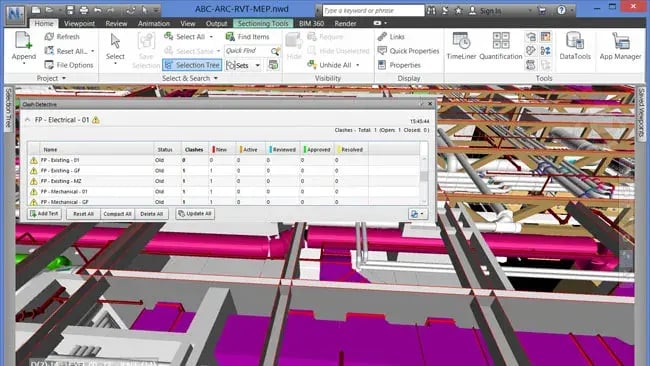
A go-to role for anyone fluent in Navisworks clash detection and coordination. You will handle the aggregation of models, run clash reports, and ensure the entire project team is on the same page. Expect to use Navisworks Manage, the Navisworks coordination plugin, and contribute to model health checks.
### **2. Construction Project Manager **
With Navisworks for construction, project managers can simulate construction sequences using 4D simulation in Navisworks. This helps avoid delays, reduce waste, and boost productivity. Add in Navisworks features like time-liner tools, and you have a virtual roadmap for the entire build.
### **3. MEP Engineer **
Working with mechanical, electrical, and plumbing systems? You will benefit immensely from Navisworks clash detection report generation, allowing you to spot and fix conflicts between complex systems early in the design stage.
### **4. Quantity Surveyor **
Yes, even quantity surveyors are using Navisworks software to extract quantities directly from the [3D model](https://www.novatr.com/blog/bim-modeling-software) in the Navisworks environment. With accurate material takeoffs and visual verification, it’s a game changer.
### **5. Facility Manager **
Post-construction, Navisworks for engineers and facility managers helps visualise and maintain infrastructure throughout its lifecycle. The integration of asset data through Navisworks BIM 360 enhances long-term facility planning efficiency.
### **6. VDC Engineer **
Virtual Design and Construction (VDC) engineers rely on [**Navisworks**](https://www.novatr.com/blog/navisworks-guide)integration to bring multiple models together, conduct clash detection, and prepare a detailed 4D simulation in Navisworks for presentation and planning.
### **7. Project Coordinator**
This role bridges communication gaps between teams. Using Navisworks coordination, coordinators help align architects, engineers, and contractors by sharing updated models and running live review sessions with Navisworks rendering features.
### **8. Facility Lifecycle Analyst**
A highly strategic position that benefits from Navisworks for construction and post-build analysis. From sustainability tracking to operations management, the lifecycle analyst uses Navisworks benefits like model linking and data syncing.
### **Other Potential Career Paths**
While the roles above are most directly tied to Navisworks software, there are other exciting directions your Navisworks career can take:
### **1. Architectural Designer**
With Navisworks for architects, designers can better visualise their models in coordination with structural and MEP elements, ensuring their vision remains buildable and clash-free.
### **2. Structural Engineer**
Seeing how your structural elements interact with other systems is critical. The Navisworks 3d model capabilities enable structural engineers to detect and resolve interface issues early.
### **3. Urban Planner**
Use Navisworks rendering features to visualise city-wide models, simulate infrastructure changes, and plan developments with more context and accuracy.
### **4. Interior Designer**
Interior professionals can utilise Navisworks features for walkthroughs and verifying design details within the overall model to ensure everything fits and flows well.
### **5. CAD Drafter/Technician**
Even at the drafting level, understanding Navisworks basics can help technicians see how their components align with others and support coordination teams effectively.
## **What Additional Skills Boost Your Career Alongside Navisworks?**
****
Mastering [**Navisworks**](https://www.novatr.com/blog/navisworks-guide)is brilliant, but pairing it with the right set of complementary skills takes your **Navisworks career** to a whole new level. Here is what you should focus on next:
### **1. Revit Expertise**
Since most models imported into Navisworks originate from [Revit](https://www.novatr.com/blog/detailed-revit-guide), being able to model in Revit is a must. This helps you understand object properties and manage models more efficiently.
### [2. BIM](https://www.novatr.com/blog/detailed-bim-guide)**Understanding**
Having a profound grasp of Building Information Modelling makes Navisworks workflows more meaningful. It helps you understand the “why” behind model coordination and data integration.
### **3. Construction Knowledge**
To make the most of Navisworks for construction, you need a real-world understanding of how buildings go up. This ensures your simulations and clash resolutions are practical and site-ready.
### **4. Communication Skills**
Whether presenting a Navisworks [clash detection](https://www.novatr.com/blog/navisworks-for-clash-detection) report to a boardroom or conducting a model review meeting, clear communication makes all the difference.
### **5. Navisworks Certification**
Obtaining a formal Navisworks certification enhances your credibility and demonstrates to employers that you are not only familiar with the tool but also officially trained to utilise it.
Master BIM and Get Hired Faster
Join a community of 8500+ Architects and Engineers.
Explore Now
\*Limited seats available
## **Conclusion **
So there you have it, a full breakdown of Navisworks jobs and how this powerful software opens doors in the AEC industry. From BIM managers to quantity surveyors and even urban planners, the opportunities are vast and varied. With tools like Navisworks Manage, Navisworks Simulate, and Navisworks Freedom, you are not just visualising models, you are shaping the future of construction.
[Building Information Modelling for Architects](https://www.novatr.com/us/courses/building-information-modelling) by [Novatr](https://www.novatr.com/us) is designed to help professionals and students seamlessly transition. This course bridges the gap between theory and implementation with industry-relevant tools, advanced BIM workflows, and mentorship delivered by experts.
Take the next step in your career today! Explore Novatr’s [Resource Page](https://www.novatr.com/learning-hub) for the latest industry insights and updates.
## **FAQS**
### **1. What career roles require Navisworks skills in the AEC industry?**
Roles such as BIM Coordinator, Construction Project Manager, MEP Engineer, Quantity Surveyor, Facility Manager, VDC Engineer, and Project Coordinator require strong skills in Navisworks. These professionals use the software for clash detection, 4D simulation, model integration, and cross-disciplinary coordination throughout project lifecycles.
### **2. Can mastering Navisworks help you get a job in BIM coordination?**
Absolutely! Mastering Navisworks is essential for BIM coordination roles. It enables professionals to detect clashes, merge multi-disciplinary models, generate coordination reports, and streamline communication between teams. Proficiency in Navisworks workflows directly supports successful BIM implementation, making candidates highly valuable in such roles.
### **3. Which industries hire professionals with strong Navisworks experience?**
Industries such as construction, architecture, engineering, infrastructure development, facility management, and real estate hire professionals with strong Navisworks experience. These sectors rely on Navisworks software for efficient project planning, model visualisation, Navisworks integration, and reducing on-site conflicts through virtual collaboration.
Was this content helpful to you
Like Yes
Dislike No
.png)
TABLE OF CONTENTS
BIM Is The New Standard. Are You Certified?
Get Certified in BIM
SHARE ON YOUR SOCIALS
Link Copied Successfully
Related articles
[ Building Information Modelling Top 5 BIM Technologies Set to Transform the AEC Industry in 2026 8 May 2025 5 min read](https://blog.novatr.com/blog/5-bim-technologies-that-will-dominate-the-aec-industry) [ Building Information Modelling Top 10 Architecture Firms in Tucson 10 June 2025 18 min read](https://blog.novatr.com/blog/top-architecture-firms-in-tucson) [ Building Information Modelling Top 10 Architecture Firms in Virginia 11 June 2025 7 min read](https://blog.novatr.com/blog/top-architecture-firms-in-virginia) [ Building Information Modelling Is BIM Certification A Smart Investment For Architects in the U.S.? 8 May 2025 6 min read](https://blog.novatr.com/blog/is-bim-certification-a-smart-investment-for-architects-in-the-us)
Download Syllabus
## BIM Professional Program
Next Cohort
June 2026
Program Duration
7 Months
Premium Program benefits
8 Credentials from Autodesk, NSDC, Novatr
1 program. 10 career paths. Infinite Growth.
40+ ISO 19650 & RIBA real-world projects to practice
1-on-1 guidance. Access 400+ industry experts.
Access the biggest AEC-Tech community on the planet. 8500+ and counting
Curated for you by 100+ global BIM leaders.
Lifelong access to course content
Enter your details to download the program syllabus.
##### BIM Professional Program
June 2026, 7 Months
Your Name Invalid name.
Phone Number Enter a valid phone number
Email Please enter a valid email address.
Select years of experience\* Currently studying 0-1 years 1-2 years 2-4 years 4-8 years 8-10 years 10-12 years 12+ years Invalid selection.
Specialisation Select your background\* Architecture Civil Engineering Mechanical Engineering Electrical Engineering Invalid selection.
Are you professionally trained in interior design?
Yes
No
I agree to the [Terms of Use](https://www.novatr.com/terms-and-conditions) and [Privacy Policy](https://www.novatr.com/privacy-policy), and consent to be contacted by Email, Call, WhatsApp, or SMS.
Submit
Ready to skyrocket your career?
Begin your next chapter in AEC
with Novatr!
We are here to help you take the industry by storm with advanced, tech-first skills.
[Explore Courses](https://www.novatr.com/#courses)
Join our newsletter
Submit
Thank you for signing up.
We’ll send you a nice letter once per week. No spam.

Dare to Disrupt.
Join thousands of people who organise
work and life with Novatr.
Company
- [About Us](https://www.novatr.com/about)
- [BIM Professional Program v.2026](https://www.novatr.com/courses/bim-professional-program)
- [Masters Computational Design](https://www.novatr.com/courses/computational-design)
- [Become a Mentor](https://www.novatr.com/apply-as-mentor)
- [Hiring from Us](https://www.novatr.com/hire-from-us)
- [Careers at Novatr](https://www.novatr.com/career)
Resources
- [Blog](https://www.novatr.com/learning-hub)
- [Media Room](https://www.novatr.com/media-room-home-page)
- [Career Builder](https://www.novatr.com/career-navigator)
- [Events & Webinars](https://www.novatr.com/webinars)
- [FAQs & Support Center](https://www.novatr.com/contact-us)
- [Contact Us](https://www.novatr.com/contact-us)
- [Privacy Policy](https://www.novatr.com/privacy-policy)
- [Terms of Use](https://www.novatr.com/terms-and-conditions)
©2023 Oneistox Network Pvt. Ltd.
All Rights Reserved
```json
{
"@context" : "https://schema.org",
"@type" : "BlogPosting",
"author" : {
"@type" : "Person",
"name" : "Naina",
"url" : "https://blog.novatr.com/blog/author/naina"
},
"dateModified" : "2025-07-11T08:21:10.037Z",
"datePublished" : "2025-07-11T07:32:29.000Z",
"headline" : "What Jobs Can You Get After Mastering Navisworks Software?",
"image" : [ "https://blog.novatr.com/hubfs/Your%20paragraph%20text%20(24).png" ],
"mainEntityOfPage" : {
"@id" : "https://blog.novatr.com/blog/what-jobs-can-you-get-after-mastering-navisworks-software",
"@type" : "WebPage"
},
"publisher" : {
"@type" : "Organization",
"logo" : {
"@type" : "ImageObject",
"url" : "https://blog.novatr.com/hubfs/Novatr%20Prev%20OX-2.svg"
}
}
}
```