---
title: What Is BIM 360 and Why Architects Use It? 2026
description: Learn what BIM 360 is, its features, modules, and how it improves collaboration, workflows, and project efficiency for architects.
image: https://blog.novatr.com/hubfs/What%20Is%20BIM%20360%20and%20Why%20Architects%20Use%20It.png
---
[Blogs](https://www.novatr.com/learning-hub)
- [Architecture & Construction](https://www.novatr.com/learning-hub?category=Architecture+%26+Construction)
- [BIM](https://www.novatr.com/learning-hub?category=BIM)
- [Computational Design](https://www.novatr.com/learning-hub?category=Computational+Design)
- [Company News](https://www.novatr.com/learning-hub?category=Company+News)
- [Expert Talks](https://www.novatr.com/learning-hub?category=Expert+Talks)
Explore Courses
[Just Launched  BIM Professional Program v.2026 Take your career to the next level by mastering the real-world application of BIM. Know More](https://www.novatr.com/courses/bim-professional-program)
[ Master Computational Design Course Break into an advanced career by learning to apply the power of computation to the art of design. Know More](https://www.novatr.com/courses/computational-design)
[Blogs](https://www.novatr.com/learning-hub)
Explore Blogs
- [Architecture & Construction](https://www.novatr.com/learning-hub?category=Architecture+%26+Construction)
- [BIM](https://www.novatr.com/learning-hub?category=BIM)
- [Computational Design](https://www.novatr.com/learning-hub?category=Computational+Design)
- [Company News](https://www.novatr.com/learning-hub?category=Company+News)
- [Expert Talks](https://www.novatr.com/learning-hub?category=Expert+Talks)
Courses
- [BIM Professional Program v.2026](https://www.novatr.com/courses/bim-professional-program)
- [Master Computational Design](https://www.novatr.com/courses/computational-design)
- [Archi/](https://www.novatr.com/learning-hub?category=BIM)
Featured Article
# What Is BIM 360 and Why Do Architects Use It?

Neha Singh
March 30, 2026
6 min read

Understanding what is bim 360 helps architects manage projects, collaborate in real time, and streamline workflows. It is a cloud-based platform that connects teams, data, and processes across the building lifecycle.
Digital transformation in construction continues to accelerate. The UK National [Digital Twin Programme](https://www.cdbb.cam.ac.uk/what-we-did/national-digital-twin-programme) highlights how connected data environments improve infrastructure planning and delivery efficiency. This shift explains why BIM 360 software is widely adopted in modern project environments.
For architects, adopting advanced architecture technology such as BIM 360 enables better coordination, faster decision-making, and improved project outcomes. It supports integrated workflows that align design and construction teams effectively.
Unlock High-Paying Careers With BIM
Master BIM workflows, software and skills on real projects.
Apply Now
\*Limited seats available
## **What Is BIM 360?**
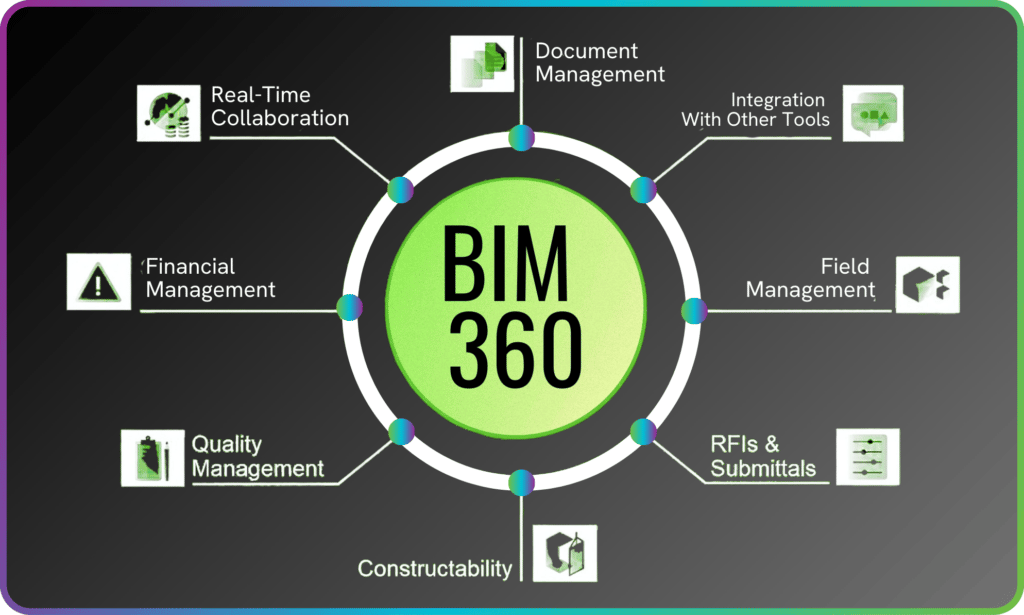
BIM 360 is a cloud-based platform that connects project teams, tools, and data in one environment. It supports design collaboration, document management, and construction workflows across the entire project lifecycle.
At its core, what is BIM 360 refers to a set of connected tools that improve communication and coordination in projects. It is widely used as a construction software solution that integrates design, planning, and execution processes.
The platform includes several capabilities that define its role in modern projects:
- **Centralized Data Management**BIM 360 document management ensures all project files are stored, updated, and accessed from a single source, reducing version conflicts.
- **Real-Time Collaboration**Teams can work together using BIM 360 collaboration, allowing architects, engineers, and contractors to access the same data simultaneously.
- **Design Integration**With BIM 360 design, architects can co-author models and share updates instantly, improving coordination during design development.
- **Project Oversight**BIM 360 management tools help track progress, manage issues, and monitor performance across project phases.
- **Data-Driven Insights**Using BIM 360 insight, teams can analyze project data to improve decision-making and reduce risks.
These features define how BIM 360 supports modern project delivery. It enables teams to work more efficiently while maintaining accuracy and transparency.
## **Why Is BIM 360 Important for Architects in 2026 ?**
BIM 360 is important because it enables architects to manage complex projects, collaborate with multiple stakeholders, and maintain design accuracy in real time.
As projects grow in complexity, architects rely on tools that improve coordination and reduce errors. BIM 360 for architects plays an important role in managing design workflows and ensuring that all stakeholders are aligned.
Its importance can be understood through the following factors:
- **Improved Design Coordination**Architects can work with engineers and contractors using shared models, improving alignment and reducing conflicts.
- **Faster Decision-Making**Real-time updates allow teams to respond quickly to design changes and project requirements.
- **Enhanced Workflow Efficiency**Structured BIM 360 workflow processes ensure that tasks are completed systematically and without delays.
- **Reduced Project Risks**Early issue detection improves project outcomes and minimizes costly revisions.
- **Scalable Project Management**Using BIM 360 project management, architects can handle projects of different sizes and complexities effectively.
These advantages show the growing relevance of BIM 360 in modern architecture practice. It supports better coordination and improves project outcomes.
## **How Does BIM 360 Improve Collaboration and Workflow?**
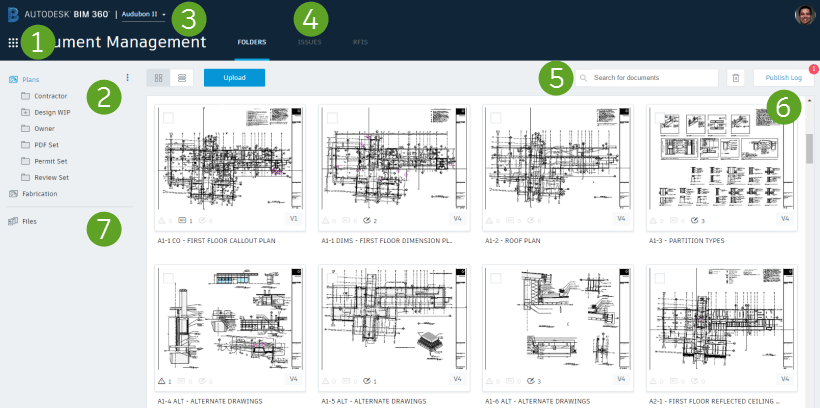
BIM 360 improves collaboration by connecting teams, data, and workflows in a shared environment. It ensures that all stakeholders have access to accurate and up-to-date information.
Effective collaboration is critical in construction projects. BIM 360 workflows are designed to streamline communication and improve coordination across teams.
The platform enhances collaboration in the following ways:
- **Shared Project Environment**Teams work within a unified platform, reducing miscommunication and improving transparency.
- **Real-Time Updates**Changes made by one team are immediately visible to others, ensuring alignment across disciplines.
- **Improved Coordination**BIM 360 collaboration allows architects, engineers, and contractors to coordinate designs efficiently.
- **Integrated Tools**The platform connects various BIM 360 tools, enabling seamless workflows across design and construction phases.
- **Efficient Data Management**Centralized storage through BIM 360 document management ensures that all stakeholders have access to the latest information.
- **Performance Tracking**Using BIM 360 insight, teams can monitor project performance and identify areas for improvement.
These capabilities improve communication, reduce delays, and ensure smoother project execution. BIM 360 creates a connected environment that supports efficient workflows.
## **Which BIM 360 Modules Are Most Useful for Architects?**
BIM 360 includes several modules that support different aspects of project delivery. These modules help architects manage design, coordination, and project data effectively.
The most useful BIM 360 modules for architects include:
- **Design Collaboration Module**Supports BIM 360 design, enabling architects to collaborate on models and manage design updates efficiently.
- **Document Management Module**Provides structured BIM 360 document management, ensuring organized file storage and version control.
- **Project Management Module**Facilitates BIM 360 project management, helping teams track progress, manage issues, and maintain project timelines.
- **Insight Module**Uses BIM 360 insight to analyze data and improve project performance through actionable insights.
- **Field Management Module**Supports on-site coordination and issue tracking, improving communication between design and construction teams.
These modules demonstrate how BIM 360 supports different project needs. They provide architects with tools to manage workflows, improve coordination, and deliver better outcomes.
## **BIM 360 vs Other BIM Collaboration Tools: What Makes It Stand Out?**
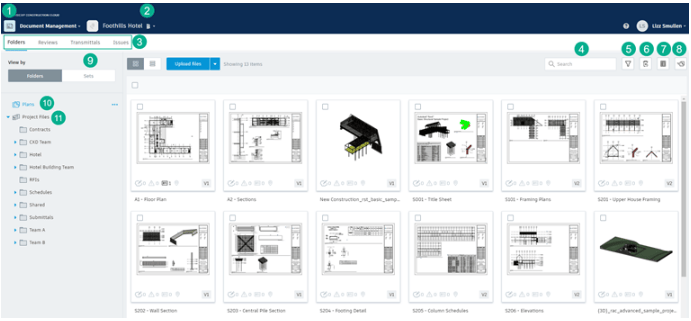
BIM 360 stands out because it integrates design, collaboration, and project management into a single platform. It provides a unified environment that supports end-to-end project delivery.
Compared to other tools, BIM 360 offers several distinct advantages:
- **End-to-End Integration**Unlike standalone tools, BIM 360 connects design, coordination, and construction processes in one platform.
- **Cloud-Based Accessibility**Teams can access project data from anywhere, improving flexibility and collaboration.
- **Comprehensive Feature Set**A wide range of BIM 360 features supports design, coordination, and project management tasks.
- **Scalable Workflows**Structured BIM 360 workflows adapt to projects of different sizes and complexities.
- **Strong Collaboration Capabilities**Built-in BIM 360 collaboration tools ensure smooth communication across disciplines.
- **Enhanced Project Visibility**Real-time data and analytics improve transparency and decision-making.
These strengths highlight the BIM 360 benefits that make it a preferred choice for architects.
Master BIM and Get Hired Faster
Join a community of 8500+ Architects and Engineers.
Explore Now
\*Limited seats available
## Conclusion
BIM 360 plays a central role in modern architecture by connecting teams, improving workflows, and enabling real-time collaboration. It supports better decision-making and helps architects manage complex projects with greater efficiency.
As digital construction continues to evolve, tools like BIM 360 remain essential for improving coordination and delivering high-quality outcomes. Architects who adopt these technologies are better prepared to handle modern project demands.
For architects looking to strengthen their BIM expertise, structured learning can accelerate career growth. Consider enrolling in the [BIM Course for Architects](https://www.novatr.com/us/courses/building-information-modelling) by [Novatr](https://www.novatr.com/us) and build hands-on, industry-relevant skills. Visit our [resource page](https://www.novatr.com/learning-hub) to explore more insights, tools, and learning materials.
## **FAQs**
### **1. What are the most useful keyboard shortcuts in Navisworks?**
The most useful shortcuts include navigation tools such as F2 for selection, F3 for panning, and F4 for orbiting. Commands like Ctrl + A for selection and F10 for clash detection are also widely used, helping professionals work faster and manage models efficiently.
### **2. How can shortcuts improve productivity during clash detection and navigation?**
Shortcuts reduce the time spent navigating menus and allow quick access to tools. During clash detection, they help users review conflicts faster and switch between views efficiently. This improves workflow speed and ensures better coordination across project teams.
### **3. Are there any time-saving tips for working faster in Navisworks?**
Time-saving tips include organizing models, using saved viewpoints, applying clash detection early, and leveraging shortcuts regularly. Combining these practices with collaboration tools and simulation features helps improve efficiency and ensures smoother project execution.
Was this content helpful to you
Like Yes
Dislike No

TABLE OF CONTENTS
BIM Is The New Standard. Are You Certified?
Get Certified in BIM
SHARE ON YOUR SOCIALS
Link Copied Successfully
Related articles
[ What Is SketchUp and Why Do Architects Use It? 8 April 2026 5 min read](https://blog.novatr.com/blog/what-is-sketchup-and-why-do-architects-use-it) [ What Is Archicad and Why Do Architects Use It? 18 February 2026 6 min read](https://blog.novatr.com/blog/what-is-archicad-and-why-do-architects-use-it) [ Milan Design Week 2026 8 April 2026 3 min read](https://blog.novatr.com/blog/milan-design-week-2026) [ Why Tier-2 Cities Are Becoming India’s Next BIM Growth Hubs in 2026 23 March 2026 12 min read](https://blog.novatr.com/blog/why-tier-2-cities-are-indias-next-bim-growth-hubs)
Download Syllabus
## BIM Professional Program
Next Cohort
June 2026
Program Duration
7 Months
Premium Program benefits
8 Credentials from Autodesk, NSDC, Novatr
1 program. 10 career paths. Infinite Growth.
40+ ISO 19650 & RIBA real-world projects to practice
1-on-1 guidance. Access 400+ industry experts.
Access the biggest AEC-Tech community on the planet. 8500+ and counting
Curated for you by 100+ global BIM leaders.
Lifelong access to course content
Enter your details to download the program syllabus.
##### BIM Professional Program
June 2026, 7 Months
Your Name Invalid name.
Phone Number Enter a valid phone number
Email Please enter a valid email address.
Select years of experience\* Currently studying 0-1 years 1-2 years 2-4 years 4-8 years 8-10 years 10-12 years 12+ years Invalid selection.
Specialisation Select your background\* Architecture Civil Engineering Mechanical Engineering Electrical Engineering Invalid selection.
Are you professionally trained in interior design?
Yes
No
I agree to the [Terms of Use](https://www.novatr.com/terms-and-conditions) and [Privacy Policy](https://www.novatr.com/privacy-policy), and consent to be contacted by Email, Call, WhatsApp, or SMS.
Submit
Ready to skyrocket your career?
Begin your next chapter in AEC
with Novatr!
We are here to help you take the industry by storm with advanced, tech-first skills.
[Explore Courses](https://www.novatr.com/#courses)
Join our newsletter
Submit
Thank you for signing up.
We’ll send you a nice letter once per week. No spam.

Dare to Disrupt.
Join thousands of people who organise
work and life with Novatr.
Company
- [About Us](https://www.novatr.com/about)
- [BIM Professional Program v.2026](https://www.novatr.com/courses/bim-professional-program)
- [Masters Computational Design](https://www.novatr.com/courses/computational-design)
- [Become a Mentor](https://www.novatr.com/apply-as-mentor)
- [Hiring from Us](https://www.novatr.com/hire-from-us)
- [Careers at Novatr](https://www.novatr.com/career)
Resources
- [Blog](https://www.novatr.com/learning-hub)
- [Media Room](https://www.novatr.com/media-room-home-page)
- [Career Builder](https://www.novatr.com/career-navigator)
- [Events & Webinars](https://www.novatr.com/webinars)
- [FAQs & Support Center](https://www.novatr.com/contact-us)
- [Contact Us](https://www.novatr.com/contact-us)
- [Privacy Policy](https://www.novatr.com/privacy-policy)
- [Terms of Use](https://www.novatr.com/terms-and-conditions)
©2023 Oneistox Network Pvt. Ltd.
All Rights Reserved
```json
{
"@context" : "https://schema.org",
"@type" : "BlogPosting",
"author" : {
"@type" : "Person",
"name" : "Neha Singh",
"url" : "https://blog.novatr.com/blog/author/neha-singh"
},
"dateModified" : "2026-03-30T11:18:11.552Z",
"datePublished" : "2026-03-30T11:04:09.000Z",
"headline" : "What Is BIM 360 and Why Architects Use It? {{year}}",
"image" : [ "https://blog.novatr.com/hubfs/What%20Is%20BIM%20360%20and%20Why%20Architects%20Use%20It.png" ],
"mainEntityOfPage" : {
"@id" : "https://blog.novatr.com/blog/what-is-bim-360-and-why-architects-use-it",
"@type" : "WebPage"
},
"publisher" : {
"@type" : "Organization",
"logo" : {
"@type" : "ImageObject",
"url" : "https://blog.novatr.com/hubfs/Novatr%20Prev%20OX-2.svg"
}
}
}
```