---
title: How Do Revit and Navisworks Differ in BIM MEP Workflows?
description: Compare Revit vs. Navisworks for BIM MEP workflows. Learn how each tool supports design, coordination, clash detection, and smooth project delivery.
image: https://blog.novatr.com/hubfs/Revit%20vs%20Navisworks%20For%20BIM%20MEP%20Workflows.%20Give%20me%20an%20image%20with%20this%20text%20and%20a%20related%20MEP%20background.%20Please%20do%20not%20overwrite%20or%20change%20the%20size%20of%20the%20text%20%26%20spellings%20should%20be%20same%20%20%26%20correct.jpg
---
[Blogs](https://www.novatr.com/learning-hub)
- [Architecture & Construction](https://www.novatr.com/learning-hub?category=Architecture+%26+Construction)
- [BIM](https://www.novatr.com/learning-hub?category=BIM)
- [Computational Design](https://www.novatr.com/learning-hub?category=Computational+Design)
- [Company News](https://www.novatr.com/learning-hub?category=Company+News)
- [Expert Talks](https://www.novatr.com/learning-hub?category=Expert+Talks)
Explore Courses
[Just Launched  BIM Professional Program v.2026 Take your career to the next level by mastering the real-world application of BIM. Know More](https://www.novatr.com/courses/bim-professional-program)
[ Master Computational Design Course Break into an advanced career by learning to apply the power of computation to the art of design. Know More](https://www.novatr.com/courses/computational-design)
[Blogs](https://www.novatr.com/learning-hub)
Explore Blogs
- [Architecture & Construction](https://www.novatr.com/learning-hub?category=Architecture+%26+Construction)
- [BIM](https://www.novatr.com/learning-hub?category=BIM)
- [Computational Design](https://www.novatr.com/learning-hub?category=Computational+Design)
- [Company News](https://www.novatr.com/learning-hub?category=Company+News)
- [Expert Talks](https://www.novatr.com/learning-hub?category=Expert+Talks)
Courses
- [BIM Professional Program v.2026](https://www.novatr.com/courses/bim-professional-program)
- [Master Computational Design](https://www.novatr.com/courses/computational-design)
- [MEP/](https://www.novatr.com/learning-hub?category=BIM)
Featured Article
# Revit vs Navisworks: Which Tool Does What in BIM MEP Workflows?
.jpeg)
Naina
June 18, 2025
12 min read
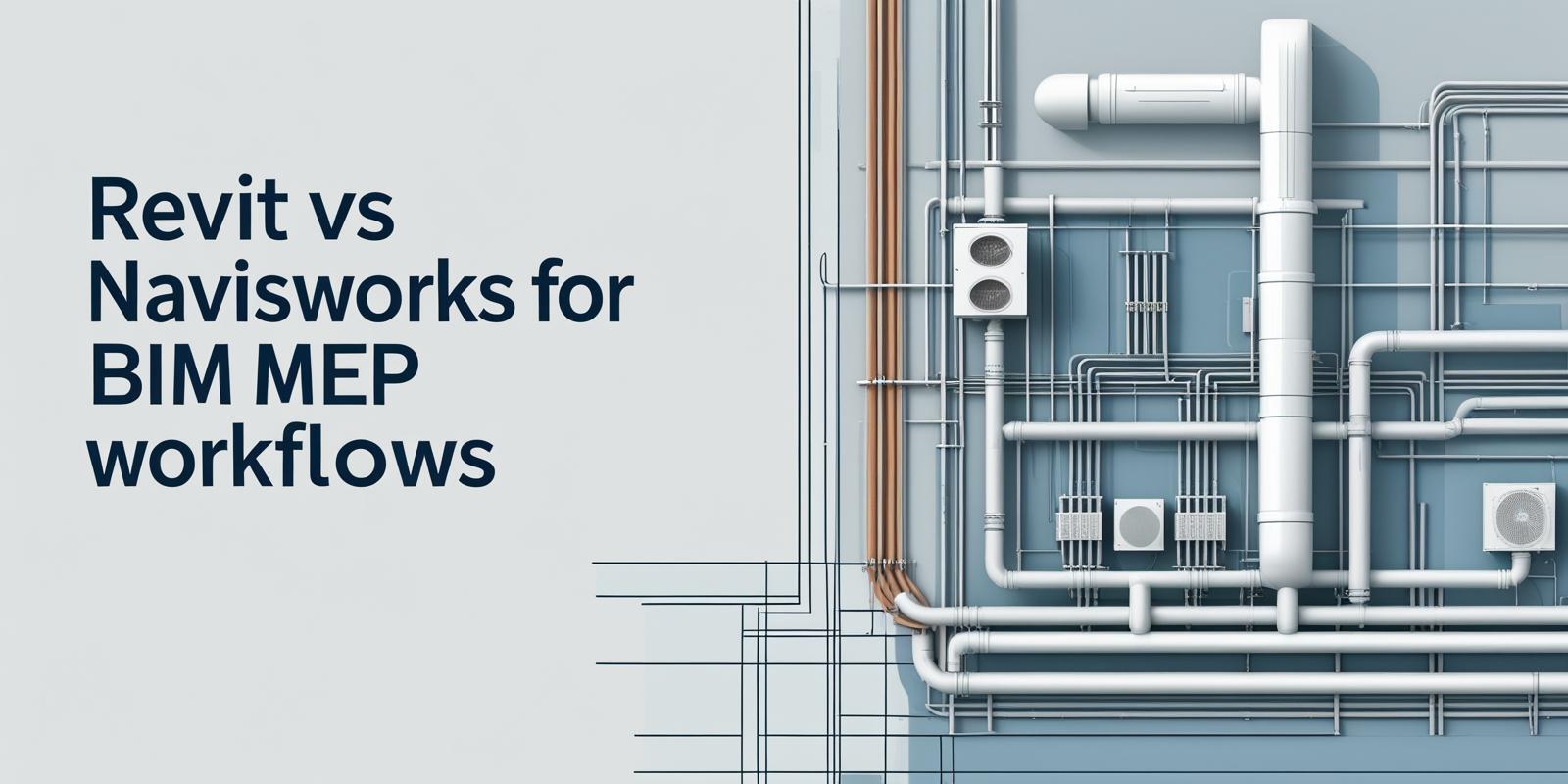

If you have ever peeked into the world of BIM MEP services, you have probably heard of Revit MEP and Navisworks software. These two powerful tools play a crucial role in streamlining workflows in the MEP industry, but they are not interchangeable. While both tools fall under Autodesk’s umbrella, they serve very different functions in the MEP engineering and BIM software landscape.
Picture this: You are working on a complex hospital with intricate MEP systems. Everything, from ventilation shafts to plumbing and fire safety networks, needs to be coordinated without conflict. Enter Revit software and Navisworks software; however, how do you determine which one is best suited for a particular task?
This blog aims to break it all down for you. We will compare Revit and Navisworks, exploring where each excels in MEP projects and helping you understand how these tools are shaping the future of MEP work in construction. Whether you are a student applying for Revit MEP jobs or an experienced MEP engineer managing large-scale builds, this guide will clear the fog around their roles.
Unlock High-Paying Careers With BIM
Master BIM workflows, software and skills on real projects.
Apply Now
\*Limited seats available
## **What Is Revit and How Is It Used in MEP Design?**
Revit software is Autodesk’s flagship tool for Building Information Modelling (BIM). It enables professionals to plan, design, and document building systems in a 3D environment. Specifically, [Revit MEP software](https://www.novatr.com/blog/revit-mep-software) is tailored for mechanical, electrical, and plumbing engineers.
When it comes to MEP design, Revit MEP lets you create intelligent components, simulate systems, and automatically update changes across the model. It brings immense value to MEP drafting software workflows by enabling parametric modelling, system analysis, and automated schedules.
MEP engineers use Revit MEP for designing HVAC ductwork, electrical panels, plumbing networks, and fire protection systems. Its strength lies in visualising and simulating real-world performance, helping avoid MEP design mistakes early in the process.
Moreover, Revit architecture integrates seamlessly with **Revit MEP**, allowing architects and engineers to work in tandem. The unified platform ensures that updates on one end reflect across disciplines, reducing the risk of miscommunication.
## **What Is Navisworks and Where Does It Fit in MEP Workflows?**
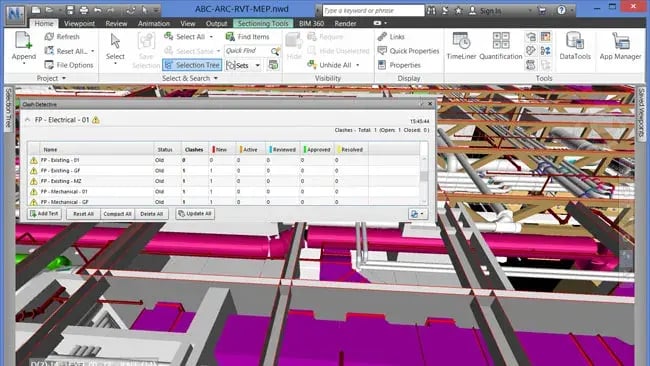
Navisworks is a project review tool used primarily for model aggregation, clash detection, and construction simulation. It enables users to integrate 3D models from various disciplines, architectural, structural, and MEP, into a single environment.
This tool is invaluable during the coordination phase of MEP projects. By importing models from Revit software and other platforms, [Navisworks software](https://www.novatr.com/blog/capabilities-of-navisworks-for-mep-engineering) enables design and construction teams to identify potential clashes, such as an HVAC duct running through a beam, before they reach the site.
Beyond just detection, it also facilitates team collaboration, offering features like issue tracking, comments, viewpoints, and animations. This makes Navisworks an indispensable part of MEP BIM modelling and MEP design software workflows, especially on large and complex projects.
It does not generate design models like Revit MEP, but instead refines, reviews, and prepares them for the build phase, making it the perfect companion in the MEP software toolkit.
Also Read: [Top 50 MEP Interview Questions & Answers 2026](https://www.novatr.com/blog/best-mep-engineer-interview-questions)
## **Revit vs Navisworks**
Let us now look at the real comparison of Revit vs Navisworks in tabular form:
| **Feature/Function** | **Revit MEP** | **Navisworks Software** |
| --- | --- | --- |
| Primary Purpose | Design and modelling of MEP systems | Model coordination, clash detection, and simulation |
| User Group | MEP engineers, designers, architects | Project managers, coordinators, BIM modellers |
| File Format Support | RVT (native), IFC | NWD, NWF supports multiple model types, including RVT |
| Clash Detection | Basic (limited) | Advanced clash detection across disciplines |
| Collaboration | Live collaboration in the cloud via BIM 360 | Aggregation and issue tracking post-model import |
| Simulation | System performance, load calculations | 4D simulation and construction planning |
| Output | Construction-ready designs and documents | Coordination models, clash reports, timelines |
| Learning Curve | Steeper (technical and design-intensive) | Easier (mainly review and coordination tasks) |
## **Which Tool Supports Better Collaboration and Clash Detection?**
When it comes to team coordination and detecting design conflicts, Navisworks software takes the lead. Its clash detection engine is far more potent than what Revit MEP offers. While Revit MEP allows for some level of interference checking, it lacks the comprehensive clash reporting features that Navisworks is known for.
Furthermore, Navisworks shines in environments where multiple stakeholders are involved. You can import Revit MEP, Revit architecture, structural models, and even CAD files into a single coordinated model. This provides the entire team, designers, fabricators, contractors, and site managers, with a holistic view of the project.
Its collaboration features, such as Timeliner (for 4D simulation), redlining, and viewpoint sharing, make it a central hub during project coordination meetings. In MEP works in construction, where accuracy and coordination can make or break a timeline, Navisworks software becomes essential.
That said, Revit MEP also supports real-time cloud collaboration through Autodesk Construction Cloud, allowing multiple users to work on the same model simultaneously. This makes it ideal for the design phase, but it is still limited when it comes to project-wide coordination.
## **When Should MEP Professionals Use Revit vs Navisworks?**
Let us break it down based on use cases:
### **Use Revit MEP** when
- You are at the [**MEP design**](https://www.novatr.com/blog/top-10-trends-in-mep-design) or documentation stage.
- You need to perform system analysis or simulate HVAC and electrical performance.
- You are generating construction documents, schedules, and equipment layouts.
- You are applying for Revit MEP jobs and need strong design skills.
- You are part of a design team using MEP design software to create coordinated layouts.
### **Use Navisworks software** when:
- The design is complete, and the project moves into the coordination phase.
- You need to conduct detailed clash detection between architectural, structural, and MEP engineering models.
- You are planning site activities or simulating construction timelines.
- You are working on large-scale MEP infrastructure projects with multiple stakeholders.
- You need a central model viewer that integrates input from various MEP drafting software platforms.
Ultimately, both tools play crucial yet distinct roles within the MEP industry. Many projects begin in Revit MEP and transition to Navisworks software as they move into execution. Mastering both can give professionals a serious edge in MEP BIM modelling and BIM software coordination workflows.
Also Read: [BIM for MEP: A Complete Guide 2026](https://www.novatr.com/blog/what-is-bim-in-mep-engineering)
Master BIM and Get Hired Faster
Join a community of 8500+ Architects and Engineers.
Explore Now
\*Limited seats available
## Conclusion
The MEP in architecture and construction space is evolving rapidly, and digital tools are the catalysts. If you are navigating the maze of BIM tools, understanding the difference between Revit vs Navisworks is non-negotiable.
Revit MEP is your go-to tool for detailed design, documentation, and system analysis. It is the engine behind intelligent MEP design, helping create buildable, efficient, and clash-free layouts. On the other hand, Navisworks software is your coordination champion; it helps bring all pieces together, flagging issues before they turn costly and enabling smooth execution.
For professionals in MEP engineering, mastering both tools is not just a good-to-have; it is a career essential. Whether you are working on high-rise buildings, hospitals, or airports, these tools together ensure that your MEP projects are accurate, efficient, and future-ready.
We suggest that you explore the [**BIM Professional Course for MEP Engineers**](https://www.novatr.com/courses/bim-for-mep-engineers) by [**Novatr**](https://www.novatr.com/). And visit our [**Resources Page**](https://www.novatr.com/learning-hub) to learn about the latest industry developments.
Also Read: [Revit Software For MEP: Training, Certification & Benefits](https://www.novatr.com/blog/revit-mep-software)
## FAQs
### **1. What is the main difference between Revit and Navisworks in MEP workflows?**
Revit is primarily used for designing, modeling, and documenting MEP systems in a building, while Navisworks is used for project coordination, clash detection, and 4D construction simulation. Revit is a design tool; Navisworks is a review and coordination tool.
### **2. Can Revit and Navisworks be used together in a BIM project?**
Yes, Revit and Navisworks are often used together. MEP engineers use Revit to create detailed models, which are then imported into Navisworks for coordination with other disciplines, clash detection, and project scheduling.
### **3. Which software is better for clash detection in BIM MEP projects?**
Navisworks is the go-to software for clash detection. It allows users to aggregate models from different disciplines (MEP, architecture, structure) and identify conflicts before construction begins, reducing costly errors and rework.
Was this content helpful to you
Like Yes
Dislike No

TABLE OF CONTENTS
BIM Is The New Standard. Are You Certified?
Get Certified in BIM
SHARE ON YOUR SOCIALS
Link Copied Successfully
Related articles
[.png) BIM for Mechanical Engineers: A Complete Guide 7 April 2025 16 min read](https://blog.novatr.com/blog/bim-for-mechanical-engineers) [ How to transition from Mechanical Designer to BIM Mechanical Designer 3 March 2025 19 min read](https://blog.novatr.com/blog/mechanical-designer-to-bim-mechanical-designer-transition-guide) [.jpg) MEP Drafting: From 2D CAD to 3D BIM 13 June 2025 8 min read](https://blog.novatr.com/blog/mep-drafting-from-2d-cad-to-3d-bim) [.png) How to transition from Electrical Designer to BIM Electrical Designer 5 March 2025 18 min read](https://blog.novatr.com/blog/electrical-designer-to-bim-electrical-designer-transition-guide)
Download Syllabus
## BIM Professional Program
Next Cohort
June 2026
Program Duration
7 Months
Premium Program benefits
8 Credentials from Autodesk, NSDC, Novatr
1 program. 10 career paths. Infinite Growth.
40+ ISO 19650 & RIBA real-world projects to practice
1-on-1 guidance. Access 400+ industry experts.
Access the biggest AEC-Tech community on the planet. 8500+ and counting
Curated for you by 100+ global BIM leaders.
Lifelong access to course content
Enter your details to download the program syllabus.
##### BIM Professional Program
June 2026, 7 Months
Your Name Invalid name.
Phone Number Enter a valid phone number
Email Please enter a valid email address.
Select years of experience\* Currently studying 0-1 years 1-2 years 2-4 years 4-8 years 8-10 years 10-12 years 12+ years Invalid selection.
Specialisation Select your background\* Architecture Civil Engineering Mechanical Engineering Electrical Engineering Invalid selection.
Are you professionally trained in interior design?
Yes
No
I agree to the [Terms of Use](https://www.novatr.com/terms-and-conditions) and [Privacy Policy](https://www.novatr.com/privacy-policy), and consent to be contacted by Email, Call, WhatsApp, or SMS.
Submit
Ready to skyrocket your career?
Begin your next chapter in AEC
with Novatr!
We are here to help you take the industry by storm with advanced, tech-first skills.
[Explore Courses](https://www.novatr.com/#courses)
Join our newsletter
Submit
Thank you for signing up.
We’ll send you a nice letter once per week. No spam.

Dare to Disrupt.
Join thousands of people who organise
work and life with Novatr.
Company
- [About Us](https://www.novatr.com/about)
- [BIM Professional Program v.2026](https://www.novatr.com/courses/bim-professional-program)
- [Masters Computational Design](https://www.novatr.com/courses/computational-design)
- [Become a Mentor](https://www.novatr.com/apply-as-mentor)
- [Hiring from Us](https://www.novatr.com/hire-from-us)
- [Careers at Novatr](https://www.novatr.com/career)
Resources
- [Blog](https://www.novatr.com/learning-hub)
- [Media Room](https://www.novatr.com/media-room-home-page)
- [Career Builder](https://www.novatr.com/career-navigator)
- [Events & Webinars](https://www.novatr.com/webinars)
- [FAQs & Support Center](https://www.novatr.com/contact-us)
- [Contact Us](https://www.novatr.com/contact-us)
- [Privacy Policy](https://www.novatr.com/privacy-policy)
- [Terms of Use](https://www.novatr.com/terms-and-conditions)
©2023 Oneistox Network Pvt. Ltd.
All Rights Reserved
```json
{
"@context" : "https://schema.org",
"@type" : "BlogPosting",
"author" : {
"@type" : "Person",
"name" : "Naina",
"url" : "https://blog.novatr.com/blog/author/naina"
},
"dateModified" : "2025-07-28T11:20:07.093Z",
"datePublished" : "2025-06-18T06:35:41.000Z",
"headline" : "How Do Revit and Navisworks Differ in BIM MEP Workflows?",
"image" : [ "https://blog.novatr.com/hubfs/Revit%20vs%20Navisworks%20For%20BIM%20MEP%20Workflows.%20Give%20me%20an%20image%20with%20this%20text%20and%20a%20related%20MEP%20background.%20Please%20do%20not%20overwrite%20or%20change%20the%20size%20of%20the%20text%20&%20spellings%20should%20be%20same%20%20&%20correct.jpg" ],
"mainEntityOfPage" : {
"@id" : "https://blog.novatr.com/blog/revit-vs-navisworks-in-bim-mep-workflows",
"@type" : "WebPage"
},
"publisher" : {
"@type" : "Organization",
"logo" : {
"@type" : "ImageObject",
"url" : "https://blog.novatr.com/hubfs/Novatr%20Prev%20OX-2.svg"
}
}
}
```