---
title: Revit vs Navisworks and What Architects Get Wrong About These? 2026
description: Understand the distinction between Revit and Navisworks, why architects make mistakes & how the proper use of both enhances coordination, efficiency & maturity of BIM.
image: https://blog.novatr.com/hubfs/Revit%20vs%20Navisworks_%20What%20Architects%20Often%20Get%20Wrong%20About%20These%20Tools.png
---
[Blogs](https://www.novatr.com/learning-hub)
- [Architecture & Construction](https://www.novatr.com/learning-hub?category=Architecture+%26+Construction)
- [BIM](https://www.novatr.com/learning-hub?category=BIM)
- [Computational Design](https://www.novatr.com/learning-hub?category=Computational+Design)
- [Company News](https://www.novatr.com/learning-hub?category=Company+News)
- [Expert Talks](https://www.novatr.com/learning-hub?category=Expert+Talks)
Explore Courses
[Just Launched  BIM Professional Program v.2026 Take your career to the next level by mastering the real-world application of BIM. Know More](https://www.novatr.com/courses/bim-professional-program)
[ Master Computational Design Course Break into an advanced career by learning to apply the power of computation to the art of design. Know More](https://www.novatr.com/courses/computational-design)
[Blogs](https://www.novatr.com/learning-hub)
Explore Blogs
- [Architecture & Construction](https://www.novatr.com/learning-hub?category=Architecture+%26+Construction)
- [BIM](https://www.novatr.com/learning-hub?category=BIM)
- [Computational Design](https://www.novatr.com/learning-hub?category=Computational+Design)
- [Company News](https://www.novatr.com/learning-hub?category=Company+News)
- [Expert Talks](https://www.novatr.com/learning-hub?category=Expert+Talks)
Courses
- [BIM Professional Program v.2026](https://www.novatr.com/courses/bim-professional-program)
- [Master Computational Design](https://www.novatr.com/courses/computational-design)
- [Archi/](https://www.novatr.com/learning-hub?category=BIM)
Featured Article
# Expert Opinion: Revit vs Navisworks – What Architects Often Get Wrong About These Tools
Ashdeep Singh
April 16, 2026
4 min read

BIM has been adopted by the AEC industry, with a worldwide adoption rate of almost [70 percent](https://gitnux.org/bim-industry-statistics/?utm). Despite its increasing popularity, firms still face several issues when integrating BIM processes into their workflows. For example, architects often mistakenly think Revit and Navisworks are similar, leading them to assume they do the same work.
Such misperception about the two software programs can affect the project schedule, coordination, and efficiency. According to industry statistics, rework accounts for [30 percent](https://www.cadtrainingonline.com/key-metrics-for-bim-workflow-optimization/?utm) of all work in the construction industry, usually due to poor coordination that could have been resolved in advance.
While these two programs play major roles in the AEC industry, each plays a unique one, making it important for users to distinguish between them. When teams view these software programs as alternatives, there will be inefficiency and a lack of coordination in the projects.
Unlock High-Paying Careers With BIM
Master BIM workflows, software and skills on real projects.
Apply Now
\*Limited seats available
## **What Most Architects Fundamentally Misunderstand About What Each Tool Is For.**
It is often believed that Revit and Navisworks are similar applications in architecture. On the contrary, these two software applications are completely different in terms of their functions and purposes.
Revit is an authoring tool for design. It enables the production of smart 3D models that include information, geometry, and associations between different building elements. The primary role of the software is to document design decisions.
However, Navisworks is a coordination and analysis application. This program was developed to unite models created by specialists from different disciplines and to analyze the entire project.
One way to put it is quite simple: Revit does the modeling, while Navisworks tests the model.
What most architects tend to say is, "I am simply going to do it in Revit." It works well only for small-scale projects and for those in which complexity does not play an important role. It no longer holds when several disciplines are involved, e.g., when you try to coordinate the structural beams and HVAC ducts in Revit.
There are indeed severe repercussions of using the wrong tool for the job. First of all, it would take a lot of time to deal with large models or those done by other people in separate models. Secondly, inconsistency is another problem that is likely to emerge.
## **Where Revit's Limitations Make Navisworks Not Optional, But Necessary.**
While Revit is a powerful tool, it is not designed for extensive collaboration among many disciplines. As projects grow bigger, their performance will deteriorate. That is when Navisworks becomes critical and not just an extra tool.
Normally, when a project requires collaboration among multiple consultants creating different models, such as architectural, structural, MEP, and facade systems, Navisworks is a must-have. Infrastructure projects, hospitals, airports, and skyscrapers are definite cases where relying solely on Revit becomes problematic.
Another problem occurs when the clash detection procedure is delayed. Individuals continue to model their elements in Revit, believing that they are working together. However, without checking the model, it becomes evident that there are conflicts at the system level during the building process.
Visibility from a holistic perspective could also be an issue. Models created using Revit are typically discipline-specific. Navisworks software, on the other hand, allows all project team members to view the entire construction process in a single window.
Getting a team to use Navisworks may be difficult, particularly if they are not enthusiastic about incorporating a new piece of software into their process. It is important to present Navisworks in such a way that reduces risk and saves time. This task can be done by citing previous cases where coordination errors occurred and had to be corrected at the construction site.
## **How Architects Misuse Navisworks and What They Miss Because of It.**
Firms may choose to use Navisworks, but limit themselves to clash detection, which is probably one of the greatest underutilization in BIM process management.
Navisworks provides more than clash detection services. One such possibility is 4D simulation, which connects the design model to the construction schedule and shows how the project would be built within the designated time period.
Other underutilized aspects of using Navisworks are model review and communication. For instance, it is possible to create different viewpoints and issues and communicate them effectively to other specialists involved in the work.
However, by limiting their use of Navisworks to clash detection, architects deprive themselves of these advantages. Without 4D simulation, there can be conflicts in sequencing the work, especially when services must be installed before the structural work is completed.
Early involvement of architects in the Navisworks project process will give them control over coordination and constructability.
## **How the Revit-Navisworks Relationship Should Actually Work on a Coordinated Project.**
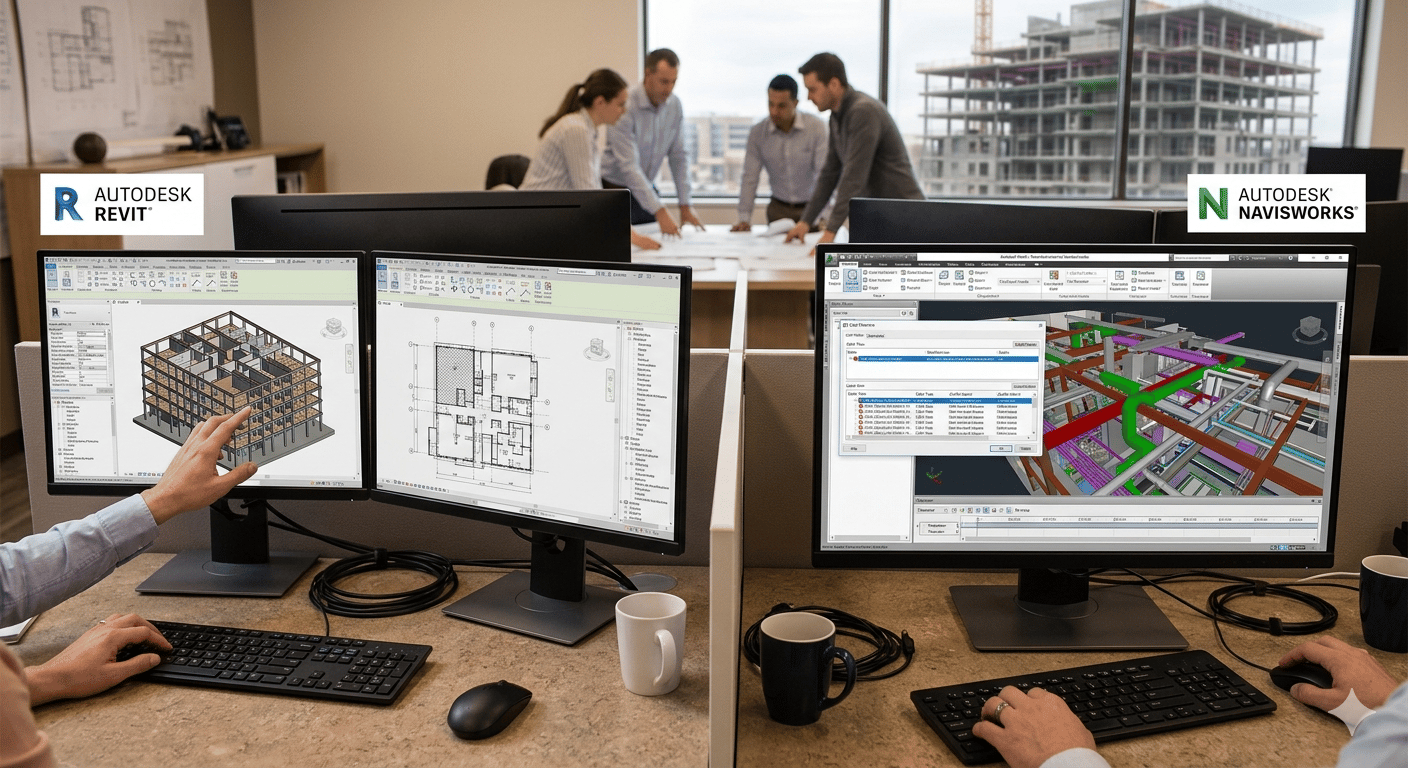
A properly coordinated project will use both tools in an organized manner.
In the early phases of project design, Revit will take precedence. The architectural team will create the model and determine the spatial relationships and design intent. During this phase, Navisworks can be used for preliminary checks; however, the emphasis will be on developing the design.
When the design reaches the coordination phase, models from all disciplines are extracted and imported into Navisworks.
It is essential to have a handover process. There should be proper model exports according to the schedule and version control system to improve accuracy. The ownership of the Navisworks model also plays an integral part.
There needs to be centralization of ownership on the federated model, clash detection, and a reporting process. Centralized ownership of these processes helps ensure the proper utilization of resources and prevents conflicts.
Proper coordination between Revit and Navisworks is essential. Teams should strictly follow the agreed workflow for managing things. It would help avoid version control issues.
## **What Getting These Tools Right Signals About a Firm's Broader BIM Maturity?**
An organization's use of Revit and Navisworks indicates its BIM maturity.
Organizations that use Revit for all their operations face difficulties coordinating tasks. The reason for this scenario is that these organizations fail to understand how Revit works and lack defined BIM processes.
Organizations that work effectively and efficiently tend to draw boundaries between these two tools. They assign specific roles to each tool while setting up well-defined workflows for exchanging information.
which involves using Navisworks throughout the process to detect and resolve potential disputes before they escalate. This strategy will reduce risk and increase success.
What architects must recognize is that no one software application can do everything for them in BIM modeling. They must recognize what each tool can do and then use them together to achieve optimal results.
Master BIM and Get Hired Faster
Join a community of 8500+ Architects and Engineers.
Explore Now
\*Limited seats available
## **Conclusion**
The functions of Revit and Navisworks are distinct yet complementary. It is crucial to understand this distinction when seeking to improve coordination and reduce errors in BIM projects.
Using Revit as a design platform and Navisworks as a coordination tool enables a team to build a more systematic process. It reduces the likelihood of conflicts later in the project and improves effective decision-making across all phases of project development.
The project's complexity increases as it progresses. Thus, professionals' ability to apply such tools is a decisive factor in success. Learning to use both tools can help architects navigate project complexity with greater confidence and efficiency.
If you wish to join the upskilling route,[**Novatr’s BIM Course for Architects**](https://www.novatr.com/courses/building-information-modelling) can be a good place to start. The BIM certification for architects offers you the opportunity to learn in-depth about BIM processes, tools, and workflows.
Was this content helpful to you
Like Yes
Dislike No

TABLE OF CONTENTS
BIM Is The New Standard. Are You Certified?
Get Certified in BIM
SHARE ON YOUR SOCIALS
Link Copied Successfully
Related articles
[.png) Building Information Modelling Top 10 Architectural Drafting Firms in the USA \[2026\] 7 August 2025 6 min read](https://blog.novatr.com/blog/top-architectural-drafting-firms-in-usa) [ Predictive Maintenance with AI: Extending the Life of MEP Systems 16 February 2026 5 min read](https://blog.novatr.com/blog/predictive-maintenance-with-ai-in-mep-systems) [ Direct vs Parametric Modelling: Which Is the Better Choice for Designers - Know from an Expert! 30 March 2026 3 min read](https://blog.novatr.com/blog/direct-vs-parametric-modelling-which-is-the-better-choice-for-designers-know-from-an-expert) [ AutoCAD Workflows for Architects in 2026 20 April 2026 4 min read](https://blog.novatr.com/blog/autocad-workflows-for-architects)
Download Syllabus
## BIM Professional Program
Next Cohort
June 2026
Program Duration
7 Months
Premium Program benefits
8 Credentials from Autodesk, NSDC, Novatr
1 program. 10 career paths. Infinite Growth.
40+ ISO 19650 & RIBA real-world projects to practice
1-on-1 guidance. Access 400+ industry experts.
Access the biggest AEC-Tech community on the planet. 8500+ and counting
Curated for you by 100+ global BIM leaders.
Lifelong access to course content
Enter your details to download the program syllabus.
##### BIM Professional Program
June 2026, 7 Months
Your Name Invalid name.
Phone Number Enter a valid phone number
Email Please enter a valid email address.
Select years of experience\* Currently studying 0-1 years 1-2 years 2-4 years 4-8 years 8-10 years 10-12 years 12+ years Invalid selection.
Specialisation Select your background\* Architecture Civil Engineering Mechanical Engineering Electrical Engineering Invalid selection.
Are you professionally trained in interior design?
Yes
No
I agree to the [Terms of Use](https://www.novatr.com/terms-and-conditions) and [Privacy Policy](https://www.novatr.com/privacy-policy), and consent to be contacted by Email, Call, WhatsApp, or SMS.
Submit
Ready to skyrocket your career?
Begin your next chapter in AEC
with Novatr!
We are here to help you take the industry by storm with advanced, tech-first skills.
[Explore Courses](https://www.novatr.com/#courses)
Join our newsletter
Submit
Thank you for signing up.
We’ll send you a nice letter once per week. No spam.

Dare to Disrupt.
Join thousands of people who organise
work and life with Novatr.
Company
- [About Us](https://www.novatr.com/about)
- [BIM Professional Program v.2026](https://www.novatr.com/courses/bim-professional-program)
- [Masters Computational Design](https://www.novatr.com/courses/computational-design)
- [Become a Mentor](https://www.novatr.com/apply-as-mentor)
- [Hiring from Us](https://www.novatr.com/hire-from-us)
- [Careers at Novatr](https://www.novatr.com/career)
Resources
- [Blog](https://www.novatr.com/learning-hub)
- [Media Room](https://www.novatr.com/media-room-home-page)
- [Career Builder](https://www.novatr.com/career-navigator)
- [Events & Webinars](https://www.novatr.com/webinars)
- [FAQs & Support Center](https://www.novatr.com/contact-us)
- [Contact Us](https://www.novatr.com/contact-us)
- [Privacy Policy](https://www.novatr.com/privacy-policy)
- [Terms of Use](https://www.novatr.com/terms-and-conditions)
©2023 Oneistox Network Pvt. Ltd.
All Rights Reserved
```json
{
"@context" : "https://schema.org",
"@type" : "BlogPosting",
"author" : {
"@type" : "Person",
"name" : "Ashdeep Singh",
"url" : "https://blog.novatr.com/blog/author/ashdeep-singh"
},
"dateModified" : "2026-04-16T07:22:53.566Z",
"datePublished" : "2026-04-16T07:20:18.000Z",
"headline" : "Revit vs Navisworks and What Architects Get Wrong About These? {{year}}",
"image" : [ "https://blog.novatr.com/hubfs/Revit%20vs%20Navisworks_%20What%20Architects%20Often%20Get%20Wrong%20About%20These%20Tools.png" ],
"mainEntityOfPage" : {
"@id" : "https://blog.novatr.com/blog/revit-vs-navisworks-and-what-architects-get-wrong-about-these",
"@type" : "WebPage"
},
"publisher" : {
"@type" : "Organization",
"logo" : {
"@type" : "ImageObject",
"url" : "https://blog.novatr.com/hubfs/Novatr%20Prev%20OX-2.svg"
}
}
}
```