---
title: "Paneling Tools: A Practical Guide for Facade Design"
description: Learn what is paneling tools, how to use paneling tools in Grasshopper and Rhino paneling tools for facade design. Step-by-step guide, best practices, and learning paths.
image: https://blog.novatr.com/hubfs/Paneling%20Tools%20-%20A%20Practical%20Guide%20for%20Facade%20Design.jpg
---
[Blogs](https://www.novatr.com/learning-hub)
- [Architecture & Construction](https://www.novatr.com/learning-hub?category=Architecture+%26+Construction)
- [BIM](https://www.novatr.com/learning-hub?category=BIM)
- [Computational Design](https://www.novatr.com/learning-hub?category=Computational+Design)
- [Company News](https://www.novatr.com/learning-hub?category=Company+News)
- [Expert Talks](https://www.novatr.com/learning-hub?category=Expert+Talks)
Explore Courses
[Just Launched  BIM Professional Program v.2026 Take your career to the next level by mastering the real-world application of BIM. Know More](https://www.novatr.com/courses/bim-professional-program)
[ Master Computational Design Course Break into an advanced career by learning to apply the power of computation to the art of design. Know More](https://www.novatr.com/courses/computational-design)
[Blogs](https://www.novatr.com/learning-hub)
Explore Blogs
- [Architecture & Construction](https://www.novatr.com/learning-hub?category=Architecture+%26+Construction)
- [BIM](https://www.novatr.com/learning-hub?category=BIM)
- [Computational Design](https://www.novatr.com/learning-hub?category=Computational+Design)
- [Company News](https://www.novatr.com/learning-hub?category=Company+News)
- [Expert Talks](https://www.novatr.com/learning-hub?category=Expert+Talks)
Courses
- [BIM Professional Program v.2026](https://www.novatr.com/courses/bim-professional-program)
- [Master Computational Design](https://www.novatr.com/courses/computational-design)
- [BIM/](https://www.novatr.com/learning-hub?category=BIM) [BIM/](https://www.novatr.com/learning-hub?category=BIM)
Featured Article
# Paneling Tools: A Practical Guide for Facade Design
.jpg)
Tanmay Gadade
October 16, 2025
4 min read
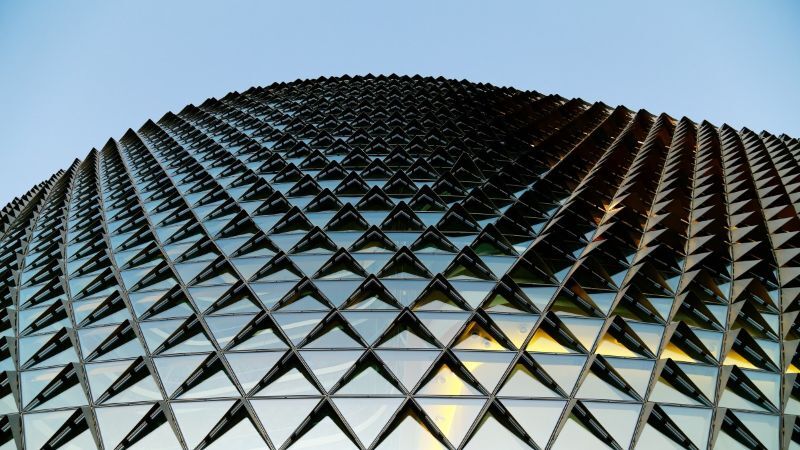

When an architect or designer asks **“what is paneling tools?”**, they refer to software plugins or toolsets that convert complex surface geometry into buildable panel layouts for facades. These tools bridge the gap between design freedom and real-world fabrication by automating the process of subdividing, aligning, and rationalizing geometry.
In the United States, construction spending reached $[2,139.1 billion](https://www.census.gov/construction/c30/pdf/release.pdf?) in July 2026, a seasonally adjusted annual rate, and a significant portion of it is allocated to building envelopes. As facades become more performance-oriented and expressive, paneling tools help designers balance creativity with efficiency, transforming ideas into manufacturable systems.
Unlock High-Paying Careers With BIM
Master BIM workflows, software and skills on real projects.
Apply Now
\*Limited seats available
## What is Paneling Tools?
Paneling tools are [computational design](https://www.novatr.com/blog/computational-design-guide)extensions that allow architects and engineers to subdivide complex 3D surfaces into manageable, fabricable panels. These tools make it possible to transform freeform geometries into logical grids or modular systems suitable for construction.
They are often integrated into parametric modeling software like Rhino and Grasshopper. Paneling tools in Grasshopper provide visual scripting control over panel shape, size, and alignment, while Rhino paneling tools offer a direct modeling interface to design and adjust surface grids interactively. Designers also use Rhino panel tools to refine surface structures and maintain precision in geometry during facade development.
These tools play an important role in ensuring that visually complex facades can be realized accurately and efficiently. They support innovation while maintaining constructability, making them essential for facade design using paneling tools and broader computational workflows.
## Importance of Paneling Tools in Designing Parametric Facades
In modern architecture, a facade is more than just an outer skin; it is a performance-driven system integrating structure, sustainability, and aesthetics. Paneling tools make this integration achievable by linking complex surface design with real-world fabrication techniques.
They enable designers to optimize designs quickly while ensuring practicality. Some of their most valuable benefits include:
- **Feasibility:** They ensure panel dimensions and curvatures stay within manufacturing limits.
- **Efficiency:** They reduce the number of unique parts and simplify assembly.
- **Performance integration:** They embed environmental and structural data for responsive designs.
- **Iterative control:** Adjusting one parameter automatically updates the entire system.
- **Quality assurance:** They help detect potential construction issues early in the design process.
These advantages demonstrate how paneling tools streamline facade optimization and enable more sustainable, adaptable, and creative outcomes. They connect digital experimentation with physical performance, a defining trait of modern computational design.
## Designing a Facade with Paneling Tools: Step-by-Step Process
### Step 1: Define the Concept and Form
Start by shaping the base geometry or conceptual surface for your facade. Determine curvature, orientation, and overall design intent.
### Step 2: Set Panel Constraints
Specify practical limits like maximum panel size, curvature tolerance, and material thickness to maintain constructability.
### Step 3: Choose a Panel Topology
Select a grid system, rectangular, triangular, hexagonal, or custom that aligns with your facade’s visual logic and performance goals.
### Step 4: Apply the Paneling Layout
Use Rhino paneling tools or paneling tools in Grasshopper to subdivide the surface based on your chosen parameters. Generate the initial layout for evaluation.
### Step 5: Analyze the Layout
Check curvature, panel alignment, and distortion. Modify panels that exceed tolerance limits to ensure clean geometry.
### Step 6: Add Performance Layers
Integrate functional aspects such as shading depth, perforation, or solar response using computational inputs.
### Step 7: Rationalize and Simplify
Group similar panels, standardize components, and reduce variations to cut costs without sacrificing design quality.
### Step 8: Export Fabrication Data
Extract precise fabrication details, 2D drawings, material lists, or CNC cutting paths for direct use in CAM or BIM workflows.
### Step 9: Review and Iterate
Run simulations, test prototypes, and refine your system until it meets design, aesthetic, and performance standards.
By following these steps, facade design using paneling tools becomes a streamlined, data-informed process that merges creativity with real-world precision.
## Best Practices & Optimization Tips
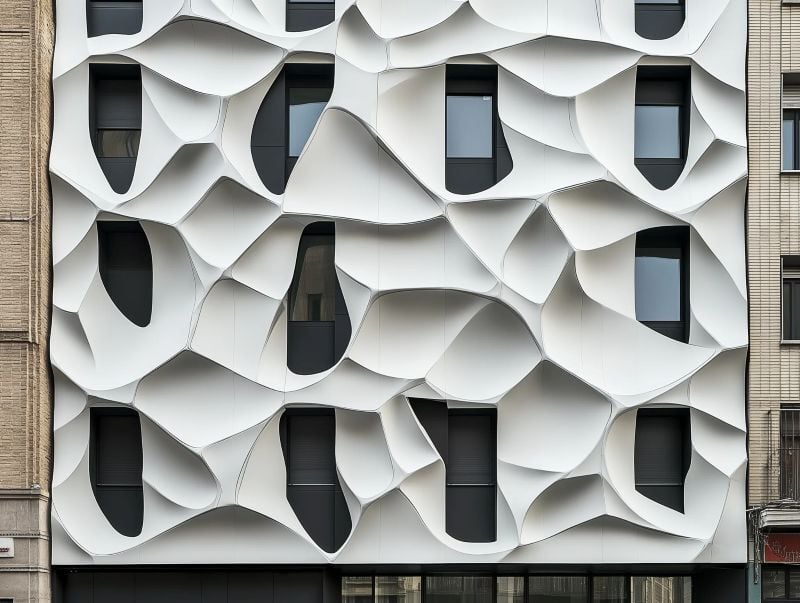
To fully leverage paneling tools, designers should integrate computational logic with well defined performance objectives. Every design element, whether panel density, curvature, or orientation, should contribute purposefully to the overall architectural intent.
- **Define objectives early:** Determine whether your focus is thermal comfort, daylight optimization, or aesthetic expression.
- **Use adaptive grids:** Adjust panel divisions based on geometry complexity.
- **Encourage repetition:** Reuse similar panels to minimize fabrication effort.
- **Control distortion:** Keep curvature within realistic limits.
- **Test performance often:** Integrate environmental simulations to refine results.
- **Balance automation and craft:** Let computational logic guide design, but refine manually where necessary.
- **Document thoroughly:** Track panel IDs, materials, and sizes for accuracy in fabrication.
These best practices promote cleaner, more buildable designs and a stronger connection between design intent and execution.
## Where to Learn Computational Design Along With Paneling Tools
Mastering paneling tools is one part of building a future-ready architectural skillset. To apply these techniques within real-world workflows, architects increasingly turn to specialized learning platforms that integrate computational design, AI, and parametric modeling.
One such program is the [Master in Computational Design course](https://www.novatr.com/courses/computational-design) offered by Novatr, a hands-on program built to help architects and designers future-proof their careers. Through expert-led training, you’ll learn how to merge creativity with technology to solve complex design challenges and develop workflows used by top global firms.
Here’s what you’ll learn:
- 5 powerful industry tools – Grasshopper, Rhino 3D, Flux.ai, ComfyUI, and D5 Render.
- Master popular plugins like Paneling Tools, DeCoding Spaces, Anemone, Galapagos, Wallacei, LunchBox, OpenNest, and Horster Animation to create smarter, faster design workflows.
- Understand parametric and generative design workflows used by global firms.
- Automate repetitive design tasks, explore AI-driven creativity, and produce high-quality renders.
- Develop a professional computational design portfolio through project-based learning.
- Earn dual certification from Novatr and NSDC (National Skill Development Corporation) upon completion, stepping confidently into the world of future-ready architecture and design.
Disclaimer: Course details, including curriculum, duration, fees, and related information, are for informational purposes only and may change at the company’s discretion without prior notice. Please visit the official [course page](https://www.novatr.com/courses/computational-design) or contact our admissions team for the latest updates.
Master BIM and Get Hired Faster
Join a community of 8500+ Architects and Engineers.
Explore Now
\*Limited seats available
## Conclusion
Understanding **what is paneling tools** enables architects to translate complex forms into practical, buildable systems. These tools merge design creativity with data precision, providing a bridge between vision and fabrication.
By leveraging paneling tools, designers can achieve advanced **facade optimization** and integrate performance insights seamlessly into their workflows.
For professionals ready to expand their expertise, the [Master Computational Design](https://www.novatr.com/courses/computational-design) course by [Novatr](https://www.novatr.com/) provides the technical foundation and creative confidence needed to lead the next generation of computational architects.
Visit our [resource page](https://www.novatr.com/learning-hub) for more guides and insights on advancing your career in architectural technology and computational design.
Was this content helpful to you
Like Yes
Dislike No

TABLE OF CONTENTS
BIM Is The New Standard. Are You Certified?
Get Certified in BIM
SHARE ON YOUR SOCIALS
Link Copied Successfully
Related articles
[ Parametric Facade Design: Tools and Workflows for Architects 15 September 2025 5 min read](https://blog.novatr.com/blog/parametric-facade-design-tools-and-workflows-for-architects) [ BIM Civil Want to Work on Mеtro Projеcts? Lеarn Thеsе BIM Skills 28 May 2026 7 min read](https://blog.novatr.com/blog/bim-skills-for-metro-projects-and-infrastructure-careers) [ BIM How To Transition from Tekla Modeler to a High-Paying BIM Engineer 11 November 2025 7 min read](https://blog.novatr.com/blog/how-to-transition-from-tekla-modeler-to-a-high-paying-bim-engineer) [.png) BIM Archi Best YouTube Channels, Courses & Communities to Learn Autodesk Construction Cloud 12 May 2026 5 min read](https://blog.novatr.com/blog/best-resources-to-learn-autodesk-construction-cloud)
Download Syllabus
## BIM Professional Program
Next Cohort
June 2026
Program Duration
7 Months
Premium Program benefits
8 Credentials from Autodesk, NSDC, Novatr
1 program. 10 career paths. Infinite Growth.
40+ ISO 19650 & RIBA real-world projects to practice
1-on-1 guidance. Access 400+ industry experts.
Access the biggest AEC-Tech community on the planet. 8500+ and counting
Curated for you by 100+ global BIM leaders.
Lifelong access to course content
Enter your details to download the program syllabus.
##### BIM Professional Program
June 2026, 7 Months
Your Name Invalid name.
Phone Number Enter a valid phone number
Email Please enter a valid email address.
Select years of experience\* Currently studying 0-1 years 1-2 years 2-4 years 4-8 years 8-10 years 10-12 years 12+ years Invalid selection.
Specialisation Select your background\* Architecture Civil Engineering Mechanical Engineering Electrical Engineering Invalid selection.
Are you professionally trained in interior design?
Yes
No
I agree to the [Terms of Use](https://www.novatr.com/terms-and-conditions) and [Privacy Policy](https://www.novatr.com/privacy-policy), and consent to be contacted by Email, Call, WhatsApp, or SMS.
Submit
Ready to skyrocket your career?
Begin your next chapter in AEC
with Novatr!
We are here to help you take the industry by storm with advanced, tech-first skills.
[Explore Courses](https://www.novatr.com/#courses)
Join our newsletter
Submit
Thank you for signing up.
We’ll send you a nice letter once per week. No spam.

Dare to Disrupt.
Join thousands of people who organise
work and life with Novatr.
Company
- [About Us](https://www.novatr.com/about)
- [BIM Professional Program v.2026](https://www.novatr.com/courses/bim-professional-program)
- [Masters Computational Design](https://www.novatr.com/courses/computational-design)
- [Become a Mentor](https://www.novatr.com/apply-as-mentor)
- [Hiring from Us](https://www.novatr.com/hire-from-us)
- [Careers at Novatr](https://www.novatr.com/career)
Resources
- [Blog](https://www.novatr.com/learning-hub)
- [Media Room](https://www.novatr.com/media-room-home-page)
- [Career Builder](https://www.novatr.com/career-navigator)
- [Events & Webinars](https://www.novatr.com/webinars)
- [FAQs & Support Center](https://www.novatr.com/contact-us)
- [Contact Us](https://www.novatr.com/contact-us)
- [Privacy Policy](https://www.novatr.com/privacy-policy)
- [Terms of Use](https://www.novatr.com/terms-and-conditions)
©2023 Oneistox Network Pvt. Ltd.
All Rights Reserved
```json
{
"@context" : "https://schema.org",
"@type" : "BlogPosting",
"author" : {
"@type" : "Person",
"name" : "Tanmay Gadade",
"url" : "https://blog.novatr.com/blog/author/tanmay"
},
"dateModified" : "2025-10-16T11:17:37.858Z",
"datePublished" : "2025-10-16T11:16:03.000Z",
"headline" : "Paneling Tools: A Practical Guide for Facade Design",
"image" : [ "https://blog.novatr.com/hubfs/Paneling%20Tools%20-%20A%20Practical%20Guide%20for%20Facade%20Design.jpg" ],
"mainEntityOfPage" : {
"@id" : "https://blog.novatr.com/blog/paneling-tools-a-practical-guide-for-facade-design",
"@type" : "WebPage"
},
"publisher" : {
"@type" : "Organization",
"logo" : {
"@type" : "ImageObject",
"url" : "https://blog.novatr.com/hubfs/Novatr%20Prev%20OX-2.svg"
}
}
}
```