---
title: Capabilities of Navisworks for MEP Engineering
description: Discover how Autodesk Navisworks enhances MEP design with clash detection, coordination tools, & BIM integration for efficient project delivery.
image: https://blog.novatr.com/hubfs/Capabilities%20of%20Navisworks%20for%20MEP%20Engineering.jpg
---
[Blogs](https://www.novatr.com/learning-hub)
- [Architecture & Construction](https://www.novatr.com/learning-hub?category=Architecture+%26+Construction)
- [BIM](https://www.novatr.com/learning-hub?category=BIM)
- [Computational Design](https://www.novatr.com/learning-hub?category=Computational+Design)
- [Company News](https://www.novatr.com/learning-hub?category=Company+News)
- [Expert Talks](https://www.novatr.com/learning-hub?category=Expert+Talks)
Explore Courses
[Just Launched  BIM Professional Program v.2026 Take your career to the next level by mastering the real-world application of BIM. Know More](https://www.novatr.com/courses/bim-professional-program)
[ Master Computational Design Course Break into an advanced career by learning to apply the power of computation to the art of design. Know More](https://www.novatr.com/courses/computational-design)
[Blogs](https://www.novatr.com/learning-hub)
Explore Blogs
- [Architecture & Construction](https://www.novatr.com/learning-hub?category=Architecture+%26+Construction)
- [BIM](https://www.novatr.com/learning-hub?category=BIM)
- [Computational Design](https://www.novatr.com/learning-hub?category=Computational+Design)
- [Company News](https://www.novatr.com/learning-hub?category=Company+News)
- [Expert Talks](https://www.novatr.com/learning-hub?category=Expert+Talks)
Courses
- [BIM Professional Program v.2026](https://www.novatr.com/courses/bim-professional-program)
- [Master Computational Design](https://www.novatr.com/courses/computational-design)
- [MEP/](https://www.novatr.com/learning-hub?category=BIM)
Featured Article
# Top Features of Autodesk Navisworks for MEP Engineering
.jpeg)
Naina
April 23, 2025
4 min read
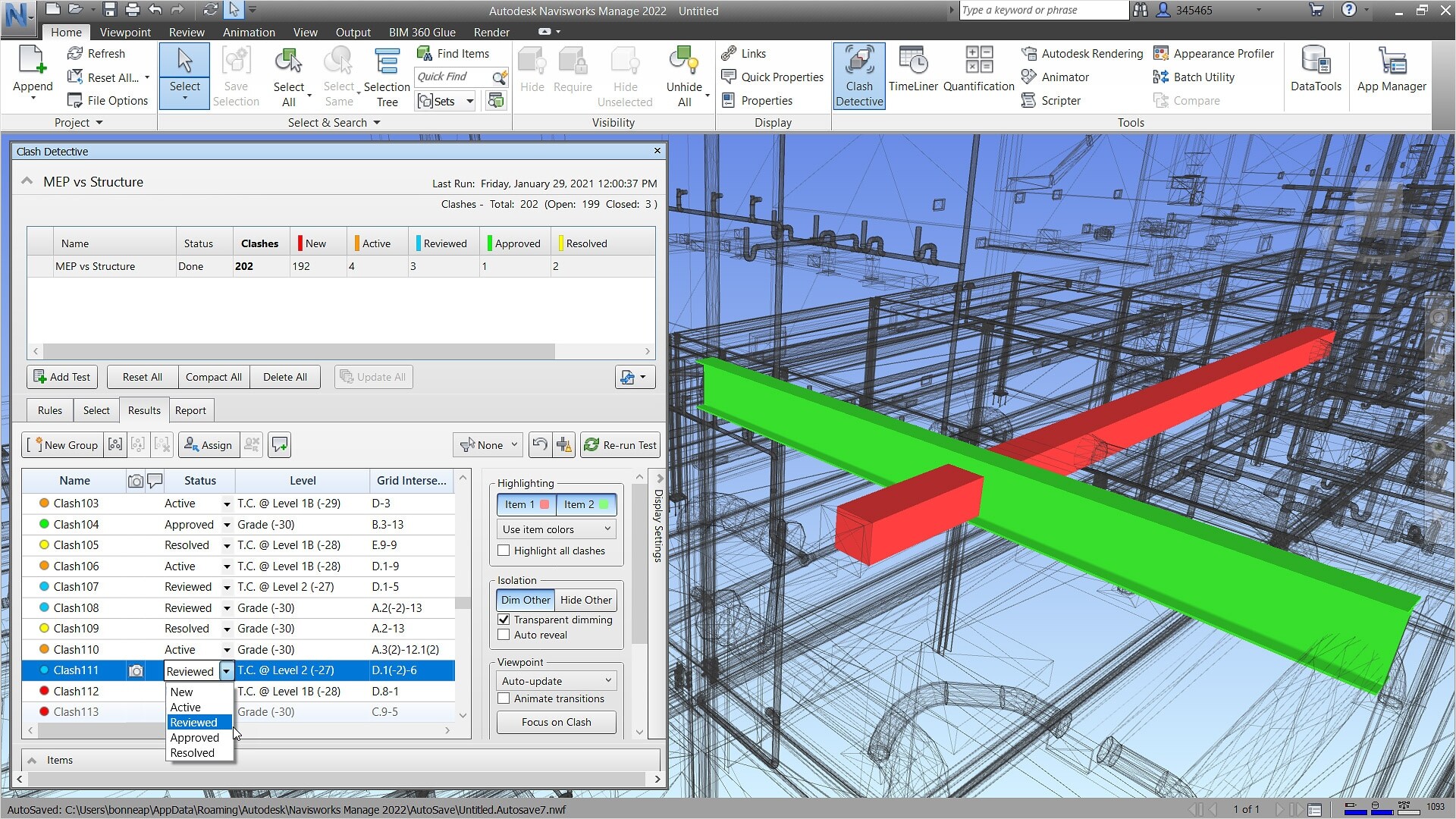

If you have ever wondered how massive construction projects come together with seemingly impossible coordination, the secret often lies in clever software solutions. Among them, Navisworks software stands out as a game-changer in the construction and design world, especially when it comes to MEP engineering. With its ability to visualise, coordinate, and simulate building systems in a single environment, it has become a must-have tool for modern engineers.
Let us dive into what makes Autodesk Navisworks such a powerful ally for those working in MEP services, and why learning it through a professional BIM MEP course could be one of the smartest moves you make in your engineering journey.
Unlock High-Paying Careers With BIM
Master BIM workflows, software and skills on real projects.
Apply Now
\*Limited seats available
## **What is Navisworks and Its Role in MEP Design**
To begin with, what is [Navisworks](https://www.novatr.com/blog/navisworks-type)? Simply put, it is a project review tool developed by Autodesk that allows teams to open, combine, review, and navigate 3D models in a single software environment. But it is more than just a 3D viewer. Think of it as the digital brain that helps architects, engineers, and contractors detect clashes, schedule tasks, and collaborate with ease.
When it comes to MEP design, this is especially critical. Coordinating a building’s mechanical, electrical, and plumbing systems can be a logistical nightmare without the right tools. Enter [Autodesk Navisworks](https://www.novatr.com/blog/navisworks-software), with its powerful model federation capabilities and clash detection tools, helping to streamline every part of the MEP building process. It brings together models from multiple disciplines, most commonly using Revit and Navisworks together, to ensure seamless integration of the MEP system within the larger construction framework.
## **Key Capabilities of Navisworks for MEP Engineering**
So, what exactly can Navisworks software do for an MEP engineer? Let us unpack the key features:
### **1. Model Aggregation**
Navisworks can combine models from different sources and formats, be it architectural, structural, or MEP [BIM](https://www.novatr.com/blog/what-is-bim-for-architects)modeling, into a single, unified model. This helps ensure that all elements of the MEP [design](https://www.novatr.com/blog/bim-and-architectural-visualisation)are visible in relation to other systems.
### **2. Clash Detection**
Possibly its most celebrated feature, clash detection helps users identify and resolve conflicts between systems before construction even begins. For example, if a duct is intersecting with a structural beam, Autodesk Navisworks will highlight the issue long before anyone starts drilling holes.
### **3. 4D and 5D Simulation**
By linking time and cost data to your model, you can simulate construction sequencing and budgeting. This feature is extremely useful in MEP engineering, where the timing of system installation can be critical to overall project success.
### **4. Navigation and Visualisation**
The software provides powerful navigation tools and realistic visualisation, helping stakeholders explore and understand complex **MEP services** layouts. Whether you are inside a virtual plant room or reviewing a rooftop chiller unit setup, the experience is immersive and informative.
### **5. Quantification**
Navisworks also offers quantification tools that help with estimating material quantities. When it comes to MEP BIM services, having accurate numbers can significantly reduce waste and control costs.
## **How Navisworks Improves Efficiency in MEP Project Delivery**
Efficiency is everything in construction. Projects have tight timelines, tighter budgets, and no room for rework. This is where [**Navisworks software**](https://www.novatr.com/blog/navisworks-type) becomes a project manager’s best friend.
Its clash detection capability alone can save countless hours and resources. By identifying issues early, teams can avoid costly site rework. Also, because it integrates so well with other tools, particularly Revit and Navisworks, teams can collaborate more effectively across locations and disciplines.
Another bonus? The clear visualisation and easy navigation make it easier to explain complex MEP systems to non-technical stakeholders. Whether you are working on a hospital, airport, or a commercial high-rise, having the right tools in place can make your MEP BIM project delivery smooth and hiccup-free.
## **Challenges in Using Navisworks for MEP & How to Overcome Them**
Now, while Autodesk Navisworks is undoubtedly powerful, it is not without its challenges. One of the most common is the learning curve. For someone new to BIM environments or 3D navigation, the interface might feel overwhelming.
There is also the issue of data inconsistency. If models are not properly prepared in Revit or other software, bringing them into Navisworks can result in display errors or missing elements, especially critical in MEP BIM modeling.
But fear not! These challenges are entirely manageable. By following some basic Navisworks tips and tricks, such as setting proper file naming conventions, regularly checking model integrity, and using clash sets wisely, you can avoid most headaches. More importantly, formal training, like a certified MEP course, can make all the difference.
## Why is Novatr’s BIM MEP Course the Best Way to Master Navisworks for MEP Projects?
### **1. Industry-Centric Learning Approach**
Learn from real-world construction case studies and live projects tailored for MEP engineering, ensuring practical, job-ready skills from day one.
### **2. Hands-On Training with Navisworks Software**
Master every essential feature of Autodesk Navisworks, including clash detection, 4D simulation, quantification, and model federation, with step-by-step guidance.
### **3. Seamless Revit and Navisworks Integration**
Understand how to efficiently use Revit and Navisworks together for complete, coordinated MEP BIM modeling and project delivery.
### **4. Clash Detection Like a Pro**
Learn how to identify and resolve clashes across MEP systems before construction begins, saving time, money, and headaches on-site.
### **5. Career Support & Portfolio Building**
Build a standout portfolio with real MEP projects and receive career support to help you land roles in MEP BIM services, whether in India or abroad.
### **6. Flexible Learning Designed for Working Professionals**
Study at your own pace with online, mentor-guided sessions—perfect for engineers juggling work or looking to transition into MEP BIM modeling roles.
### **7. Direct Path to In-Demand MEP Roles**
Equip yourself with the right tools, skills, and confidence to take on BIM Coordinator, MEP Modeler, or BIM Engineer roles across top firms worldwide.
Master BIM and Get Hired Faster
Join a community of 8500+ Architects and Engineers.
Explore Now
\*Limited seats available
## **Conclusion**
In today’s fast-paced construction world, mastering tools like Autodesk Navisworks is no longer optional but essential. Whether you are coordinating a complex MEP system, aiming to reduce clashes and delays, or simply looking to deliver better MEP services, this software has your back. With its powerful features and seamless integration with platforms like Revit, Navisworks software is changing how we [design](https://www.novatr.com/blog/bim-and-architectural-visualisation), plan, and deliver MEP buildings. And if you are ready to upskill, enrolling in a BIM MEP course like the one from Novatr could be your perfect launchpad.
Novatr’s [BIM Professional Program for MEP](https://www.novatr.com/courses/bim-for-mep-engineers) engineers is a leading choice for mastering BIM tools and workflows. For expert insights, software updates, and the latest trends in the BIM and MEP industry, visit Novatr’s [Resource Page](https://www.novatr.com/learning-hub).
## **FAQs**
### **Q1: What is Navisworks used for in MEP engineering?**
**Ans:** Navisworks software is widely used in MEP engineering to detect clashes, simulate construction schedules, and coordinate between different building systems. It allows engineers to combine multiple 3D models, often from Revit, to ensure the MEP system integrates seamlessly with architectural and structural elements, helping reduce rework and improving efficiency.
### **Q2: How does Navisworks help improve MEP BIM modelling?**
**Ans:** Autodesk Navisworks enhances MEP BIM modeling by enabling teams to identify design conflicts, visualise systems in real-time, and simulate project timelines. When used alongside Revit, it provides a complete workflow for MEP BIM services, making it easier to detect errors early and streamline project delivery from design to execution.
### **Q3: Can I learn both Revit and Navisworks in a single MEP course?**
Ans: Yes, many advanced programmes, such as Novatr’s BIM MEP course, offer integrated learning of Revit and Navisworks. These tools work hand-in-hand in professional practice, especially for MEP design, where accurate coordination, visualisation, and clash detection are crucial for delivering efficient and error-free building systems.
Was this content helpful to you
Like Yes
Dislike No

TABLE OF CONTENTS
BIM Is The New Standard. Are You Certified?
Get Certified in BIM
SHARE ON YOUR SOCIALS
Link Copied Successfully
Related articles
[.png) How to transition from Electrical Designer to BIM Electrical Designer 5 March 2025 18 min read](https://blog.novatr.com/blog/electrical-designer-to-bim-electrical-designer-transition-guide) [.png) BIM for Mechanical Engineers: A Complete Guide 7 April 2025 16 min read](https://blog.novatr.com/blog/bim-for-mechanical-engineers) [ BIM Mep Engineer vs Plumbing Engineer Salary, Expertise and Skills 28 April 2025 18 min read](https://blog.novatr.com/blog/bim-mep-engineer-vs-plumbing-engineer) [ Navisworks vs Autodesk Construction Cloud: What’s Best for Coordination in MEP? 13 June 2025 6 min read](https://blog.novatr.com/blog/navisworks-vs-autodesk-construction-cloud-for-mep)
Download Syllabus
## BIM Professional Program
Next Cohort
June 2026
Program Duration
7 Months
Premium Program benefits
8 Credentials from Autodesk, NSDC, Novatr
1 program. 10 career paths. Infinite Growth.
40+ ISO 19650 & RIBA real-world projects to practice
1-on-1 guidance. Access 400+ industry experts.
Access the biggest AEC-Tech community on the planet. 8500+ and counting
Curated for you by 100+ global BIM leaders.
Lifelong access to course content
Enter your details to download the program syllabus.
##### BIM Professional Program
June 2026, 7 Months
Your Name Invalid name.
Phone Number Enter a valid phone number
Email Please enter a valid email address.
Select years of experience\* Currently studying 0-1 years 1-2 years 2-4 years 4-8 years 8-10 years 10-12 years 12+ years Invalid selection.
Specialisation Select your background\* Architecture Civil Engineering Mechanical Engineering Electrical Engineering Invalid selection.
Are you professionally trained in interior design?
Yes
No
I agree to the [Terms of Use](https://www.novatr.com/terms-and-conditions) and [Privacy Policy](https://www.novatr.com/privacy-policy), and consent to be contacted by Email, Call, WhatsApp, or SMS.
Submit
Ready to skyrocket your career?
Begin your next chapter in AEC
with Novatr!
We are here to help you take the industry by storm with advanced, tech-first skills.
[Explore Courses](https://www.novatr.com/#courses)
Join our newsletter
Submit
Thank you for signing up.
We’ll send you a nice letter once per week. No spam.

Dare to Disrupt.
Join thousands of people who organise
work and life with Novatr.
Company
- [About Us](https://www.novatr.com/about)
- [BIM Professional Program v.2026](https://www.novatr.com/courses/bim-professional-program)
- [Masters Computational Design](https://www.novatr.com/courses/computational-design)
- [Become a Mentor](https://www.novatr.com/apply-as-mentor)
- [Hiring from Us](https://www.novatr.com/hire-from-us)
- [Careers at Novatr](https://www.novatr.com/career)
Resources
- [Blog](https://www.novatr.com/learning-hub)
- [Media Room](https://www.novatr.com/media-room-home-page)
- [Career Builder](https://www.novatr.com/career-navigator)
- [Events & Webinars](https://www.novatr.com/webinars)
- [FAQs & Support Center](https://www.novatr.com/contact-us)
- [Contact Us](https://www.novatr.com/contact-us)
- [Privacy Policy](https://www.novatr.com/privacy-policy)
- [Terms of Use](https://www.novatr.com/terms-and-conditions)
©2023 Oneistox Network Pvt. Ltd.
All Rights Reserved
```json
{
"@context" : "https://schema.org",
"@type" : "BlogPosting",
"author" : {
"@type" : "Person",
"name" : "Naina",
"url" : "https://blog.novatr.com/blog/author/naina"
},
"dateModified" : "2025-04-23T10:03:26.210Z",
"datePublished" : "2025-04-23T10:00:30.000Z",
"headline" : "Capabilities of Navisworks for MEP Engineering",
"image" : [ "https://blog.novatr.com/hubfs/Capabilities%20of%20Navisworks%20for%20MEP%20Engineering.jpg" ],
"mainEntityOfPage" : {
"@id" : "https://blog.novatr.com/blog/capabilities-of-navisworks-for-mep-engineering",
"@type" : "WebPage"
},
"publisher" : {
"@type" : "Organization",
"logo" : {
"@type" : "ImageObject",
"url" : "https://blog.novatr.com/hubfs/Novatr%20Prev%20OX-2.svg"
}
}
}
```