---
title: Best YouTube Channels, Courses & Communities to Learn AutoCAD 2026
description: Learn AutoCAD online with top YouTube channels, courses, and certifications. Find the best resources for beginners and architects.
image: https://blog.novatr.com/hubfs/Blog%20Image%20(1).png
---
[Blogs](https://www.novatr.com/learning-hub)
- [Architecture & Construction](https://www.novatr.com/learning-hub?category=Architecture+%26+Construction)
- [BIM](https://www.novatr.com/learning-hub?category=BIM)
- [Computational Design](https://www.novatr.com/learning-hub?category=Computational+Design)
- [Company News](https://www.novatr.com/learning-hub?category=Company+News)
- [Expert Talks](https://www.novatr.com/learning-hub?category=Expert+Talks)
Explore Courses
[Just Launched  BIM Professional Program v.2026 Take your career to the next level by mastering the real-world application of BIM. Know More](https://www.novatr.com/courses/bim-professional-program)
[ Master Computational Design Course Break into an advanced career by learning to apply the power of computation to the art of design. Know More](https://www.novatr.com/courses/computational-design)
[Blogs](https://www.novatr.com/learning-hub)
Explore Blogs
- [Architecture & Construction](https://www.novatr.com/learning-hub?category=Architecture+%26+Construction)
- [BIM](https://www.novatr.com/learning-hub?category=BIM)
- [Computational Design](https://www.novatr.com/learning-hub?category=Computational+Design)
- [Company News](https://www.novatr.com/learning-hub?category=Company+News)
- [Expert Talks](https://www.novatr.com/learning-hub?category=Expert+Talks)
Courses
- [BIM Professional Program v.2026](https://www.novatr.com/courses/bim-professional-program)
- [Master Computational Design](https://www.novatr.com/courses/computational-design)
- [Archi/](https://www.novatr.com/learning-hub?category=BIM)
Featured Article
# Best YouTube Channels, Courses & Communities to Learn AutoCAD

Neha Singh
April 20, 2026
5 min read
.png)

AutoCAD has been around for decades, and yet it hasn't lost relevance. Even today, a large share of professionals, roughly 70% in design-related fields, still depend on CAD tools for everyday work. So if you're trying to understand what is AutoCAD or planning to build skills in AutoCAD design, you're not wasting your time.
What has changed, though, is how people learn it. You no longer need to sit in a classroom or enroll in expensive offline training. You can learn AutoCAD online, often starting for free. The real challenge is figuring out what actually works and what looks helpful but isn't.
Unlock High-Paying Careers With BIM
Master BIM workflows, software and skills on real projects.
Apply Now
\*Limited seats available
## **What Are the Best YouTube Channels to Learn AutoCAD for Free?**
Let's be honest, most people begin with YouTube. It is fast, convenient and does not seem like an obligation.Not every tutorial is actually helpful. Some creators go through commands too quickly or skip context, which can make things confusing, especially when you’re just starting out.
That said, a few channels are more reliable than most:
- **CAD in Black**
Explains things simply without overdoing it. A good place to start if you're new, and even the AutoCAD 3D parts are easy to follow.
- **SourceCAD**
Feels more structured compared to random videos. It's especially for architecture-related learning.
- **CAD CAM Tutorials**
More focused on actual work rather than just explaining commands. Helps you see how things are used in real AutoCAD design.
- **The CAD Geek**
Short and practical. Useful when you're stuck on something specific. Not as big as other channels, but it often explains smaller tools better.
If you're trying to find the best YouTube channel for learning AutoCAD, there isn't just one. It really depends on how you prefer to learn.
Still, one thing to keep in mind: YouTube rarely gives you a clear sequence. You might learn commands, but not how they fit into a full workflow. That gap shows up later.
## **Which Online Courses Are Best for Learning AutoCAD From Beginner to Advanced?**
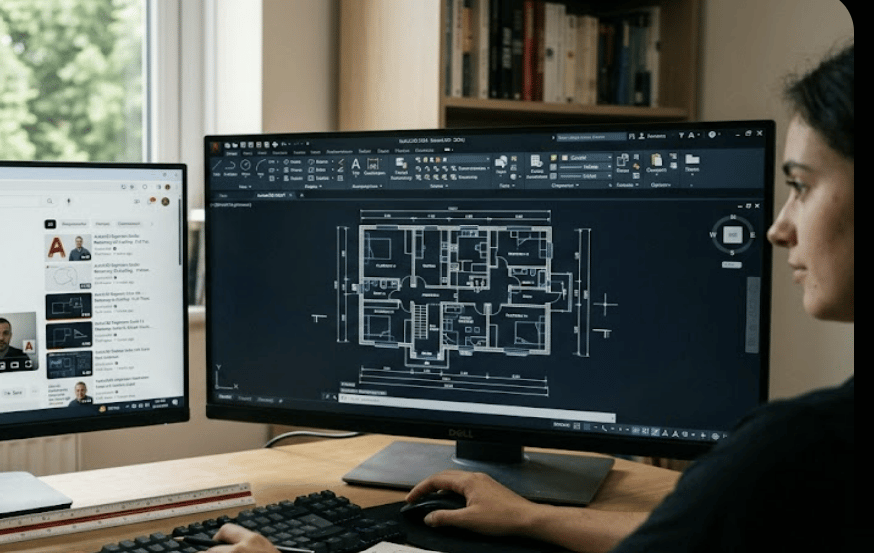
It is usually the point where learners start looking for something more structured. After a while, random tutorials stop being enough.
A good AutoCAD learning course doesn't just teach tools; it builds understanding step by step.
Here's how most well-designed courses are laid out:
- **Starting Phase**
- **Progression Phase**
- **Advanced Phase**
- **Architecture-Focused Tracks**
If you're wondering which online courses are best for AutoCAD beginners, platforms like Udemy or Coursera are common starting points. LinkedIn Learning is also useful, especially if you're looking at industry-oriented content.
Before enrolling, check a few things:
- Does it follow a proper sequence?
- Are there exercises or just lectures?
- Does it include real-world examples?
Courses do require more effort, but they remove the guesswork.
## **How Do AutoCAD Communities and Forums Help You Learn Faster?**

It is something people usually overlook at the beginning. You can watch hours of tutorials and still get stuck on something small. Maybe a command behaves differently, or your drawing doesn't look right. That's normal, and also where communities come in.
Here's what they actually help with:
- **Real answers, not generic ones**
You get solutions from people actively using AutoCAD software
- **Different ways of doing the same thing**
Helps you understand AutoCAD design beyond one method
- **Feedback on your work**
You can share drawings and get suggestions
- **Exposure to real workflows**
Helps you think like a professional
Platforms like Autodesk forums, Reddit, and LinkedIn groups are quite active. Discord communities are also growing, especially among students. You don't need them on day one, but once you start using them, the difference is noticeable.
## **What Are the Best Free vs Paid AutoCAD Learning Resources Worth Your Time?**
Most beginners ask this at some point, and there isn’t a clear answer. People usually begin with free resources since they’re easy to access and good enough to get a basic understanding of AutoCAD.
Free resources usually offer the following:
- YouTube guides that demonstrate the instructions and workflows graphically.
- Articles and guides for step-by-step instructions.
- Community discussions to find solutions to common problems.
They help at the start, but things can feel all over the place after a while. You might end up revisiting the same basics, and it's hard to judge if you're really improving. While paid resources are different. You usually get structured courses with a clearer path, along with certifications that make your skills easier to show.
Most of the time, using both works better. Starting with free resources helps you explore the software and get used to it. Once you are certain you want to continue, investing in a structured course can save time and reduce confusion later.
## **Which AutoCAD Certifications Are Recognized and Worth Pursuing in2026 ?**
Certifications might look like the final step, but that's not really how it works. They're just one part of the overall learning process.
You'll mostly come across a few common ones.
- **Autodesk Certified User (ACU):**
This is the basic level.It is generally the starting point where individuals begin to become familiar with AutoCAD.
- **Autodesk Certified Professional (ACP):**
This one is more advanced than ACU and is more commonly recognized in professional settings.
- **Specialized Certifications:**
These are area specific like AutoCAD 3D or AutoCAD architecture, depending upon what you wish to transition to.
Certification is beneficial only if you have real skills to back it up. They can help improve your resume, act as proof of what you've learned, and support your job applications.
Master BIM and Get Hired Faster
Join a community of 8500+ Architects and Engineers.
Explore Now
\*Limited seats available
## **Conclusion**
There’s no perfect way to learn AutoCAD. Most people figure it out along the way. Some start with YouTube, others go for structured courses, but in the end, staying consistent is what actually makes the difference.
You will progress much more easily if you keep practicing, use the right blend of resources, and don't rely on a single strategy.
If you want to improve your skills, consider taking the [Revit and BIM Online Certification Course](https://www.novatr.com/courses/building-information-modelling) by[Novatr](https://www.novatr.com/). It will give you more confidence, as you can apply your expertise in real-world settings, making it easier to get a job in the AEC industry.
You may also check out our [resources page](https://www.novatr.com/learning-hub) for additional information and materials to support your professional development.
## **FAQs**
### **1. What should beginners look for when choosing an AutoCAD course online?**
If you're just starting, don't go straight to advanced courses. Pick something that explains the basics and includes practice, not just videos.
### **2. Which AutoCAD certification is most recognized by architecture firms and employers?**
In most cases, the Autodesk Certified Professional (ACP) is the one employers recognize the most. But it's always better to combine certification with real work samples.
### **3. Are there any AutoCAD communities or forums where architects can ask questions and share knowledge?**
Yes, and they are more useful than most people think. Autodesk's official forums are a wonderful place to start, but many people also use Reddit, LinkedIn groups, and even Discord servers to learn. There, you'll often obtain useful answers, not simply textbook ones.
Was this content helpful to you
Like Yes
Dislike No
.png)
TABLE OF CONTENTS
BIM Is The New Standard. Are You Certified?
Get Certified in BIM
SHARE ON YOUR SOCIALS
Link Copied Successfully
Related articles
[.png) BIM Archi Best YouTube Channels, Courses & Communities to Learn Autodesk Construction Cloud 12 May 2026 5 min read](https://blog.novatr.com/blog/best-resources-to-learn-autodesk-construction-cloud) [ Why Continuous Learning is Crucial for Civil Engineers in 2026 4 November 2025 4 min read](https://blog.novatr.com/blog/why-continuous-learning-is-crucial-for-civil-engineers) [ Computational Design Beyond Code and Tools | Ar. Jayanaveena (Zaha Hadid Architects) 30 October 2025 4 min read](https://blog.novatr.com/blog/computational-design-beyond-code-and-tools-ar.-jayanaveena-zaha-hadid-architects) [.png) BIM Archi Best YouTube Channels, Courses & Communities to Learn SketchUp 30 April 2026 5 min read](https://blog.novatr.com/blog/best-resources-to-learn-sketchup)
Download Syllabus
## BIM Professional Program
Next Cohort
June 2026
Program Duration
7 Months
Premium Program benefits
8 Credentials from Autodesk, NSDC, Novatr
1 program. 10 career paths. Infinite Growth.
40+ ISO 19650 & RIBA real-world projects to practice
1-on-1 guidance. Access 400+ industry experts.
Access the biggest AEC-Tech community on the planet. 8500+ and counting
Curated for you by 100+ global BIM leaders.
Lifelong access to course content
Enter your details to download the program syllabus.
##### BIM Professional Program
June 2026, 7 Months
Your Name Invalid name.
Phone Number Enter a valid phone number
Email Please enter a valid email address.
Select years of experience\* Currently studying 0-1 years 1-2 years 2-4 years 4-8 years 8-10 years 10-12 years 12+ years Invalid selection.
Specialisation Select your background\* Architecture Civil Engineering Mechanical Engineering Electrical Engineering Invalid selection.
Are you professionally trained in interior design?
Yes
No
I agree to the [Terms of Use](https://www.novatr.com/terms-and-conditions) and [Privacy Policy](https://www.novatr.com/privacy-policy), and consent to be contacted by Email, Call, WhatsApp, or SMS.
Submit
Ready to skyrocket your career?
Begin your next chapter in AEC
with Novatr!
We are here to help you take the industry by storm with advanced, tech-first skills.
[Explore Courses](https://www.novatr.com/#courses)
Join our newsletter
Submit
Thank you for signing up.
We’ll send you a nice letter once per week. No spam.

Dare to Disrupt.
Join thousands of people who organise
work and life with Novatr.
Company
- [About Us](https://www.novatr.com/about)
- [BIM Professional Program v.2026](https://www.novatr.com/courses/bim-professional-program)
- [Masters Computational Design](https://www.novatr.com/courses/computational-design)
- [Become a Mentor](https://www.novatr.com/apply-as-mentor)
- [Hiring from Us](https://www.novatr.com/hire-from-us)
- [Careers at Novatr](https://www.novatr.com/career)
Resources
- [Blog](https://www.novatr.com/learning-hub)
- [Media Room](https://www.novatr.com/media-room-home-page)
- [Career Builder](https://www.novatr.com/career-navigator)
- [Events & Webinars](https://www.novatr.com/webinars)
- [FAQs & Support Center](https://www.novatr.com/contact-us)
- [Contact Us](https://www.novatr.com/contact-us)
- [Privacy Policy](https://www.novatr.com/privacy-policy)
- [Terms of Use](https://www.novatr.com/terms-and-conditions)
©2023 Oneistox Network Pvt. Ltd.
All Rights Reserved
```json
{
"@context" : "https://schema.org",
"@type" : "BlogPosting",
"author" : {
"@type" : "Person",
"name" : "Neha Singh",
"url" : "https://blog.novatr.com/blog/author/neha-singh"
},
"dateModified" : "2026-04-20T07:17:22.087Z",
"datePublished" : "2026-04-20T07:13:14.000Z",
"headline" : "Best YouTube Channels, Courses & Communities to Learn AutoCAD {{year}}",
"image" : [ "https://blog.novatr.com/hubfs/Blog%20Image%20(1).png" ],
"mainEntityOfPage" : {
"@id" : "https://blog.novatr.com/blog/best-resources-to-learn-autocad",
"@type" : "WebPage"
},
"publisher" : {
"@type" : "Organization",
"logo" : {
"@type" : "ImageObject",
"url" : "https://blog.novatr.com/hubfs/Novatr%20Prev%20OX-2.svg"
}
}
}
```