---
title: Which Project Management Tools Are Best for MEP Teams?
description: Explore how MEP engineers use project management software to streamline workflows, while MEP project management keeps teams aligned and efficient.
image: https://blog.novatr.com/hubfs/Best%20Project%20Management%20Tools%20for%20MEP%20Engineering%20Teams.png
---
[Blogs](https://www.novatr.com/learning-hub)
- [Architecture & Construction](https://www.novatr.com/learning-hub?category=Architecture+%26+Construction)
- [BIM](https://www.novatr.com/learning-hub?category=BIM)
- [Computational Design](https://www.novatr.com/learning-hub?category=Computational+Design)
- [Company News](https://www.novatr.com/learning-hub?category=Company+News)
- [Expert Talks](https://www.novatr.com/learning-hub?category=Expert+Talks)
Explore Courses
[Just Launched  BIM Professional Program v.2026 Take your career to the next level by mastering the real-world application of BIM. Know More](https://www.novatr.com/courses/bim-professional-program)
[ Master Computational Design Course Break into an advanced career by learning to apply the power of computation to the art of design. Know More](https://www.novatr.com/courses/computational-design)
[Blogs](https://www.novatr.com/learning-hub)
Explore Blogs
- [Architecture & Construction](https://www.novatr.com/learning-hub?category=Architecture+%26+Construction)
- [BIM](https://www.novatr.com/learning-hub?category=BIM)
- [Computational Design](https://www.novatr.com/learning-hub?category=Computational+Design)
- [Company News](https://www.novatr.com/learning-hub?category=Company+News)
- [Expert Talks](https://www.novatr.com/learning-hub?category=Expert+Talks)
Courses
- [BIM Professional Program v.2026](https://www.novatr.com/courses/bim-professional-program)
- [Master Computational Design](https://www.novatr.com/courses/computational-design)
- [MEP/](https://www.novatr.com/learning-hub?category=BIM)
Featured Article
# Best Project Management Tools for MEP Engineering Teams
.jpg)
Tanmay Gadade
October 28, 2025
6 min read


Engineering projects demand precise coordination, timely scheduling, and effective oversight across multiple disciplines. To achieve this, teams increasingly rely on MEP coordination software, which helps track tasks, monitor progress, and integrate workflows seamlessly. With the average MEP project engineer's salary in the USA around [$92,358](https://www.ziprecruiter.com/Salaries/Mep-Project-Engineer-Salary) per year, it highlights the importance of adopting the right tools to enhance productivity, reduce errors, and ensure projects are delivered efficiently.
In addition, digital construction tools facilitate communication across teams by centralizing data and standardizing documentation. They support milestone tracking, resource allocation, and progress reporting, enabling engineering teams to maintain alignment, uphold quality standards, and complete complex projects on schedule with greater clarity.
Unlock High-Paying Careers With BIM
Master BIM workflows, software and skills on real projects.
Apply Now
\*Limited seats available
## **Why Do MEP Engineering Teams Need Project Management Tools?**
MEP engineering projects require careful coordination of schedules, tasks, and team responsibilities across multiple disciplines. Using the right project management tools helps maintain organized workflows and ensures transparency without overcomplicating processes. The impact of digital collaboration tools on construction efficiency enhances communication and keeps project milestones visible for all stakeholders.
Here’s how project management tools benefit MEP teams:
- **Simplified Task Management:** Clearly defines responsibilities and deadlines, helping teams stay on track without confusion.
- **Improved Team Communication:** Centralized updates and notifications reduce misunderstandings between engineers, designers, and contractors.
- **Optimized Resource Allocation:** Ensures manpower, equipment, and materials are used efficiently, preventing shortages or idle resources.
- **Progress Visibility:** Provides real-time dashboards and reports to monitor project milestones and performance metrics.
- **Risk Reduction:** Detects scheduling conflicts or design issues early, minimizing costly mistakes and rework.
## **What Features Should MEP Teams Look for in Project Management Software?**
**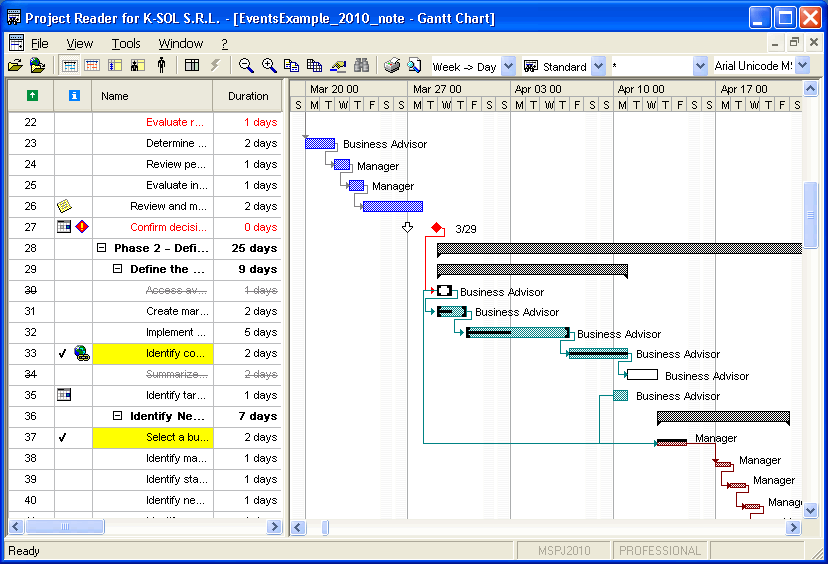**
Choosing the right project management tool for MEP projectsensures teams can access essential capabilities, track workflows efficiently, and coordinate activities seamlessly. Effective tools provide visibility across tasks, support organized operations, and enable MEP teams to manage complex project requirements with clarity and precision.
Here are the key features MEP teams need in project management platforms:
- **Task Prioritization and Scheduling:** Allows teams to organize and sequence tasks effectively, ensuring timely completion.
- **Real-Time Collaboration Tools:** Facilitates instant sharing of updates and documents across team members for clarity.
- **Resource Planning Capabilities:** Monitors personnel, equipment, and materials to maximize efficiency and reduce waste.
- **Progress Tracking and Reporting:** Uses **project tracking systems** to provide dashboards and analytics for evaluating milestones and overall performance.
- **Risk and Issue Management:** Detects potential conflicts early, allowing teams to address problems before they escalate.
Also Read: [BIM for Mechanical Engineers: A Complete Guide](https://www.novatr.com/blog/bim-for-mechanical-engineers)
## **Top Project Management Tools for MEP Engineering Teams**
Selecting the right software is essential for streamlining project execution, improving coordination, and maintaining clarity across tasks. The top collaboration platforms for construction projects help MEP teams manage multi-disciplinary workflows efficiently, keeping timelines, resources, and responsibilities organized.
Leading platforms for efficient MEP project management:
### **1. Autodesk BIM 360**
This platform centralizes project data, enhancing document control and model coordination. Its robust integration supports workflow management for engineers, allowing real-time collaboration across complex MEP project models.
### **2. Trimble ProjectSight**
Trimble ProjectSight offers comprehensive cost tracking, reporting, and issue management. It streamlines project oversight and shows teams how to improve productivity with project management software through clear processes and structured accountability.
### **3. Procore**
Procore enables project-wide transparency by connecting teams and resources. Its system allows for task tracking and reporting, ensuring efficient planning and execution across multi-disciplinary MEP projects.
### **4. PlanGrid (Autodesk Build)**
PlanGrid (Autodesk Build) enhances field collaboration by giving teams instant access to drawings and project documents. Its intuitive interface allows teams to track changes, monitor milestones, and maintain accuracy throughout execution, leveraging construction scheduling tools to keep projects on time and coordinated.
### **5. MS Project**
MS Project offers advanced scheduling, resource allocation, and progress tracking features. Its structured interface helps teams plan and coordinate complex MEP project timelines effectively.
### **6. Primavera P6**
Primavera P6 is ideal for large-scale projects, offering detailed project scheduling and risk analysis. It ensures teams manage dependencies and critical paths efficiently across multiple engineering disciplines.
### **7. Asana**
Asana streamlines task dependencies with visual timelines, helping MEP teams track critical paths, adjust schedules, and monitor overlapping responsibilities efficiently, ensuring accountability and smooth workflow management across complex projects.
### **8. Trello**
Trello provides an intuitive card-based workflow for organizing tasks and deadlines. Its simplicity helps teams maintain visibility over project progress while coordinating multi-step activities.
### **9. Monday.com**
Monday.com enables flexible workflow customization, tracking assignments, and progress. Teams can align resources and deadlines efficiently while ensuring project tasks are completed systematically.
### **10. Smartsheet**
Smartsheet combines spreadsheet familiarity with project tracking, reporting, and collaboration features. It supports structured data management, ensuring timelines, budgets, and responsibilities remain clear throughout MEP projects.
## **How Do These Tools Improve Collaboration, Scheduling, and Resource Allocation?**
**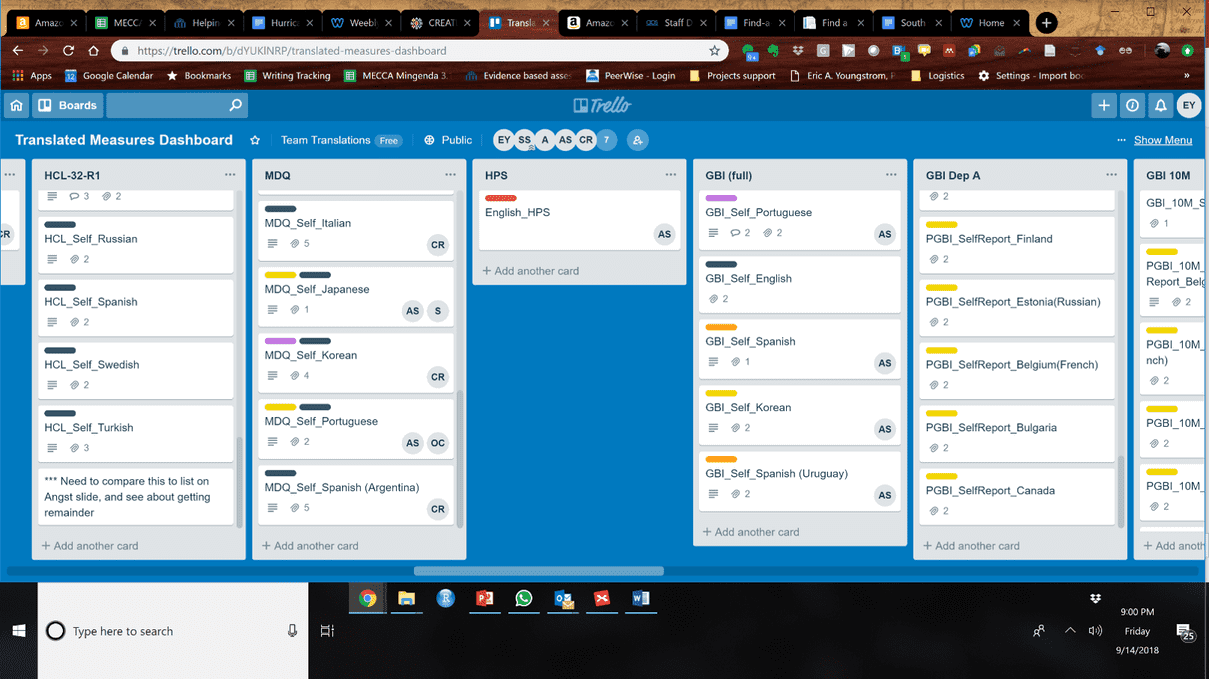**
Project management solutions enable MEP teams to coordinate complex tasks, maintain clarity across workflows, and ensure resources are used efficiently. Leveraging construction collaboration software allows teams to track progress, communicate seamlessly, and keep project timelines aligned while supporting execution.
Key ways tools improve collaboration, scheduling, and resource allocation:
- **Enhanced Communication:** Enables precise information sharing, keeping teams aligned and reducing errors across all project activities.
- **Structured Task Scheduling:** Organizes and sequences tasks, ensuring deadlines are met and milestones are achieved efficiently.
- **Efficient Resource Management:** Allocates personnel, equipment, and materials effectively, optimizing usage and minimizing idle resources, improving engineering team productivity.
- **Comprehensive Progress Tracking:** Provides dashboards and reports to monitor project status, identify delays, and maintain clarity.
- **Seamless Multi-Discipline Coordination:** Enables different engineering teams to work together efficiently, showing how MEP engineers manage multi-disciplinary collaboration.
Also Read: [How Project-Based Learning Helps You Build a Strong Portfolio for MEP Engineers](https://www.novatr.com/blog/build-mep-portfolio-with-project-based-learning)
## **What Role Does BIM Integration Play in Project Management?**
**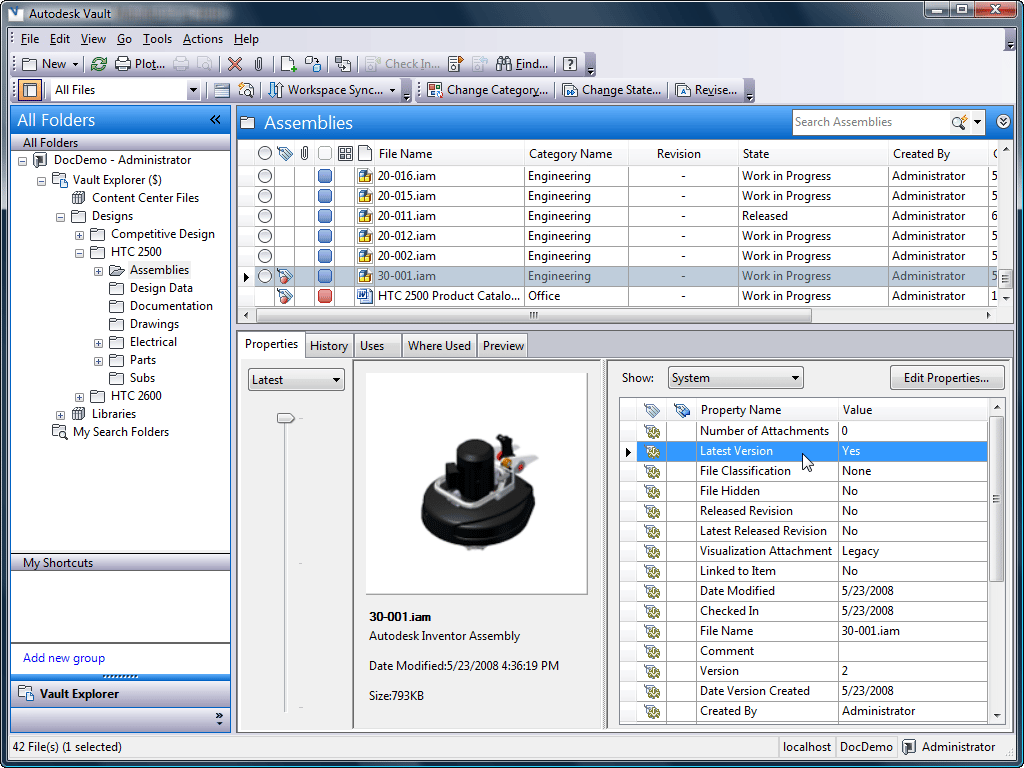**
BIM integration allows teams to visualize project models, coordinate multiple disciplines, and track design changes efficiently. By leveraging [BIM for MEP engineers](https://www.novatr.com/us/courses/bim-for-mep-engineers), teams can maintain consistency across drawings and documentation, supporting better planning and informed decision-making throughout the project lifecycle.
Key contributions of BIM integration in project management:
- Provides a centralized digital model, allowing teams to access real-time design updates and minimize errors during execution.
- Improves clash detection between systems, helping identify potential conflicts before construction begins and saving time and costs.
- Enhances planning efficiency, enabling construction scheduling and task management for MEP engineers with accurate timelines and resource allocation.
- Supports integration with MEP software to streamline workflows and enhance team coordination.
- Provides actionable insights on performance, risks, and progress for better project management.
Master BIM and Get Hired Faster
Join a community of 8500+ Architects and Engineers.
Explore Now
\*Limited seats available
## Conclusion
Effective project management in MEP engineering relies on structured tools that integrate workflows, improve coordination, and maintain visibility across teams. By centralizing data, tracking progress, and optimizing resource use, these tools ensure that complex projects are executed efficiently and that potential delays or errors are minimized, supporting consistent and accurate project delivery.
For teams looking to enhance their expertise, the [BIM Course for MEP Engineers](https://www.novatr.com/us/courses/bim-for-mep-engineers) offered by [Novatr](https://www.novatr.com/us) provides practical guidance on integrating BIM into project workflows. To explore additional insights and resources, visit our [resource page](https://www.novatr.com/learning-hub), which offers detailed references on best practices, digital tools, and strategies for improving project efficiency in MEP engineering.
> [View this post on Instagram](https://www.instagram.com/p/DJRVDpwvopI/?utm_source=ig_embed&utm_campaign=loading)
>
> [A post shared by Kritika | Architectural illustrator | iPad Artist (@art.ikki)](https://www.instagram.com/p/DJRVDpwvopI/?utm_source=ig_embed&utm_campaign=loading)
## **FAQs**
### **1. What features should MEP engineers look for in project management software?**
Ans: MEP engineers should seek features that enable task tracking, workflow visibility, resource planning, and real-time collaboration.
### **2. How do project management tools improve coordination among MEP, architects, and contractors?**
Ans: They improve coordination by centralizing data, streamlining communication, and aligning tasks across all stakeholders.
### **3. Which project management tools are best for BIM-integrated workflows?**
Ans: Tools that support model coordination, clash detection, and BIM integration for MEP engineers are best suited.
Was this content helpful to you
Like Yes
Dislike No

TABLE OF CONTENTS
BIM Is The New Standard. Are You Certified?
Get Certified in BIM
SHARE ON YOUR SOCIALS
Link Copied Successfully
Related articles
[ CIVIL Must Used BIM Softwares By Construction project manager in 2026 18 August 2025 4 min read](https://blog.novatr.com/blog/must-used-bim-softwares-by-construction-project-manager) [ What Jobs Can You Get After Mastering Revit Software? 18 February 2026 4 min read](https://blog.novatr.com/blog/jobs-after-mastering-revit) [ CIVIL Top 5 Construction Management Software Courses to Boost Your Career in the USA 9 July 2025 6 min read](https://blog.novatr.com/blog/construction-management-software-courses-to-boost-your-career-in-the-usa) [.png) CIVIL Using BIM Effectively for Efficient Project Management in Civil Engineering 29 May 2024 13 min read](https://blog.novatr.com/blog/bim-for-project-management)
Download Syllabus
## BIM Professional Program
Next Cohort
June 2026
Program Duration
7 Months
Premium Program benefits
8 Credentials from Autodesk, NSDC, Novatr
1 program. 10 career paths. Infinite Growth.
40+ ISO 19650 & RIBA real-world projects to practice
1-on-1 guidance. Access 400+ industry experts.
Access the biggest AEC-Tech community on the planet. 8500+ and counting
Curated for you by 100+ global BIM leaders.
Lifelong access to course content
Enter your details to download the program syllabus.
##### BIM Professional Program
June 2026, 7 Months
Your Name Invalid name.
Phone Number Enter a valid phone number
Email Please enter a valid email address.
Select years of experience\* Currently studying 0-1 years 1-2 years 2-4 years 4-8 years 8-10 years 10-12 years 12+ years Invalid selection.
Specialisation Select your background\* Architecture Civil Engineering Mechanical Engineering Electrical Engineering Invalid selection.
Are you professionally trained in interior design?
Yes
No
I agree to the [Terms of Use](https://www.novatr.com/terms-and-conditions) and [Privacy Policy](https://www.novatr.com/privacy-policy), and consent to be contacted by Email, Call, WhatsApp, or SMS.
Submit
Ready to skyrocket your career?
Begin your next chapter in AEC
with Novatr!
We are here to help you take the industry by storm with advanced, tech-first skills.
[Explore Courses](https://www.novatr.com/#courses)
Join our newsletter
Submit
Thank you for signing up.
We’ll send you a nice letter once per week. No spam.

Dare to Disrupt.
Join thousands of people who organise
work and life with Novatr.
Company
- [About Us](https://www.novatr.com/about)
- [BIM Professional Program v.2026](https://www.novatr.com/courses/bim-professional-program)
- [Masters Computational Design](https://www.novatr.com/courses/computational-design)
- [Become a Mentor](https://www.novatr.com/apply-as-mentor)
- [Hiring from Us](https://www.novatr.com/hire-from-us)
- [Careers at Novatr](https://www.novatr.com/career)
Resources
- [Blog](https://www.novatr.com/learning-hub)
- [Media Room](https://www.novatr.com/media-room-home-page)
- [Career Builder](https://www.novatr.com/career-navigator)
- [Events & Webinars](https://www.novatr.com/webinars)
- [FAQs & Support Center](https://www.novatr.com/contact-us)
- [Contact Us](https://www.novatr.com/contact-us)
- [Privacy Policy](https://www.novatr.com/privacy-policy)
- [Terms of Use](https://www.novatr.com/terms-and-conditions)
©2023 Oneistox Network Pvt. Ltd.
All Rights Reserved
```json
{
"@context" : "https://schema.org",
"@type" : "BlogPosting",
"author" : {
"@type" : "Person",
"name" : "Tanmay Gadade",
"url" : "https://blog.novatr.com/blog/author/tanmay"
},
"dateModified" : "2025-10-28T05:57:15.228Z",
"datePublished" : "2025-10-28T05:49:52.000Z",
"headline" : "Which Project Management Tools Are Best for MEP Teams?",
"image" : [ "https://blog.novatr.com/hubfs/Best%20Project%20Management%20Tools%20for%20MEP%20Engineering%20Teams.png" ],
"mainEntityOfPage" : {
"@id" : "https://blog.novatr.com/blog/best-project-management-tools-for-mep",
"@type" : "WebPage"
},
"publisher" : {
"@type" : "Organization",
"logo" : {
"@type" : "ImageObject",
"url" : "https://blog.novatr.com/hubfs/Novatr%20Prev%20OX-2.svg"
}
}
}
```