Best Architecture Software for Modern Designers (2026)

In the modern construction world, every building is actually constructed twice: first inside a computer, and then on the job site. While the classic image of an architect involves a messy table covered in rolled-up blueprints, today's professionals rely on the best architecture software practical software for architects to turn dreams into precise plans, often within versatile architecture design software. This digital evolution ensures that a wall isn't just a sketched line on paper, but a calculated part of a structure before a single brick is ever laid.

This guide demystifies modern architecture design software, contrasting intuitive 3D "digital clay" modeling with data-rich BIM "smart spreadsheets" to show when each is best. It compares SketchUp, AutoCAD, and Revit core choices in architecture cad software so you can align tools with goals from quick visualizations and precise 2D drafting to professional BIM workflows. It also explains how rendering and real-time visualization add realism, along with the hardware demands behind them. A simple action plan closes the loop: audit hardware, define goals, test trials, and learn with targeted tutorials.

This transition from graphite to pixels is defined by CAD, or Computer-Aided Design, a core type of architecture design software used by software for architects. Think of it as "Digital Drafting" , a workflow where your ruler never slips, and every mistake disappears with a simple keystroke. This capability is the foundation of learning how to choose architecture software for beginners . By mastering architecture cad software, you gain the ability to copy, paste, and modify complex designs instantly, saving hours of manual labor compared to traditional drawing. 

BIM Professional Course for Architects V2.0

Learn Revit and 15+ BIM software with industry workflows in just 7 months.

Apply now

*Limited seats available

Why Your Software Choice Depends on 'Digital Clay' vs. 'Smart Spreadsheets'

Moving beyond simple 2D lines often feels like playing with digital clay. In standard 3D modeling, you push and pull virtual shapes to create a visual representation of your idea perfect for showing a partner exactly how a new kitchen island might look. However, the computer usually sees these shapes as hollow boxes rather than actual brick or wood. While this approach works wonders for quick creative sketches, it falls short when you need to calculate exactly how much lumber to buy.

Building Information Modeling, or BIM, solves this by acting like a smart spreadsheet hiding behind a 3D view. In a BIM environment, you aren't just drawing a rectangle; you are placing a "parametric object" that understands it is a window. It holds data about its glass type, cost, and weight. If you decide to change the ceiling height, the software automatically adjusts the attached walls and recalculates the materials required, turning a drawing into a data-driven design.

To help you visualize the difference, consider how these approaches compare:

  • Ease of Use: "Digital Clay" tools (like SketchUp) are intuitive and fast to learn, whereas BIM tools (like Revit) generally require dedicated study.

  • Data Depth: Modeling offers surface-level visuals; BIM provides deep construction data.

  • Primary Goal: Use modeling to sell the look ; use BIM to manage the build.

For a DIY renovation, a visual model might be all you need. However, professionals rely on BIM to prevent expensive budget surprises before construction begins. With the distinction between sketching and engineering clear, finding the right balance between the heavy hitters AutoCAD, SketchUp, and Revit becomes the priority.

Finding the Right Balance Between AutoCAD, SketchUp, and Revit

Navigating the software market can feel like walking into a massive hardware store without a shopping list. While there are dozens of niche programs available, the architecture world revolves around three primary ecosystems of architecture design software that dictate how most buildings are designed today and that many software for architects rely on. Your choice depends entirely on whether you are planning a simple weekend deck project or aiming for a career in commercial construction.

Consider this breakdown of the industry standards to help you choose your starting point:

  • SketchUp: Best for quickly visualizing 3D ideas (like a DIY renovation). Learning Curve: 3/10.

  • AutoCAD: Best for precise 2D floor plans and technical drawings. Learning Curve: 6/10.

  • Revit: Best for professional, data-heavy building systems (BIM). Learning Curve: 9/10.

Think of these programs as different tools in a carpenter's belt. If you need absolute 2D precision like drawing a digital blueprint for a local council permit AutoCAD is the industry standard for professional drafting software for residential projects and a leading piece of architecture cad software. It functions like an infinite digital drawing board where lines are exact and measurements are perfect. However, if your goal is to "walk through" a new kitchen layout before buying cabinets, SketchUp offers the most intuitive path to 3D visualization.

For those looking to enter the professional industry, learning a BIM tool is eventually non-negotiable. While the debate often centers on Revit vs ArchiCAD for large scale projects, Revit remains the dominant force in North America. These tools manage everything from plumbing routes to structural integrity, making them overkill for a backyard shed but essential for a hospital. Once you have built your structure structurally, the next challenge is making it look photorealistic.
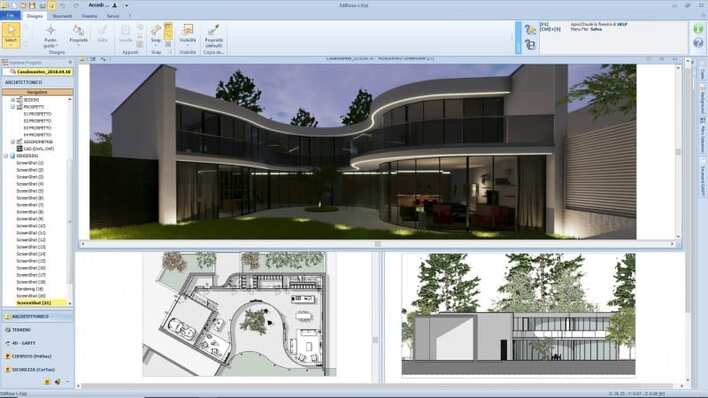
Creating a design using architecture software

How Rendering Software Adds the 'Wow' Factor

Once your digital walls are up, the raw 3D model often looks like a collection of grey, cartoonish blocks. This is where rendering steps in to act as a virtual photographer, applying realistic textures like oak flooring or marble countertops and simulating exactly how the sun hits them. The best software for 3D architectural rendering does more than just make a pretty picture; it is a critical design tool for testing reality before spending a dime on construction. For instance, accurate lighting features allow you to simulate a July afternoon to ensure a new kitchen window won't blind you while washing dishes, or verify that your chosen paint color doesn't look too gloomy in evening shadows.

Advancements in gaming technology have completely revolutionized how we interact with these virtual spaces. While older programs required hours to "develop" a single image, modern tools offer real-time architectural visualization, allowing you to walk through your design instantly, much like a character in a high-end video game. This speed is often powered by "ray-tracing," a process where high-performance rendering engines track every individual beam of digital light to create hyper-realistic reflections on glass and water. However, this visual magic requires significant computer power, specifically a dedicated graphics card, so you must verify your hardware can handle the load before diving in.


Learn Revit and 15+ BIM software with industry workflows in just 7 months.

Apply now

Your Architecture Software Action Plan

You've moved past the initial confusion of acronyms to see these tools for what they really are: digital drafting tables and virtual clay. You don't need a professional license or an expensive subscription to start visualizing your dream home or career today. Whether you explore free open source alternatives to AutoCAD like Blender or start sketching on mobile apps for architectural site analysis, the only wrong choice is standing still.

To overcome analysis paralysis, follow this simple roadmap:

  1. Audit Hardware: Check if your computer meets the "Recommended" specs, not just the "Minimum."

  2. Define the Goal: Choose a simple 2D tool for renovations or a 3D modeler for creative concepts.

  3. Test Drive: Download a 30-day free trial or a dedicated free version before buying.

  4. Start Learning: Search specifically for "first hour" tutorials to build your first room immediately.

The best architects didn't start with skyscrapers; they started with a single line. The path is clear, open a blank file and start building.

FAQs

1. What's the difference between "digital clay" 3D modeling and BIM "smart spreadsheets" and why does it matter?

Digital clay tools let you quickly push and pull shapes to visualize ideas, but the computer treats those shapes as hollow boxes. BIM treats elements as parametric objects that "know" what they are (e.g., a window with glass type, cost, and weight). Modeling is great for selling the look; BIM is built to manage the build automatically updating related elements and material takeoffs when you change the design.

2. Which software should I learn first: SketchUp, AutoCAD, or Revit?

Match the tool to your goal. Choose SketchUp (learning curve 3/10) for fast, intuitive 3D concepting and DIY visualizations. Pick AutoCAD (6/10) for precise 2D drafting like permit-ready floor plans. Go with Revit (9/10) when you need professional BIM workflows that handle systems, quantities, and coordination---especially if you're aiming at commercial practice. Revit is dominant in North America, though ArchiCAD is also used for large projects.

3. When is BIM essential, and when is it overkill?

For a simple DIY renovation or a quick concept, standard 3D modeling usually suffices. BIM becomes essential as project complexity and risk grow---when coordinating structure, MEP, quantities, and costs to avoid budget surprises. It's overkill for a backyard shed, but indispensable for complex buildings like hospitals.

4. Do I really need rendering and real-time visualization? What hardware should I plan for?

Rendering turns gray models into realistic scenes, letting you test materials and lighting (e.g., how a July afternoon hits your kitchen). Modern real-time tools provide game-like walkthroughs using ray tracing, but they demand significant GPU power. Before diving in, verify your machine meets recommended (not just minimum) specs and has a dedicated graphics card.

5. How can I get started without a big budget or steep learning curve?

Start small and iterate. Audit your hardware, define a clear goal (2D drafting vs. 3D concepting), and try 30-day trials or free versions. Explore free/open-source options like Blender and use targeted "first hour" tutorials to build your first room fast. Mobile apps can help with site analysis. The only wrong move is not starting---open a blank file and draw the first line.

Was this content helpful to you

Dislike No

TABLE OF CONTENTS

Download Syllabus
BIM Professional Course for Civil Engineers

course benefits

40+ live & bonus sessions

1 RIBA-structured capstone project

Learn 8+ BIM software

Autodesk & NSDC certifications

6 guided career sessions

Lifelong access to course content & community

Career counselling & interview preparation

Enter your details to download the course syllabus.

Download Syllabus
BIM Professional Course for Architects V2.0

course benefits

70+ live sessions

3+ RIBA and ISO 19650 structured capstone projects

18+ BIM software access

10+ guided career sessions

Certificates from Autodesk and NSDC

Lifelong access to course content & community

Career counselling & interview preparation

Enter your details to download the course syllabus.

Download Syllabus
Master Computational Design Course for Real-World Application

course benefits

80+ live sessions

50+ assignments

5+ softwares, 15+ plugins

Career counselling and interview prep

Lifelong access to to course content & community

Enter your details to download the course syllabus.

Download Syllabus
Advanced Interior Design with AI

course benefits

Simulated project based learning

Career counselling and interview prep

Lifelong access to course content

Learn 8+ software

3 Certificates of Achievement

Enter your details to download the course syllabus.

Download Syllabus
BIM Professional course for MEP Engineers

course benefits

Autodesk and NSDC Professional Certificates

12+ BIM softwares and plug-ins

80+ hours of live classes

Create 10+ toolkits to kickstart your MEP BIM project.

Dedicated Program Manager and Industry Guide Support

1:1 Career Mentoring

Networking with AEC Industry Professionals

Top 10% learners get exclusive Innovation bootcamp access.

ISO 19650 for BIM workflows

Enter your details to download the course syllabus.

Ready to skyrocket your career?

Begin your next chapter in AEC

with Novatr!

We are here to help you take the industry by storm with advanced, tech-first skills.