---
title: Autodesk Construction Cloud Shortcuts for Productivity 2026
description: Learn Autodesk Construction Cloud shortcuts, keyboard tips, and productivity hacks to work faster, improve workflows, and boost project efficiency.
image: https://blog.novatr.com/hubfs/Blog%20Image%20(18).png
---
[Blogs](https://www.novatr.com/learning-hub)
- [Architecture & Construction](https://www.novatr.com/learning-hub?category=Architecture+%26+Construction)
- [BIM](https://www.novatr.com/learning-hub?category=BIM)
- [Computational Design](https://www.novatr.com/learning-hub?category=Computational+Design)
- [Company News](https://www.novatr.com/learning-hub?category=Company+News)
- [Expert Talks](https://www.novatr.com/learning-hub?category=Expert+Talks)
Explore Courses
[Just Launched  BIM Professional Program v.2026 Take your career to the next level by mastering the real-world application of BIM. Know More](https://www.novatr.com/courses/bim-professional-program)
[ Master Computational Design Course Break into an advanced career by learning to apply the power of computation to the art of design. Know More](https://www.novatr.com/courses/computational-design)
[Blogs](https://www.novatr.com/learning-hub)
Explore Blogs
- [Architecture & Construction](https://www.novatr.com/learning-hub?category=Architecture+%26+Construction)
- [BIM](https://www.novatr.com/learning-hub?category=BIM)
- [Computational Design](https://www.novatr.com/learning-hub?category=Computational+Design)
- [Company News](https://www.novatr.com/learning-hub?category=Company+News)
- [Expert Talks](https://www.novatr.com/learning-hub?category=Expert+Talks)
Courses
- [BIM Professional Program v.2026](https://www.novatr.com/courses/bim-professional-program)
- [Master Computational Design](https://www.novatr.com/courses/computational-design)
- [Archi/](https://www.novatr.com/learning-hub?category=BIM)
Featured Article
# Keyboard Shortcuts and Productivity Hacks in Autodesk Construction Cloud

Neha Singh
May 12, 2026
4 min read
.png)

In modern construction projects, speed and accuracy are crucial. Digital tools are now the key focus of teams’ design, coordination, and delivery. Optimizing workflows on cloud-based construction platforms can enhance project efficiency by as much as [20%](https://www.researchgate.net/publication/394567193_Technological_Innovation_and_Project_Benefit_Improvement_in_Construction_Management#:~:text=comprehensive%20benefits%20improving%20by-,20%E2%80%9330%25,-.%20Issues%20such%20as%20insufficient), according to recent industry research. That’s why learning the shortcuts and productivity tricks of Autodesk Construction Cloud is becoming critical for architects and AEC professionals.
Automation tools together with correct keyboard shortcuts and cloud usage tips enable teams to complete their project work in 2026 because these tools increase work speed while they cut down on time and decrease the need for manual labor which occurs during the complete project cycle.
## **Key Takeaways**
- Autodesk Construction Cloud shortcuts provide users with tools to decrease their work repetitions while they achieve greater productivity.
- ACC keyboard shortcuts and commands enable users to navigate content while they interact with models.
- The implementation of workflow tips and templates will give you a method to achieve uniformity across your various projects.
- When used properly, these ACC productivity tools and features will deliver better results for your work efficiency.
- The construction cloud efficiency techniques mentioned above will help minimize delays and rework in the workflow.
Unlock High-Paying Careers With BIM
Master BIM workflows, software and skills on real projects.
Apply Now
\*Limited seats available
## **What Are the Most Useful Keyboard Shortcuts in Autodesk Construction Cloud in 2026?**
These are fundamental AEC tools that enhance productivity on a daily basis.
- **Fast Zoom In/Out (Scroll and/or + or - keys):** to make quick adjustments to views when reviewing models or drawings
- **Pan View (Spacebar + Drag):** is used to move smoothly across large drawings
- **Fit to Screen (F key):** will center and size the model when it is pressed
- **Select tool (V key):** quickly switch back to selection mode
- **Measure Tool (M key):** assists in taking quick measurements when designing
- **Markup Tool (K key):** speeds up adding comments and annotations
These are some of the keyboard shortcuts and commands available for the ACC that will help you save time when using them and when navigating the tools. These are very basic, yet effective tips for software daily use.
## **Why Do Keyboard Shortcuts Matter for Architectural Productivity?**
The new keyboard shortcuts have a direct effect on the way that architects and engineers work in a digital world. The tools are on your fingertips, rather than in several menus.
- **Shortcuts Make Tasks More Efficient and Faster:** Shortcuts minimize the number of clicks required to perform tasks.
- **Easy Menu Navigation:** less time navigating menus, more time designing & coordinating.
- **More rapid Tool access:** more rapid reduction of errors during repetitive operations
- **Better Collaboration:** faster updates, enhanced mark up, enhanced communication between teams
- **Efficient Methods:** Groups are more efficient to do more work in less time.
The efficiency tips are especially useful for extensive building jobs, where there are a number of events.
## **Which Navigation and Viewing Shortcuts Save the Most Time in ACC?**
Navigation is an integral part of Autodesk Construction Cloud. The ability to flow smoothly through models enhances speed and accuracy.
- **Orbit Tool (Shift + Drag):** Rotates 3D models to inspect them more easily
- **Zoom to Selection:** Zooms directly to the elements selected
- **Home View Reset:** Instantly resets to the default project view
- **Full Screen Mode:** clears the way of distractions to gain improved visibility
- **Layer Visibility Toggle:** can be used to display or hide certain elements
The cloud tips aid the users in reviewing complex models in a faster manner and enhance the decision-making process. They are also vital in mastering the ability to work faster in Autodesk Construction Cloud.
Also Read: [10 Inspiring Sustainable Architecture Firms in India ](https://www.novatr.com/blog/sustainable-architecture-firms-in-india)
## **What Markup and Review Shortcuts Should Architects Use Daily?**
Markup tools are key to communicating in design review and coordination.
- **Quick Comment Tool:** This tool provides instant notes, without opening several menus
- **Arrow and Shape Tools:** Help users to mark problems in drawings clearly
- **Text Annotation Shortcut:** Add detailed feedback quickly
- **Undo/Redo (Ctrl + Z / Ctrl + Y):** Fix errors as they occur during reviews
- **Snapshot Tool:** Take and publish a snapshot of a specific portion of drawings
These hacks enhance clarity when working together and decrease the turnaround time for feedback.
## **How Can Workflow Automation and Templates Improve Productivity in ACC?**
Automation and templates reduce repetitive work and provide uniformity of projects. All are part of a suite of high-end ACC productivity features and tools.
- Follow standard Templates: consistent file structure and file names
- Automated Workflows: simplify approval and review flow
- Automatically assign and track issues in the project with the Issue Tracking Systems.
- Document Version Control: provides that teams are using the latest versions of documents
- Predefined Markup Sets: re-use common annotations to speed up reviews
These methods enable teams to understand how to optimize workflows in the construction cloud to reduce manual work and errors.
## **What Are the Best Productivity Hacks Architects Should Use in 2026?**
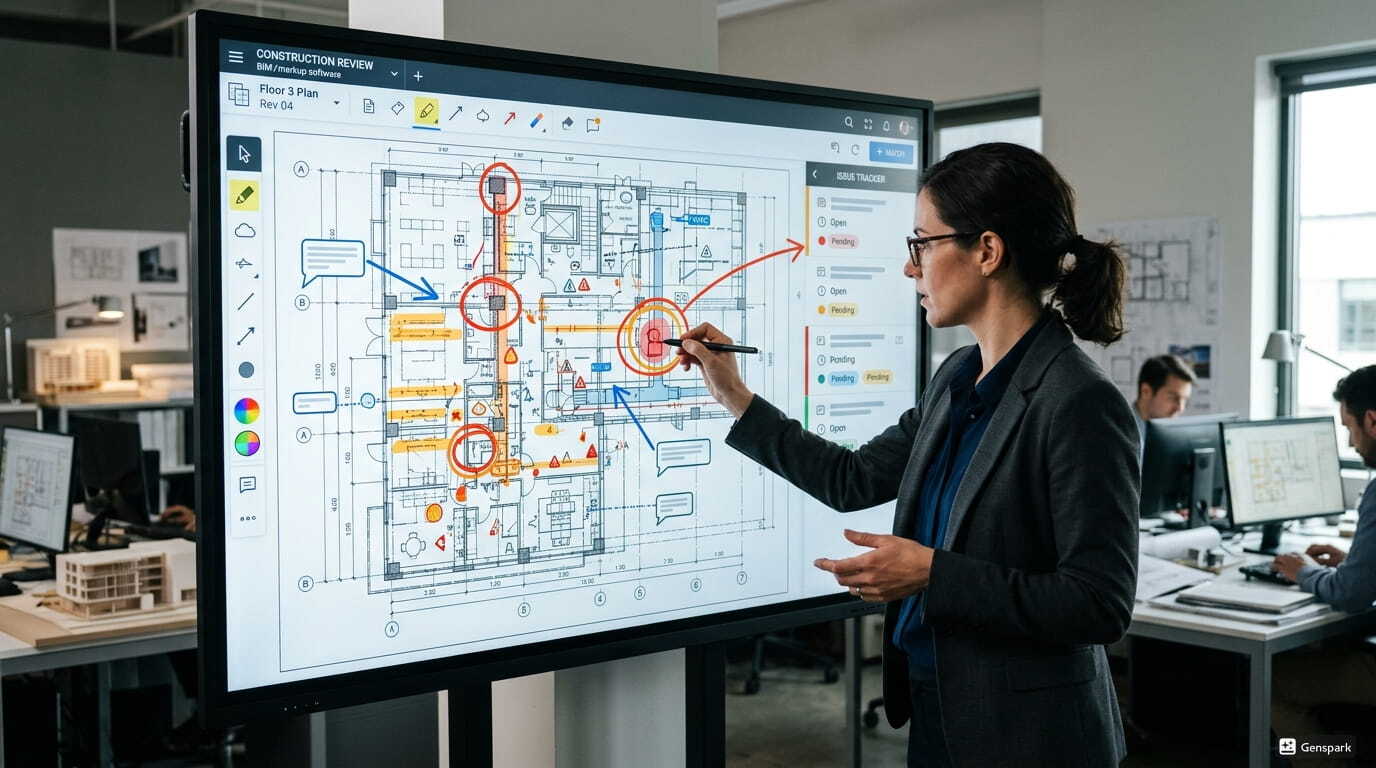
Apart from shortcuts, there are some tips which can make you work more efficiently.
- Make useful tools more accessible by adding them to the Favorites and Tool Shortcuts.
- File Organization: You'll find it easier to locate files with well organized folders.
- Leverage Cloud Syncing: have the latest information for all the team members
- Take Advantage of Batch Uploads: upload multiple files simultaneously to save time
- Enable Notifications: Be notified without getting overwhelmed with updates.
- Evaluate project information regularly for issues and improve processes; also notify stakeholders of any potential issues early in the project
- Connect with Other Tools: integrate with other cloud based construction productivity tools
These are the processes you must go through in order to discover the most effective productivity hacks in ACC to improve productivity within projects.
[Also Read: 15 Best Architecture Firms in Bangalore for Internships ](https://www.novatr.com/blog/bim-certifications)
Master BIM and Get Hired Faster
Join a community of 8500+ Architects and Engineers.
Explore Now
\*Limited seats available
## **Conclusion**
Leveraging Autodesk Construction Cloud shortcuts, smart workflows, and automation can greatly enhance construction efficiency. These tools offer architects a way to increase productivity, prevent mistakes, and collaborate with their team on projects. Ensuring efficient and repeatable processes and application of productivity hacks makes ACC a wonderful enabling platform for the modern delivery of construction.
Now available, [Novatr's](https://www.novatr.com/) [BIM Course for Architects](https://www.novatr.com/courses/building-information-modelling) will help professionals develop strong BIM and cloud workflow skills. It equips learners to enter into real project situations.
See the [resource page](https://www.novatr.com/learning-hub) for more guides and learning resources and get practical knowledge and industry know-how.
## **FAQs**
### **1. Are there default keyboard shortcuts in Autodesk Construction Cloud?**
The software includes preconfigured keyboard shortcuts which users can access through its navigation and markup and view functions. The tools enable users to complete their work more efficiently because they eliminate the need for users to navigate through menus.
### **2. How can keyboard shortcuts improve productivity in Autodesk Construction Cloud?**
Users can accomplish their work tasks more efficiently in Autodesk Construction Cloud by using keyboard shortcuts. This will be beneficial for the construction cloud operation as it will reduce any operational errors and improve productivity.
### **3. Can you customize keyboard shortcuts in Autodesk Construction Cloud?**
Some tools allow users to modify their settings to a limited extent. Users can use templates and workflows to gain better control of their work processes which will lead to higher productivity.
Was this content helpful to you
Like Yes
Dislike No
.png)
TABLE OF CONTENTS
BIM Is The New Standard. Are You Certified?
Get Certified in BIM
SHARE ON YOUR SOCIALS
Link Copied Successfully
Related articles
[.png) BIM Archi Best YouTube Channels, Courses & Communities to Learn SketchUp 30 April 2026 5 min read](https://blog.novatr.com/blog/best-resources-to-learn-sketchup) [.png) BIM Archi Best Features of Autodesk Construction Cloud Architects Should Be Using This Year 11 May 2026 5 min read](https://blog.novatr.com/blog/best-autodesk-construction-cloud-features-for-architects) [ BIM Archi What Is Autodesk Construction Cloud and Why Do Architects Use It? 11 May 2026 4 min read](https://blog.novatr.com/blog/what-is-autodesk-construction-cloud-and-why-do-architects-use-it) [.png) BIM Archi Best YouTube Channels, Courses & Communities to Learn BIM 360 28 April 2026 6 min read](https://blog.novatr.com/blog/best-resources-to-learn-bim-360)
Download Syllabus
## BIM Professional Program
Next Cohort
June 2026
Program Duration
7 Months
Premium Program benefits
8 Credentials from Autodesk, NSDC, Novatr
1 program. 10 career paths. Infinite Growth.
40+ ISO 19650 & RIBA real-world projects to practice
1-on-1 guidance. Access 400+ industry experts.
Access the biggest AEC-Tech community on the planet. 8500+ and counting
Curated for you by 100+ global BIM leaders.
Lifelong access to course content
Enter your details to download the program syllabus.
##### BIM Professional Program
June 2026, 7 Months
Your Name Invalid name.
Phone Number Enter a valid phone number
Email Please enter a valid email address.
Select years of experience\* Currently studying 0-1 years 1-2 years 2-4 years 4-8 years 8-10 years 10-12 years 12+ years Invalid selection.
Specialisation Select your background\* Architecture Civil Engineering Mechanical Engineering Electrical Engineering Invalid selection.
Are you professionally trained in interior design?
Yes
No
I agree to the [Terms of Use](https://www.novatr.com/terms-and-conditions) and [Privacy Policy](https://www.novatr.com/privacy-policy), and consent to be contacted by Email, Call, WhatsApp, or SMS.
Submit
Ready to skyrocket your career?
Begin your next chapter in AEC
with Novatr!
We are here to help you take the industry by storm with advanced, tech-first skills.
[Explore Courses](https://www.novatr.com/#courses)
Join our newsletter
Submit
Thank you for signing up.
We’ll send you a nice letter once per week. No spam.

Dare to Disrupt.
Join thousands of people who organise
work and life with Novatr.
Company
- [About Us](https://www.novatr.com/about)
- [BIM Professional Program v.2026](https://www.novatr.com/courses/bim-professional-program)
- [Masters Computational Design](https://www.novatr.com/courses/computational-design)
- [Become a Mentor](https://www.novatr.com/apply-as-mentor)
- [Hiring from Us](https://www.novatr.com/hire-from-us)
- [Careers at Novatr](https://www.novatr.com/career)
Resources
- [Blog](https://www.novatr.com/learning-hub)
- [Media Room](https://www.novatr.com/media-room-home-page)
- [Career Builder](https://www.novatr.com/career-navigator)
- [Events & Webinars](https://www.novatr.com/webinars)
- [FAQs & Support Center](https://www.novatr.com/contact-us)
- [Contact Us](https://www.novatr.com/contact-us)
- [Privacy Policy](https://www.novatr.com/privacy-policy)
- [Terms of Use](https://www.novatr.com/terms-and-conditions)
©2023 Oneistox Network Pvt. Ltd.
All Rights Reserved
```json
{
"@context" : "https://schema.org",
"@type" : "BlogPosting",
"author" : {
"@type" : "Person",
"name" : "Neha Singh",
"url" : "https://blog.novatr.com/blog/author/neha-singh"
},
"dateModified" : "2026-05-12T09:47:37.540Z",
"datePublished" : "2026-05-12T09:41:59.000Z",
"headline" : "Autodesk Construction Cloud Shortcuts for Productivity {{year}}",
"image" : [ "https://blog.novatr.com/hubfs/Blog%20Image%20(18).png" ],
"mainEntityOfPage" : {
"@id" : "https://blog.novatr.com/blog/autodesk-construction-cloud-shortcuts-for-productivity",
"@type" : "WebPage"
},
"publisher" : {
"@type" : "Organization",
"logo" : {
"@type" : "ImageObject",
"url" : "https://blog.novatr.com/hubfs/Novatr%20Prev%20OX-2.svg"
}
}
}
```