---
title: 10 Top 4D BIM Tools for Construction Planning
description: Explore top 4D BIM tools, features, pricing, and use cases. Learn how to choose the right BIM scheduling software for construction planning.
image: https://blog.novatr.com/hubfs/AEC%20team%20reviewing%204D%20BIM%20simulation..jpg
---
[Blogs](https://www.novatr.com/learning-hub)
- [Architecture & Construction](https://www.novatr.com/learning-hub?category=Architecture+%26+Construction)
- [BIM](https://www.novatr.com/learning-hub?category=BIM)
- [Computational Design](https://www.novatr.com/learning-hub?category=Computational+Design)
- [Company News](https://www.novatr.com/learning-hub?category=Company+News)
- [Expert Talks](https://www.novatr.com/learning-hub?category=Expert+Talks)
Explore Courses
[Just Launched  BIM Professional Program v.2026 Take your career to the next level by mastering the real-world application of BIM. Know More](https://www.novatr.com/courses/bim-professional-program)
[ Master Computational Design Course Break into an advanced career by learning to apply the power of computation to the art of design. Know More](https://www.novatr.com/courses/computational-design)
[Blogs](https://www.novatr.com/learning-hub)
Explore Blogs
- [Architecture & Construction](https://www.novatr.com/learning-hub?category=Architecture+%26+Construction)
- [BIM](https://www.novatr.com/learning-hub?category=BIM)
- [Computational Design](https://www.novatr.com/learning-hub?category=Computational+Design)
- [Company News](https://www.novatr.com/learning-hub?category=Company+News)
- [Expert Talks](https://www.novatr.com/learning-hub?category=Expert+Talks)
Courses
- [BIM Professional Program v.2026](https://www.novatr.com/courses/bim-professional-program)
- [Master Computational Design](https://www.novatr.com/courses/computational-design)
- [CIVIL/](https://www.novatr.com/learning-hub?category=BIM)
Featured Article
# 10 Top 4D BIM Tools for Construction Planning

Deependra Dobriyal
April 30, 2026
7 min read


**4D BIM tools** are essential for modern construction planning as they connect 3D models with schedules to simulate project execution before work begins. This improves coordination, reduces delays, and enables better decision-making across teams.
According to industry data, the adoption of digital construction methods such as BIM aimed to reduce public sector construction costs by up to [20%](https://www.thenbs.com/knowledge/what-is-the-government-construction-strategy) through improved efficiency and coordination.
As construction projects become more complex, selecting the right tools from a reliable 4D BIM software list becomes important. These tools support simulation, sequencing, and integration, making them essential for improving efficiency and reducing risks in project delivery.
Unlock High-Paying Careers With BIM
Master BIM workflows, software and skills on real projects.
Apply Now
\*Limited seats available
## **What is 4D BIM?**
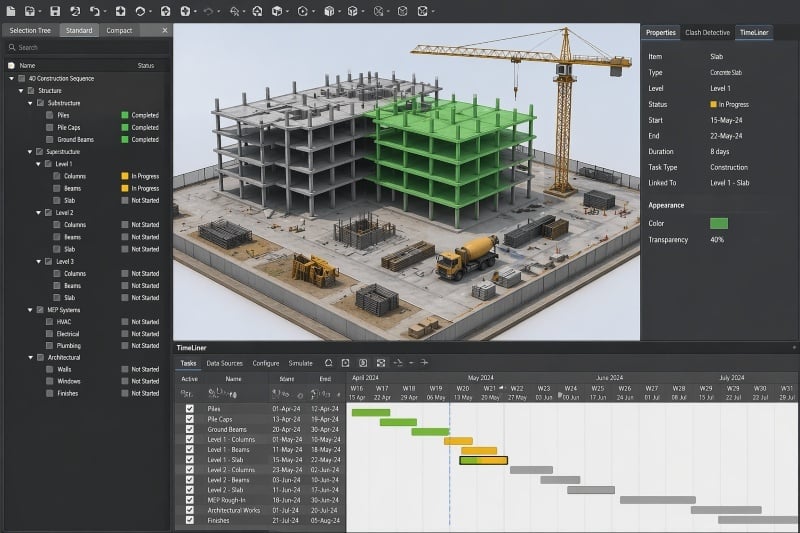
[4D BIM](https://www.novatr.com/blog/what-is-4d-bim-a-complete-guide-to-construction-planning-using-bim) is an extension of BIM where time is added as the fourth dimension to a 3D model. It allows teams to simulate construction sequences and visualize how a project will be built over time.
This process is enabled by construction simulation software, which connects model elements with schedule data. Instead of relying on static Gantt charts, teams can view construction progress dynamically, improving planning accuracy.
By integrating scheduling into models, 4D BIM supports advanced [BIM scheduling](https://www.novatr.com/blog/4d-bim-vs-traditional-scheduling-which-method-is-better-for-modern-construction) that help teams coordinate tasks, identify sequencing conflicts, and optimize workflows before construction begins.
## **10 Top 4D BIM Tools Every Engineer Should Know**
Choosing the right tool requires understanding its capabilities, cost, and industry use cases. Below is a **list of 4D BIM softwares** used in real construction workflows.
### **1. Synchro 4D**
Synchro 4D is a specialized tool designed specifically for construction sequencing and simulation. It integrates scheduling data directly with 3D models, allowing teams to visualize project execution in detail.
- **Use case:** Advanced 4D planning, sequencing, and site logistics
- **Cost:** [$4,980](https://en.virtuosity.com/synchro-4d?srsltid=AfmBOopw2XpOVtWfxsjs-NjFdPfYfnSbcwG7nOTvjMRoS875TjLHjQ1Q)
Unlike many tools, Synchro supports full schedule integration, making it a leading option in BIM 4D project management software workflows.
### **2. Navisworks Manage**
Navisworks Manage is widely used for model coordination, clash detection, and 4D simulation. It allows teams to combine models from multiple disciplines and simulate construction sequences.
- **Use case:** Model aggregation, clash detection, and 4D simulation
- **Cost:** Starts at [$355/month or $2,835/year](https://www.autodesk.com/products/navisworks/buy)
Navisworks includes a TimeLiner feature that enables 4D simulation directly within the platform, making it an important tool in 4D BIM modeling workflows.
### **3. Bexel Manager**
Bexel Manager is a BIM platform focused on integrating scheduling, cost estimation, and project management into a single environment.
- **Use case:** Integrated BIM scheduling and cost management
- **Cost:** Starting around [480 €/year](https://shop.bexelmanager.com/shop/) for basic versions up to [3400 €/year](https://shop.bexelmanager.com/shop/) for recommended project management editions.
It stands out by combining 4D and 5D capabilities, making it suitable for projects that require both time and cost integration.
### **4. Autodesk Revit**
Revit is not a 4D tool by itself but plays an important role as the base modeling platform for BIM workflows. All 4D simulations depend on accurate 3D models created in tools like Revit.
- **Use case:** Parametric 3D modeling for architecture, structure, and MEP
- **Cost:** Starting at [$251/month to $3,005/year](https://www.autodesk.com/products/revit/buy)
Revit ensures that 4D BIM modeling workflows are data-rich and accurate, which is essential for effective scheduling integration.
### **5. Microsoft Project**
Microsoft Project is widely used for scheduling and integrates with BIM tools to support 4D workflows.
- **Use case:** Project scheduling and timeline management
- **Cost:** Starts at [$10/month](https://www.microsoft.com/en-us/microsoft-365/planner/microsoft-planner-plans-and-pricing)
It is commonly used alongside BIM platforms, forming part of BIM scheduling tools that manage timelines effectively.
### **6. Primavera P6**
Primavera P6 is an advanced scheduling tool used in large infrastructure and enterprise-level construction projects.
- **Use case:** Complex scheduling and project control
- **Cost:** Enterprise pricing (custom)
It integrates with BIM tools to support construction simulation software workflows, especially for large-scale projects with multiple dependencies.
### **7. Bentley OpenBuildings**
Bentley OpenBuildings is used for infrastructure and building design with integrated BIM capabilities.
- **Use case:** Infrastructure modeling and coordination
- **Cost:** [$3,844](https://en.virtuosity.com/openbuildings-designer?_gl=1*mkdz5j*_gcl_au*MTkzMjQ0MDA4NC4xNzc3MDI3MTk0*_ga*Mjc0MjcxNDE1LjE3NzcwMjcxOTQ.*_ga_JNS8E8ELR8*czE3NzcwMjcxOTQkbzEkZzEkdDE3NzcwMjgyNDkkajYwJGwwJGgw*_ga_6RP3MTG93D*czE3NzcwMjcxOTQkbzEkZzEkdDE3NzcwMjgyNDkkajYwJGwwJGgw)
It supports large projects and integrates well with other Bentley tools, making it valuable in BIM 4D project management software ecosystems.
### **8. Bentley Synchro Control**
Synchro Control is a cloud-based platform that extends Synchro’s capabilities into project management and collaboration.
- **Use case:** Construction management and real-time tracking
- **Cost:** Included as part of the SYNCHRO 4D Pro subscription
It allows teams to manage workflows, track progress, and improve coordination across distributed teams.
### **9. Trimble Connect**
Trimble Connect is a cloud collaboration platform that supports BIM coordination and integrates with scheduling tools.
- **Use case:** Model sharing and team collaboration
- **Cost:** Starting from [$149 per user/year](https://www.trimble.com/en/products/trimble-connect/#pricing-cards-1)
It plays a key role in construction simulation software environments by ensuring that all stakeholders work with updated data.
### **10. Vico Office**
Vico Office focuses on integrating scheduling and cost estimation within BIM workflows.
- **Use case:** Cost-integrated 4D planning and construction management
- **Cost:** Custom pricing
It is widely used for projects that require both time and cost optimization, making it a strong addition to any 4D BIM software list.
## **How to Choose the Right 4D BIM Tool**
Selecting the right tool depends on project requirements, workflow complexity, and integration needs.
Consider the following factors before making a decision:
- **Project complexity:** Large infrastructure projects require advanced tools like Synchro or Primavera
- **Integration capability:** Ensure compatibility with existing BIM platforms
- **Simulation needs:** Tools should support accurate sequencing and visualization
- **Budget constraints:** Compare subscription and enterprise pricing models
- **Team collaboration:** Cloud-based tools improve coordination
Comparisons such as synchro vs navisworks help identify whether a project needs advanced scheduling capabilities or strong coordination features.
## **How to Learn 4D BIM Workflows?**
Developing expertise in 4D BIM requires a strong understanding of modeling, scheduling, and coordination workflows. Professionals must learn how to use tools effectively within real project environments.
Take your civil engineering career to the next level with Novatr’s BIM Professional Course for Civil Engineers, a project-based program that prepares you to plan, design, and manage construction projects using 12+ industry software and essential BIM plugins.
Learn how to work with Autodesk Revit, Navisworks, construction cloud and key plugins like DiRoots.One, pyRevit, EF-Tools, ProSheets, Issue and Model Checker for Revit to improve automation, accuracy, and project efficiency.
**Here’s what you’ll gain:**
- End-to-end understanding of BIM workflows — modeling, estimation, coordination, sequencing, and documentation.
- Hands-on training aligned with ISO 19650 standards and real residential + commercial projects.
- **Globally recognized certifications**:
After completing the core modules, learners can also choose 2 additional specializations, including:
- **Visual Programming with Dynamo** – for automation and parametric workflows
- **4D, 5D & 6D with BIM** – for time, cost, and facility integration
- **Tekla for RCC Modeling** – for detailed steel and concrete modeling
- **Civil 3D for Infrastructure** – for roadways, railways, and utilities
- **Project Strategy & Optimization with Plannerly -** Plan, structure, and audit BIM execution plans.
This structured approach helps professionals build strong BIM capabilities and apply them effectively in real-world projects.
Master BIM and Get Hired Faster
Join a community of 8500+ Architects and Engineers.
Explore Now
\*Limited seats available
## Conclusion
Understanding and selecting the right **4D BIM tools** is essential for improving construction planning, coordination, and execution. These tools enable teams to simulate workflows, optimize schedules, and reduce risks across project phases.
Learning how to use these tools effectively can significantly improve both project outcomes and career opportunities. For anyone looking to build expertise in BIM workflows, structured learning programs like the [BIM Professional course for Civil Engineers](https://www.novatr.com/courses/bim-for-civil-engineers) offered by [Novatr](https://www.novatr.com/) provide a strong foundation in real-world applications.
Visit our [resource page](https://www.novatr.com/learning-hub) to explore structured learning options.
Was this content helpful to you
Like Yes
Dislike No

TABLE OF CONTENTS
BIM Is The New Standard. Are You Certified?
Get Certified in BIM
SHARE ON YOUR SOCIALS
Link Copied Successfully
Related articles
[ BIM Civil What is the Role of 4D BIM in Construction Project Planning? 30 April 2026 6 min read](https://blog.novatr.com/blog/what-is-the-role-of-4d-bim-in-construction-project-planning) [ BIM Civil What is 4D BIM? A Complete Guide to Construction Planning Using BIM 30 April 2026 6 min read](https://blog.novatr.com/blog/what-is-4d-bim-a-complete-guide-to-construction-planning-using-bim) [ BIM Civil Top Benefits of 4D BIM in Large-Scale Construction Projects 30 April 2026 6 min read](https://blog.novatr.com/blog/top-benefits-of-4d-bim-in-large-scale-construction-projects) [ BIM Civil How to Become a 4D BIM Engineer: Skills, Salary, and Career Path 30 April 2026 6 min read](https://blog.novatr.com/blog/how-to-become-a-4d-bim-engineer-skills-salary-and-career-path)
Download Syllabus
## BIM Professional Program
Next Cohort
June 2026
Program Duration
7 Months
Premium Program benefits
8 Credentials from Autodesk, NSDC, Novatr
1 program. 10 career paths. Infinite Growth.
40+ ISO 19650 & RIBA real-world projects to practice
1-on-1 guidance. Access 400+ industry experts.
Access the biggest AEC-Tech community on the planet. 8500+ and counting
Curated for you by 100+ global BIM leaders.
Lifelong access to course content
Enter your details to download the program syllabus.
##### BIM Professional Program
June 2026, 7 Months
Your Name Invalid name.
Phone Number Enter a valid phone number
Email Please enter a valid email address.
Select years of experience\* Currently studying 0-1 years 1-2 years 2-4 years 4-8 years 8-10 years 10-12 years 12+ years Invalid selection.
Specialisation Select your background\* Architecture Civil Engineering Mechanical Engineering Electrical Engineering Invalid selection.
Are you professionally trained in interior design?
Yes
No
I agree to the [Terms of Use](https://www.novatr.com/terms-and-conditions) and [Privacy Policy](https://www.novatr.com/privacy-policy), and consent to be contacted by Email, Call, WhatsApp, or SMS.
Submit
Ready to skyrocket your career?
Begin your next chapter in AEC
with Novatr!
We are here to help you take the industry by storm with advanced, tech-first skills.
[Explore Courses](https://www.novatr.com/#courses)
Join our newsletter
Submit
Thank you for signing up.
We’ll send you a nice letter once per week. No spam.

Dare to Disrupt.
Join thousands of people who organise
work and life with Novatr.
Company
- [About Us](https://www.novatr.com/about)
- [BIM Professional Program v.2026](https://www.novatr.com/courses/bim-professional-program)
- [Masters Computational Design](https://www.novatr.com/courses/computational-design)
- [Become a Mentor](https://www.novatr.com/apply-as-mentor)
- [Hiring from Us](https://www.novatr.com/hire-from-us)
- [Careers at Novatr](https://www.novatr.com/career)
Resources
- [Blog](https://www.novatr.com/learning-hub)
- [Media Room](https://www.novatr.com/media-room-home-page)
- [Career Builder](https://www.novatr.com/career-navigator)
- [Events & Webinars](https://www.novatr.com/webinars)
- [FAQs & Support Center](https://www.novatr.com/contact-us)
- [Contact Us](https://www.novatr.com/contact-us)
- [Privacy Policy](https://www.novatr.com/privacy-policy)
- [Terms of Use](https://www.novatr.com/terms-and-conditions)
©2023 Oneistox Network Pvt. Ltd.
All Rights Reserved
```json
{
"@context" : "https://schema.org",
"@type" : "BlogPosting",
"author" : {
"@type" : "Person",
"name" : "Deependra Dobriyal",
"url" : "https://blog.novatr.com/blog/author/deependra-dobriyal"
},
"dateModified" : "2026-04-30T12:52:27.079Z",
"datePublished" : "2026-04-30T12:51:24.000Z",
"headline" : "10 Top 4D BIM Tools for Construction Planning",
"image" : [ "https://blog.novatr.com/hubfs/AEC%20team%20reviewing%204D%20BIM%20simulation..jpg" ],
"mainEntityOfPage" : {
"@id" : "https://blog.novatr.com/blog/10-top-4d-bim-tools-for-construction-planning",
"@type" : "WebPage"
},
"publisher" : {
"@type" : "Organization",
"logo" : {
"@type" : "ImageObject",
"url" : "https://blog.novatr.com/hubfs/Novatr%20Prev%20OX-2.svg"
}
}
}
```